
How to Use DC 24v to 12v Converter 30A 360W: Examples, Pinouts, and Specs
 Design with DC 24v to 12v Converter 30A 360W in Cirkit Designer
Introduction
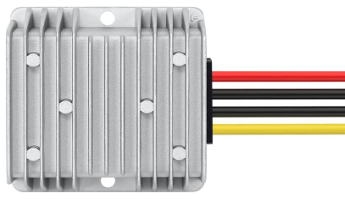
The DC 24V to 12V Converter is a step-down voltage regulator designed to convert a 24V DC input to a stable 12V DC output. With a maximum current capacity of 30A and a power output of up to 360W, this converter is ideal for powering 12V devices in systems where only a 24V power source is available. It is widely used in automotive, industrial, and renewable energy applications.
Explore Projects Built with DC 24v to 12v Converter 30A 360W
 Open Project in Cirkit Designer
 Open Project in Cirkit Designer
 Open Project in Cirkit Designer
 Open Project in Cirkit Designer
Explore Projects Built with DC 24v to 12v Converter 30A 360W
Open Project in Cirkit DesignerOpen Project in Cirkit DesignerOpen Project in Cirkit DesignerOpen Project in Cirkit DesignerCommon Applications and Use Cases
- Powering 12V automotive accessories (e.g., lights, radios) from a 24V truck or bus battery.
- Supplying 12V devices in solar power systems with 24V battery banks.
- Industrial equipment requiring a 12V power supply from a 24V source.
- Voltage regulation in telecommunications and networking systems.
Technical Specifications
Key Technical Details
| Parameter | Value |
|---|---|
| Input Voltage Range | 18V - 32V DC |
| Output Voltage | 12V DC (±2%) |
| Maximum Output Current | 30A |
| Maximum Power Output | 360W |
| Efficiency | ≥ 95% |
| Ripple and Noise | ≤ 200mV |
| Operating Temperature | -40°C to +85°C |
| Cooling Method | Passive (heat sink) or active (fan) depending on model |
| Protection Features | Overload, overvoltage, overtemperature, and short-circuit protection |
Pin Configuration and Descriptions
The DC 24V to 12V Converter typically has four connection terminals:
| Terminal Label | Description |
|---|---|
+IN |
Positive input terminal (24V DC) |
-IN |
Negative input terminal (ground) |
+OUT |
Positive output terminal (12V DC) |
-OUT |
Negative output terminal (ground) |
Note: Ensure proper polarity when connecting the input and output terminals to avoid damage to the converter or connected devices.
Usage Instructions
How to Use the Component in a Circuit
- Input Connection: Connect the
+INand-INterminals to the 24V DC power source. Ensure the input voltage is within the specified range (18V - 32V DC). - Output Connection: Connect the
+OUTand-OUTterminals to the 12V DC load. Verify that the load does not exceed the maximum current rating of 30A. - Polarity Check: Double-check all connections to ensure correct polarity. Reversed polarity can damage the converter.
- Power On: Once all connections are secure, power on the 24V DC source. The converter will step down the voltage to 12V DC and supply power to the connected load.
Important Considerations and Best Practices
- Heat Dissipation: Ensure adequate ventilation around the converter to prevent overheating. If the converter includes a fan, ensure it is unobstructed.
- Load Capacity: Do not exceed the maximum power output of 360W or the current limit of 30A. Overloading may trigger the protection features or damage the device.
- Wiring: Use appropriately rated wires for both input and output connections to handle the current without excessive voltage drop or overheating.
- Testing: Before connecting sensitive devices, test the output voltage with a multimeter to confirm it is within the expected range (12V ±2%).
Example: Connecting to an Arduino UNO
The DC 24V to 12V Converter can be used to power an Arduino UNO in systems with a 24V power source. Below is an example of how to connect the converter to the Arduino:
- Connect the
+INand-INterminals of the converter to the 24V DC power source. - Connect the
+OUTterminal to the Arduino's VIN pin and the-OUTterminal to the Arduino's GND pin. - Ensure the converter's output voltage is set to 12V (default setting).
Here is a simple Arduino sketch to test the setup by blinking an LED:
// Blink an LED connected to pin 13 of the Arduino UNO
// Ensure the Arduino is powered via the DC 24V to 12V Converter

void setup() {
  pinMode(13, OUTPUT); // Set pin 13 as an output
}

void loop() {
  digitalWrite(13, HIGH); // Turn the LED on
  delay(1000);            // Wait for 1 second
  digitalWrite(13, LOW);  // Turn the LED off
  delay(1000);            // Wait for 1 second
}
Note: The Arduino UNO's onboard voltage regulator can handle the 12V input from the converter.
Troubleshooting and FAQs
Common Issues and Solutions
| Issue | Possible Cause | Solution |
|---|---|---|
| No output voltage | Incorrect wiring or polarity | Verify all connections and polarity. |
| Output voltage too high or too low | Input voltage out of range | Ensure input voltage is between 18V-32V. |
| Converter overheating | Insufficient ventilation or overloading | Improve airflow or reduce load. |
| Load not functioning properly | Load exceeds current or power rating | Use a load within the specified limits. |
FAQs
Can I use this converter with a 12V input?
- No, the input voltage must be within the range of 18V to 32V DC for proper operation.
What happens if I exceed the maximum current rating?
- The converter's overload protection will activate, shutting down the output to prevent damage.
Is the converter waterproof?
- Most models are not waterproof. If used outdoors, ensure the converter is housed in a weatherproof enclosure.
Can I connect multiple converters in parallel for higher current?
- It is not recommended to connect converters in parallel unless explicitly supported by the manufacturer.
By following this documentation, you can safely and effectively use the DC 24V to 12V Converter in your projects.