
How to Use 3in1DC: Examples, Pinouts, and Specs
 Design with 3in1DC in Cirkit Designer
Introduction
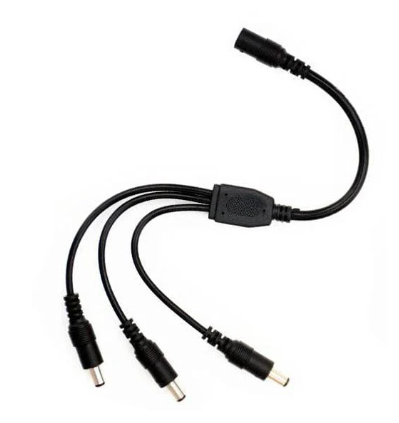
The 3in1DC module, manufactured by DigiKey (Part ID: 123some), is a versatile 3-in-1 DC module that integrates a DC-DC converter, a voltage regulator, and a power management system. This compact and efficient component is designed to simplify power management in electronic circuits, making it ideal for a wide range of applications.
Explore Projects Built with 3in1DC
 Open Project in Cirkit Designer
 Open Project in Cirkit Designer
 Open Project in Cirkit Designer
 Open Project in Cirkit Designer
Explore Projects Built with 3in1DC
Open Project in Cirkit DesignerOpen Project in Cirkit DesignerOpen Project in Cirkit DesignerOpen Project in Cirkit DesignerCommon Applications and Use Cases
- Embedded Systems: Provides stable power for microcontrollers and sensors.
- IoT Devices: Ensures efficient power conversion for battery-powered devices.
- Robotics: Supplies regulated power to motors and control systems.
- Prototyping: Simplifies power management in breadboard and PCB designs.
- Portable Electronics: Extends battery life by optimizing power usage.
Technical Specifications
The following table outlines the key technical details of the 3in1DC module:
| Parameter | Value |
|---|---|
| Input Voltage Range | 4.5V to 24V |
| Output Voltage Range | 1.8V, 3.3V, 5V (selectable) |
| Maximum Output Current | 2A |
| Efficiency | Up to 95% |
| Operating Temperature | -40°C to +85°C |
| Dimensions | 25mm x 20mm x 10mm |
| Protection Features | Overcurrent, Overvoltage, Thermal |
Pin Configuration and Descriptions
The 3in1DC module has a simple pinout for easy integration into circuits:
| Pin | Name | Description |
|---|---|---|
| 1 | VIN | Input voltage (4.5V to 24V) |
| 2 | GND | Ground connection |
| 3 | VOUT | Regulated output voltage (1.8V, 3.3V, or 5V) |
| 4 | SEL1 | Voltage selection pin 1 (used with SEL2) |
| 5 | SEL2 | Voltage selection pin 2 (used with SEL1) |
| 6 | EN | Enable pin (active high, connect to VIN to enable) |
Usage Instructions
How to Use the 3in1DC in a Circuit
- Connect Input Voltage:
- Connect the VIN pin to a DC power source within the range of 4.5V to 24V.
- Connect the GND pin to the ground of your circuit.
- Select Output Voltage:
- Use the SEL1 and SEL2 pins to configure the desired output voltage:
- SEL1 = 0, SEL2 = 0 → 1.8V
- SEL1 = 1, SEL2 = 0 → 3.3V
- SEL1 = 0, SEL2 = 1 → 5V
- Leave SEL1 and SEL2 unconnected if the default output voltage (3.3V) is sufficient.
- Use the SEL1 and SEL2 pins to configure the desired output voltage:
- Enable the Module:
- Connect the EN pin to VIN to enable the module.
- Leave the EN pin unconnected or pull it to GND to disable the module.
- Connect the Load:
- Connect your load to the VOUT pin and GND.
Important Considerations and Best Practices
- Input Voltage: Ensure the input voltage is within the specified range to avoid damage.
- Heat Dissipation: If operating at high currents, consider adding a heatsink or improving airflow.
- Capacitors: Add decoupling capacitors (e.g., 10µF and 0.1µF) near the VIN and VOUT pins for improved stability.
- Voltage Selection: Avoid changing SEL1 and SEL2 configurations while the module is powered.
Example: Using the 3in1DC with an Arduino UNO
The following example demonstrates how to power an Arduino UNO using the 3in1DC module:
Circuit Connections
- Connect the VIN pin of the 3in1DC to a 12V DC power source.
- Set SEL1 = 0 and SEL2 = 1 to configure the output voltage to 5V.
- Connect the VOUT pin of the 3in1DC to the 5V pin of the Arduino UNO.
- Connect the GND pin of the 3in1DC to the GND pin of the Arduino UNO.
Arduino Code Example
// Example code to blink an LED connected to pin 13 of the Arduino UNO
// Ensure the 3in1DC module is providing a stable 5V to the Arduino UNO

void setup() {
  pinMode(13, OUTPUT); // Set pin 13 as an output
}

void loop() {
  digitalWrite(13, HIGH); // Turn the LED on
  delay(1000);            // Wait for 1 second
  digitalWrite(13, LOW);  // Turn the LED off
  delay(1000);            // Wait for 1 second
}
Troubleshooting and FAQs
Common Issues and Solutions
No Output Voltage:
- Ensure the EN pin is connected to VIN to enable the module.
- Verify that the input voltage is within the specified range (4.5V to 24V).
- Check for loose or incorrect connections.
Overheating:
- Ensure the load does not exceed the maximum output current (2A).
- Improve heat dissipation by adding a heatsink or increasing airflow.
Unstable Output Voltage:
- Add decoupling capacitors (e.g., 10µF and 0.1µF) near the VIN and VOUT pins.
- Verify that the input power source is stable and not fluctuating.
Incorrect Output Voltage:
- Double-check the SEL1 and SEL2 pin configurations.
- Ensure the pins are not left floating if a specific voltage is required.
FAQs
Q: Can the 3in1DC module be used with a battery?
A: Yes, the module can be powered by a battery as long as the input voltage is within the range of 4.5V to 24V.
Q: What happens if the input voltage exceeds 24V?
A: The module may be damaged. Always ensure the input voltage stays within the specified range.
Q: Can I use the 3in1DC to power multiple devices?
A: Yes, as long as the total current draw does not exceed 2A.
Q: Is the module protected against reverse polarity?
A: No, the module does not have reverse polarity protection. Ensure correct polarity when connecting the input voltage.