
How to Use Circuit breaker ComPacT (MCCB) 160A: Examples, Pinouts, and Specs
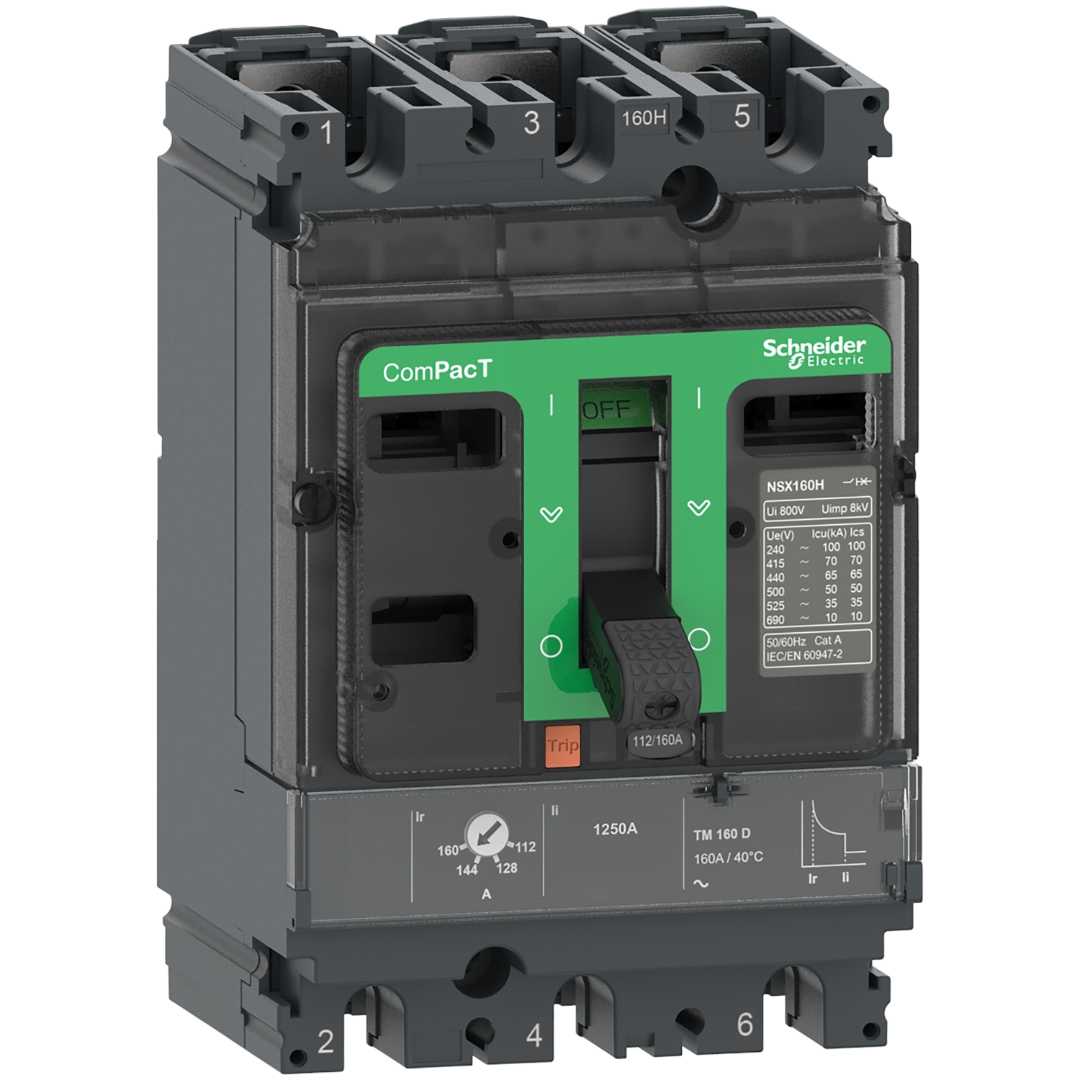
 Design with Circuit breaker ComPacT (MCCB) 160A in Cirkit Designer
Introduction
The Circuit Breaker ComPacT (MCCB) 160A, manufactured by Schneider, is a molded case circuit breaker designed to provide reliable protection for electrical circuits. It is rated for a maximum current of 160A and is engineered to safeguard circuits from overloads and short circuits. This component is widely used in industrial, commercial, and residential electrical installations to ensure safety and prevent damage to equipment.
Explore Projects Built with Circuit breaker ComPacT (MCCB) 160A
 Open Project in Cirkit Designer
 Open Project in Cirkit Designer
 Open Project in Cirkit Designer
 Open Project in Cirkit Designer
Explore Projects Built with Circuit breaker ComPacT (MCCB) 160A
Open Project in Cirkit DesignerOpen Project in Cirkit DesignerOpen Project in Cirkit DesignerOpen Project in Cirkit DesignerCommon Applications and Use Cases
- Protection of electrical distribution systems in industrial facilities.
- Overload and short circuit protection in commercial buildings.
- Circuit isolation and safety in residential electrical panels.
- Integration into motor control centers and switchgear systems.
- Backup protection for renewable energy systems like solar inverters.
Technical Specifications
Key Technical Details
| Parameter | Value |
|---|---|
| Manufacturer | Schneider |
| Model | ComPacT MCCB 160A |
| Rated Current (In) | 160A |
| Rated Voltage (Ue) | Up to 690V AC |
| Breaking Capacity (Icu) | 36 kA at 415V AC |
| Frequency | 50/60 Hz |
| Number of Poles | 3P (Three Poles) |
| Operating Temperature Range | -25°C to +70°C |
| Mounting Type | Fixed or Plug-in |
| Standards Compliance | IEC 60947-2 |
Pin Configuration and Descriptions
The ComPacT MCCB 160A does not have traditional "pins" like electronic components but instead features terminals for electrical connections. Below is a description of the terminal configuration:
| Terminal Name | Description |
|---|---|
| L1, L2, L3 | Line terminals for incoming power (3-phase) |
| T1, T2, T3 | Load terminals for outgoing power (3-phase) |
| Auxiliary Contacts | Optional terminals for monitoring or control |
| Earth Terminal | Connection for grounding (if applicable) |
Usage Instructions
How to Use the Component in a Circuit
- Determine the Load Requirements: Ensure the connected load does not exceed the rated current of 160A.
- Select the Proper MCCB Settings: If the MCCB has adjustable trip settings, configure them according to the load and system requirements.
- Connect the Terminals:
- Connect the incoming power lines to the
L1,L2, andL3terminals. - Connect the outgoing load lines to the
T1,T2, andT3terminals. - If auxiliary contacts are used, wire them to the control or monitoring circuit as needed.
- Connect the incoming power lines to the
- Secure the MCCB: Mount the MCCB securely in the electrical panel using the fixed or plug-in mounting option.
- Test the Installation: Verify the connections and test the MCCB operation by simulating an overload or short circuit condition.
Important Considerations and Best Practices
- Always ensure the MCCB is rated for the voltage and current of your application.
- Use appropriately sized cables to handle the rated current without overheating.
- Follow local electrical codes and standards during installation.
- Periodically inspect the MCCB for signs of wear or damage.
- Avoid exposing the MCCB to extreme temperatures or moisture.
Example: Integration with an Arduino UNO
While MCCBs are not typically controlled by microcontrollers like the Arduino UNO, auxiliary contacts can be used to monitor the breaker status. Below is an example of how to read the status of an MCCB using an Arduino:
// Example: Monitor MCCB status using auxiliary contacts and Arduino UNO

const int auxContactPin = 2; // Digital pin connected to MCCB auxiliary contact
const int ledPin = 13;       // Built-in LED to indicate breaker status

void setup() {
  pinMode(auxContactPin, INPUT_PULLUP); // Configure auxiliary contact pin as input
  pinMode(ledPin, OUTPUT);              // Configure LED pin as output
  Serial.begin(9600);                   // Initialize serial communication
}

void loop() {
  int breakerStatus = digitalRead(auxContactPin); // Read auxiliary contact status

  if (breakerStatus == LOW) {
    // Auxiliary contact closed: MCCB is ON
    digitalWrite(ledPin, HIGH); // Turn on LED
    Serial.println("MCCB is ON");
  } else {
    // Auxiliary contact open: MCCB is OFF
    digitalWrite(ledPin, LOW);  // Turn off LED
    Serial.println("MCCB is OFF");
  }

  delay(500); // Wait for 500ms before next reading
}
Troubleshooting and FAQs
Common Issues and Solutions
| Issue | Possible Cause | Solution |
|---|---|---|
| MCCB trips frequently | Overload or short circuit in the circuit | Check the load and wiring for faults |
| MCCB does not trip during a fault | Faulty MCCB or incorrect settings | Verify settings or replace the MCCB |
| Terminals overheating | Loose connections or undersized cables | Tighten connections or use proper cables |
| Auxiliary contacts not working | Incorrect wiring or damaged contacts | Check wiring and replace if necessary |
FAQs
Can the MCCB be used for DC circuits?
Yes, but ensure the MCCB is rated for DC operation and the voltage does not exceed the specified DC rating.How often should the MCCB be tested?
It is recommended to test the MCCB annually or as per the manufacturer's guidelines.What is the difference between MCCB and MCB?
MCCBs are designed for higher current ratings (up to 1600A) and offer adjustable trip settings, while MCBs are typically used for lower current ratings (up to 125A) with fixed trip settings.Can the MCCB be reset after tripping?
Yes, the MCCB can be manually reset after addressing the cause of the trip.