Cirkit Designer Logo
Cirkit Designer
Your all-in-one circuit design IDE
Home / 
Component Documentation

How to Use motor and wheels: Examples, Pinouts, and Specs
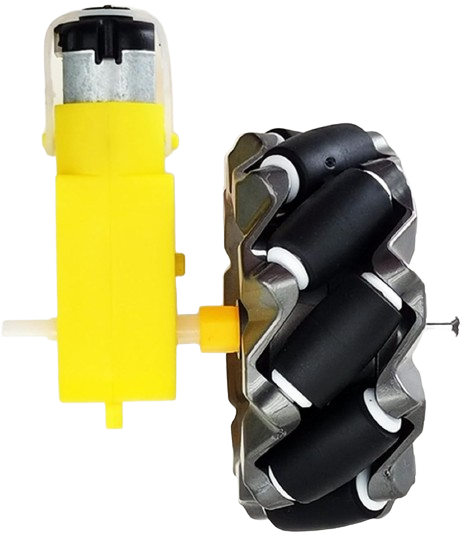

Image of motor and wheels
Cirkit Designer LogoDesign with motor and wheels in Cirkit Designer

Introduction

Motors and wheels are fundamental components in robotics, vehicles, and various automated systems. The motor converts electrical energy into mechanical energy, providing the necessary torque to drive the wheels, which in turn enable movement and support the structure they are attached to. These components are widely used in applications ranging from small DIY projects to large industrial machinery.

Explore Projects Built with motor and wheels

Use Cirkit Designer to design, explore, and prototype these projects online. Some projects support real-time simulation. Click "Open Project" to start designing instantly!
Battery-Powered Dual Gearmotor Drive System
Image of electric car: A project utilizing motor and wheels in a practical application
This circuit consists of a 6V battery pack connected in parallel to two DC gearmotors, one for the left wheel and one for the right wheel of a vehicle. The battery provides power directly to both motors, enabling them to run simultaneously. As there is no control circuitry or microcontroller code provided, the motors will run continuously when the circuit is powered.
Cirkit Designer LogoOpen Project in Cirkit Designer
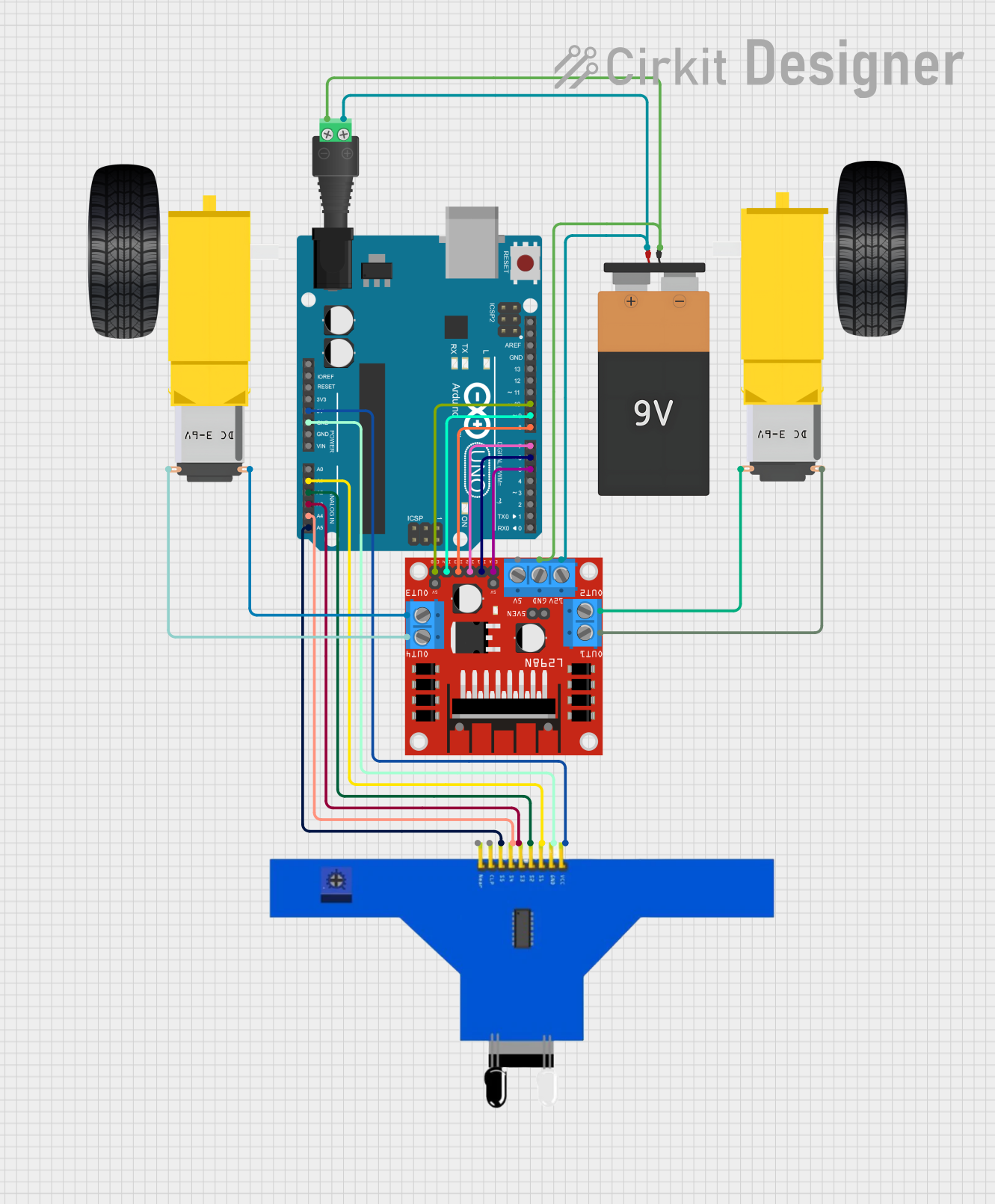
Arduino-Controlled Robotic Vehicle with IR Sensors and L298N Motor Driver
Image of xe do line: A project utilizing motor and wheels in a practical application
This circuit is designed to control a pair of DC gearmotors using an L298N motor driver module, which is interfaced with an Arduino UNO microcontroller. The Arduino is also connected to a 5-channel IR sensor for input, which may be used for line tracking or obstacle detection. Power is supplied by a 9V battery connected through a 2.1mm barrel jack, and the motor driver module regulates this power to drive the left and right gearmotors for a mobile robot platform.
Cirkit Designer LogoOpen Project in Cirkit Designer
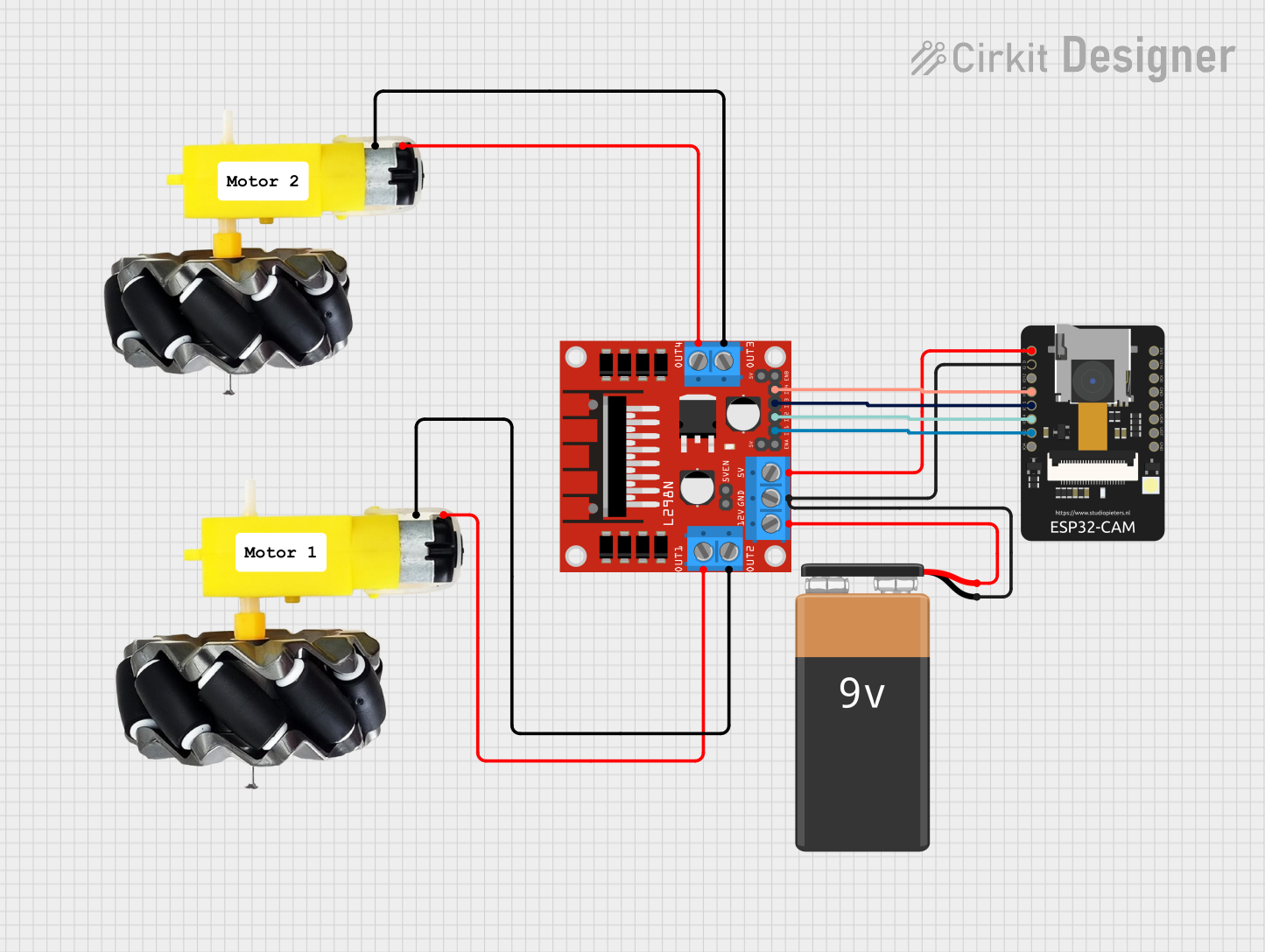
ESP32-CAM Controlled Wi-Fi Robot Car
Image of cam car: A project utilizing motor and wheels in a practical application
This circuit is designed to control a two-wheel motorized vehicle using an ESP32-CAM microcontroller. The ESP32-CAM is interfaced with an L298N DC motor driver to control the direction and speed of the motors attached to the wheels. Additionally, the ESP32-CAM is configured to capture images and provide WiFi connectivity for remote control via a web server with a user interface for driving commands.
Cirkit Designer LogoOpen Project in Cirkit Designer
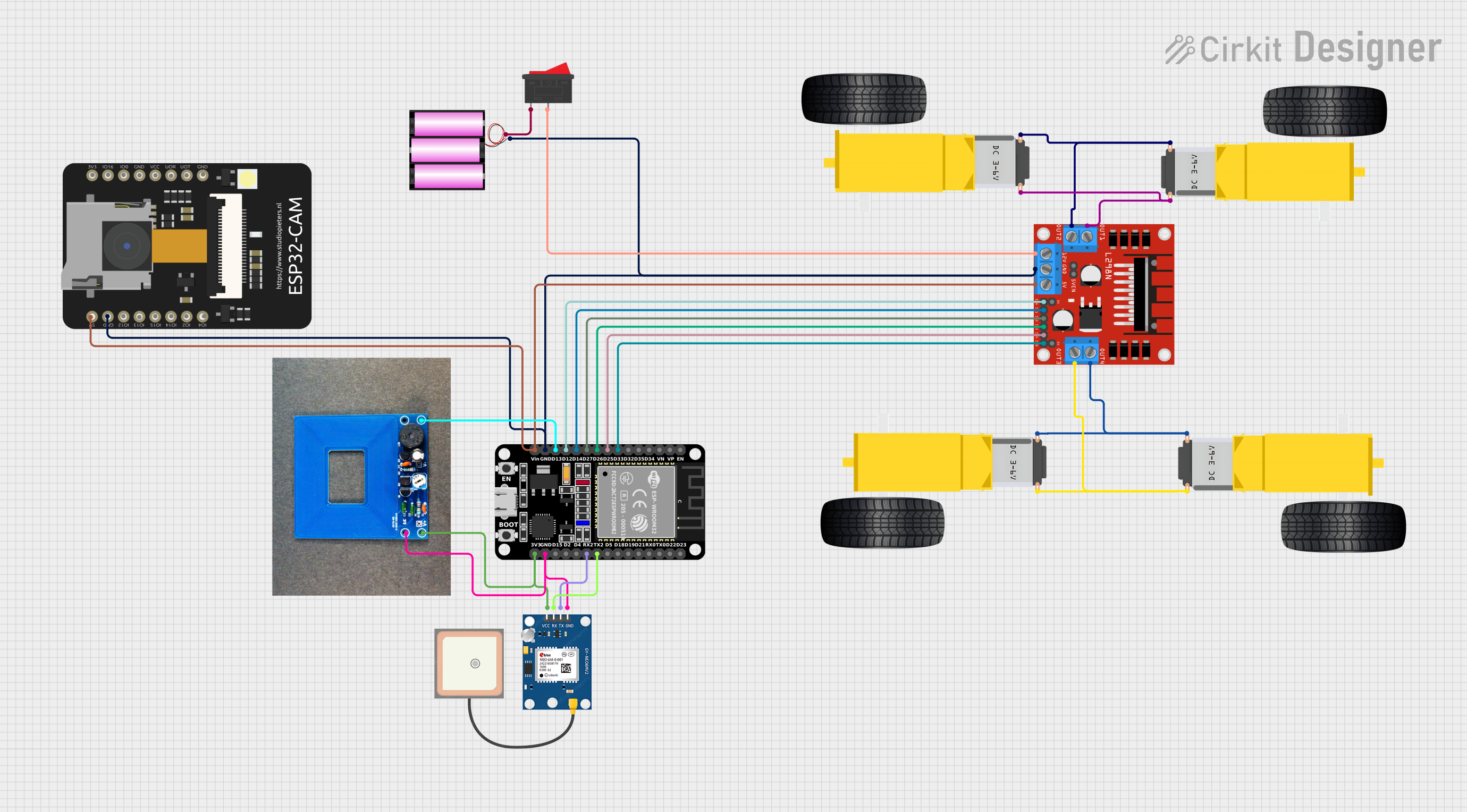
ESP32 and L298N Motor Driver-Based Wi-Fi Controlled Robotic Vehicle with GPS and Metal Detection
Image of Revolutioning Demining: AI Powered Landmine Detection: A project utilizing motor and wheels in a practical application
This circuit is a robotic vehicle control system that uses an ESP32 microcontroller to drive four DC gear motors via an L298N motor driver. It also includes a GPS module for location tracking, a metal detector for object detection, and an ESP32 CAM for capturing images or video, all powered by a 12V battery.
Cirkit Designer LogoOpen Project in Cirkit Designer

Explore Projects Built with motor and wheels

Use Cirkit Designer to design, explore, and prototype these projects online. Some projects support real-time simulation. Click "Open Project" to start designing instantly!
Image of electric car: A project utilizing motor and wheels in a practical application
Battery-Powered Dual Gearmotor Drive System
This circuit consists of a 6V battery pack connected in parallel to two DC gearmotors, one for the left wheel and one for the right wheel of a vehicle. The battery provides power directly to both motors, enabling them to run simultaneously. As there is no control circuitry or microcontroller code provided, the motors will run continuously when the circuit is powered.
Cirkit Designer LogoOpen Project in Cirkit Designer
Image of xe do line: A project utilizing motor and wheels in a practical application
Arduino-Controlled Robotic Vehicle with IR Sensors and L298N Motor Driver
This circuit is designed to control a pair of DC gearmotors using an L298N motor driver module, which is interfaced with an Arduino UNO microcontroller. The Arduino is also connected to a 5-channel IR sensor for input, which may be used for line tracking or obstacle detection. Power is supplied by a 9V battery connected through a 2.1mm barrel jack, and the motor driver module regulates this power to drive the left and right gearmotors for a mobile robot platform.
Cirkit Designer LogoOpen Project in Cirkit Designer
Image of cam car: A project utilizing motor and wheels in a practical application
ESP32-CAM Controlled Wi-Fi Robot Car
This circuit is designed to control a two-wheel motorized vehicle using an ESP32-CAM microcontroller. The ESP32-CAM is interfaced with an L298N DC motor driver to control the direction and speed of the motors attached to the wheels. Additionally, the ESP32-CAM is configured to capture images and provide WiFi connectivity for remote control via a web server with a user interface for driving commands.
Cirkit Designer LogoOpen Project in Cirkit Designer
Image of Revolutioning Demining: AI Powered Landmine Detection: A project utilizing motor and wheels in a practical application
ESP32 and L298N Motor Driver-Based Wi-Fi Controlled Robotic Vehicle with GPS and Metal Detection
This circuit is a robotic vehicle control system that uses an ESP32 microcontroller to drive four DC gear motors via an L298N motor driver. It also includes a GPS module for location tracking, a metal detector for object detection, and an ESP32 CAM for capturing images or video, all powered by a 12V battery.
Cirkit Designer LogoOpen Project in Cirkit Designer

Technical Specifications

Motor Specifications

Specification Description
Voltage 6V - 12V DC
Current 250mA - 2A (no load - stall)
Power Varies with usage, typically 1-10W
Speed 100 - 10,000 RPM (depending on voltage and load)
Torque 1 - 5 Nm (depending on model and load)
Shaft Diameter 3mm - 6mm

Wheel Specifications

Specification Description
Diameter 65mm - 70mm (standard sizes)
Width 25mm - 30mm
Material Rubber, Plastic, or Polyurethane
Mounting Hub Compatible with motor shaft diameter

Pin Configuration for a Typical DC Motor

Pin Description
V+ Connect to positive voltage supply
GND Connect to ground

Usage Instructions

Connecting the Motor to a Circuit

  1. Power Supply: Ensure that the power supply matches the voltage and current requirements of the motor.
  2. Motor Driver: Use a motor driver or H-bridge to control the direction and speed of the motor.
  3. PWM Control: For speed control, use Pulse Width Modulation (PWM) signals from a microcontroller like an Arduino UNO.
  4. Mounting Wheels: Attach the wheels to the motor shaft securely, ensuring they are aligned and rotate freely.

Best Practices

  • Always use a motor driver to protect the microcontroller from high current draw.
  • Incorporate flyback diodes to prevent back EMF damage when turning the motor off.
  • Use proper gear ratios for the desired torque and speed.
  • Avoid stalling the motor as it can lead to overheating and damage.

Example Code for Arduino UNO

#include <Arduino.h>

// Define motor control pins
const int motorPin1 = 3; // H-bridge leg 1 (pin 2, 1A)
const int motorPin2 = 4; // H-bridge leg 2 (pin 7, 2A)

void setup() {
  // Set motor control pins as outputs
  pinMode(motorPin1, OUTPUT);
  pinMode(motorPin2, OUTPUT);
}

void loop() {
  // Spin motor in one direction
  digitalWrite(motorPin1, HIGH);
  digitalWrite(motorPin2, LOW);
  delay(1000);

  // Stop motor
  digitalWrite(motorPin1, LOW);
  digitalWrite(motorPin2, LOW);
  delay(1000);

  // Spin motor in the opposite direction
  digitalWrite(motorPin1, LOW);
  digitalWrite(motorPin2, HIGH);
  delay(1000);

  // Stop motor
  digitalWrite(motorPin1, LOW);
  digitalWrite(motorPin2, LOW);
  delay(1000);
}

Troubleshooting and FAQs

Common Issues

  • Motor not spinning: Check power supply, connections, and motor driver.
  • Motor stalling: Reduce load or increase power supply.
  • Uneven wheel movement: Ensure wheels are properly mounted and aligned.

FAQs

Q: Can I control the speed of the motor? A: Yes, by using PWM signals you can control the motor's speed.

Q: What should I do if the motor gets hot? A: Ensure the motor is not overloaded and has proper ventilation. If necessary, reduce usage or check for mechanical binding.

Q: How can I reverse the direction of the motor? A: Reverse the polarity of the motor's power supply, or use an H-bridge circuit to change the direction electronically.

Q: Can I use a different voltage than specified? A: Operating the motor outside its specified voltage range can damage the motor and void any warranty. Always adhere to the manufacturer's specifications.

For further assistance, consult the manufacturer's datasheet or contact technical support.