
How to Use 12V Single Button Bistable Self-Locking Relay Module One-button Push to Start and Stop Self-locking Relay Module: Examples, Pinouts, and Specs
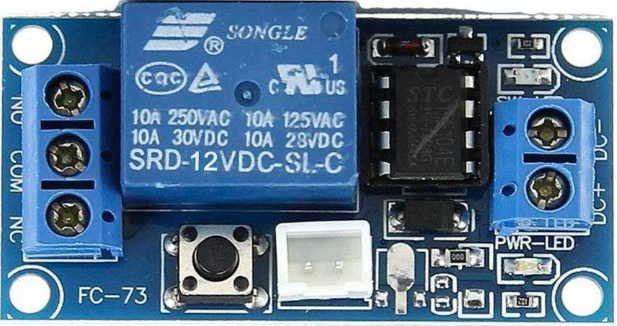
 Design with 12V Single Button Bistable Self-Locking Relay Module One-button Push to Start and Stop Self-locking Relay Module in Cirkit Designer
Introduction
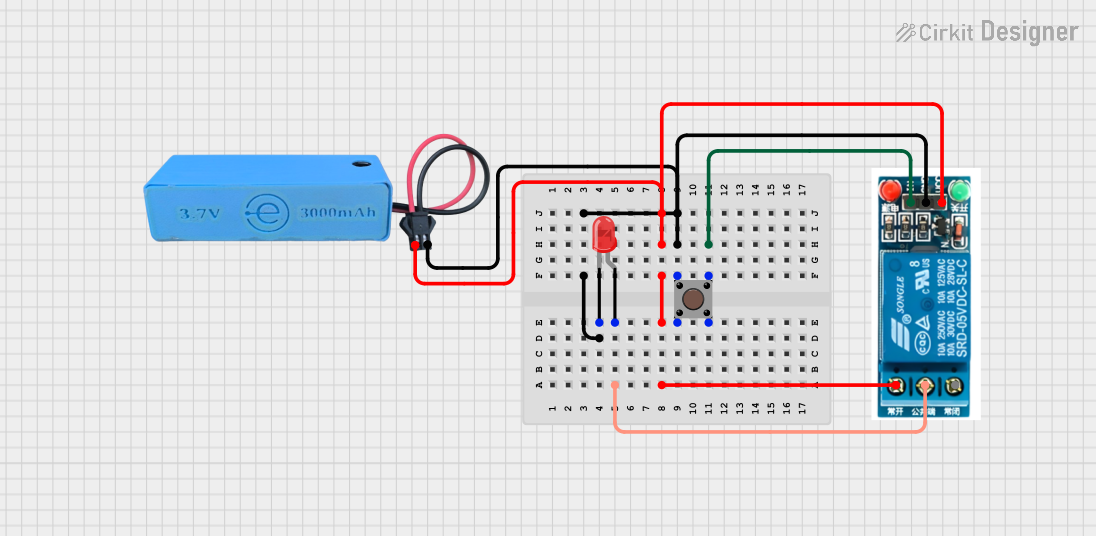
The 12V Single Button Bistable Self-Locking Relay Module by Hailege is a versatile electronic component designed for controlling high-voltage devices using a low-voltage signal. This module features a single push-button that toggles the relay state between ON and OFF, with a self-locking mechanism that retains the last state even after power loss. Its compact design and ease of use make it ideal for applications requiring simple on/off control.
Explore Projects Built with 12V Single Button Bistable Self-Locking Relay Module One-button Push to Start and Stop Self-locking Relay Module
 Open Project in Cirkit Designer
 Open Project in Cirkit Designer
 Open Project in Cirkit Designer
 Open Project in Cirkit Designer
Explore Projects Built with 12V Single Button Bistable Self-Locking Relay Module One-button Push to Start and Stop Self-locking Relay Module
Open Project in Cirkit DesignerOpen Project in Cirkit DesignerOpen Project in Cirkit DesignerOpen Project in Cirkit DesignerCommon Applications
- Home automation systems (e.g., controlling lights, fans, or appliances)
- Industrial equipment control
- DIY electronics projects
- Automotive systems for toggling devices like lights or pumps
- Arduino and microcontroller-based projects
Technical Specifications
Below are the key technical details of the module:
| Parameter | Specification |
|---|---|
| Operating Voltage | 12V DC |
| Trigger Method | Single push-button |
| Relay Type | Bistable (self-locking) |
| Maximum Load Voltage | 250V AC / 30V DC |
| Maximum Load Current | 10A |
| Module Dimensions | 50mm x 26mm x 18mm |
| Power Consumption | Low power consumption in idle state |
| Operating Temperature | -40°C to 85°C |
| Indicator LEDs | Power and relay state indicators |
Pin Configuration and Descriptions
The module has a simple pinout for easy integration into circuits:
| Pin Name | Description |
|---|---|
| VCC | Connect to 12V DC power supply |
| GND | Connect to ground |
| NO | Normally Open terminal of the relay |
| COM | Common terminal of the relay |
| NC | Normally Closed terminal of the relay |
Usage Instructions
How to Use the Module in a Circuit
- Power the Module: Connect the
VCCpin to a 12V DC power supply and theGNDpin to ground. - Connect the Load:
- For devices that should be powered when the relay is ON, connect the load between the
NO(Normally Open) andCOM(Common) terminals. - For devices that should be powered when the relay is OFF, connect the load between the
NC(Normally Closed) andCOMterminals.
- For devices that should be powered when the relay is ON, connect the load between the
- Toggle the Relay: Press the onboard button to toggle the relay state between ON and OFF. The relay will maintain its state until the button is pressed again.
- Indicator LEDs: Observe the onboard LEDs:
- Power LED indicates the module is powered.
- Relay state LED indicates whether the relay is ON or OFF.
Important Considerations
- Ensure the load connected to the relay does not exceed the maximum voltage (250V AC / 30V DC) or current (10A) ratings.
- Use proper insulation and safety precautions when working with high-voltage devices.
- If integrating with a microcontroller (e.g., Arduino), use an external transistor or optocoupler to trigger the relay safely.
Example: Connecting to an Arduino UNO
To control the relay module using an Arduino UNO, you can replace the onboard button with a digital signal from the Arduino. Below is an example code snippet:
// Define the pin connected to the relay module
const int relayPin = 7; // Connect Arduino pin 7 to the relay module's button input

// Variable to track the relay state
bool relayState = false;

void setup() {
  pinMode(relayPin, OUTPUT); // Set the relay pin as an output
  digitalWrite(relayPin, LOW); // Initialize the relay in the OFF state
}

void loop() {
  // Simulate a button press to toggle the relay state
  relayState = !relayState; // Toggle the relay state
  digitalWrite(relayPin, relayState ? HIGH : LOW); // Update the relay state

  delay(1000); // Wait for 1 second before toggling again
}
Note: The onboard button must be removed or bypassed when controlling the relay with an Arduino.
Troubleshooting and FAQs
Common Issues and Solutions
Relay Does Not Toggle:
- Ensure the module is powered with a stable 12V DC supply.
- Check the onboard button or the control signal from the microcontroller.
- Verify the load does not exceed the relay's maximum ratings.
Relay Stays in One State:
- Confirm the button or control signal is functioning correctly.
- Inspect the relay module for physical damage or loose connections.
Load Does Not Operate:
- Check the wiring between the relay terminals and the load.
- Ensure the load is functional and within the relay's voltage/current limits.
FAQs
Q: Can the module retain its state after a power outage?
A: Yes, the bistable relay design ensures the module retains its last state even after power is restored.
Q: Can I use this module with a 5V microcontroller?
A: Yes, but you will need a transistor or optocoupler to safely interface the 5V signal with the 12V relay module.
Q: Is the module suitable for AC loads?
A: Yes, the relay can handle AC loads up to 250V and 10A. Ensure proper insulation and safety precautions.
Q: Can I use this module for rapid switching?
A: No, the relay is not designed for high-frequency switching. Use a solid-state relay for such applications.