
How to Use TM1638 8-Digit LED Display Module with 8 Buttons: Examples, Pinouts, and Specs
 Design with TM1638 8-Digit LED Display Module with 8 Buttons in Cirkit Designer
Introduction
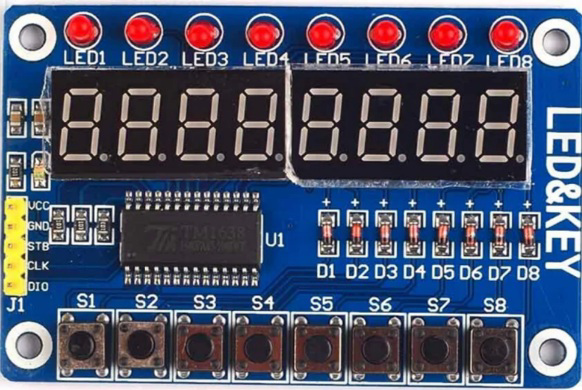
The TM1638 8-Digit LED Display Module with 8 Buttons is a versatile and compact component designed for both input and output in electronic projects. It features an 8-digit 7-segment LED display for visual output and 8 tactile buttons for user input. The module is powered by the TM1638 driver IC, which simplifies communication with microcontrollers by using a serial interface. This makes it an excellent choice for projects requiring numerical data display and user interaction.
Explore Projects Built with TM1638 8-Digit LED Display Module with 8 Buttons
 Open Project in Cirkit Designer
 Open Project in Cirkit Designer
 Open Project in Cirkit Designer
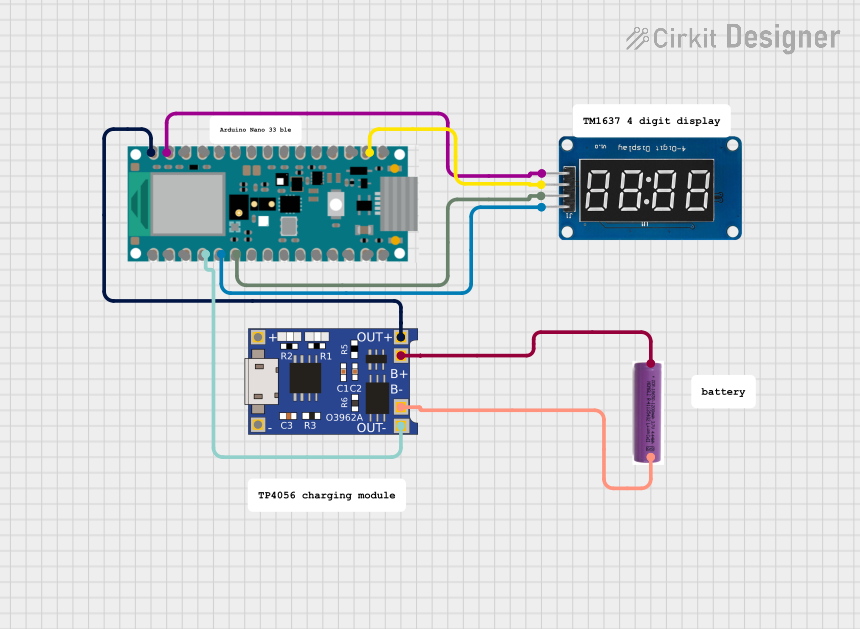 Open Project in Cirkit Designer
Explore Projects Built with TM1638 8-Digit LED Display Module with 8 Buttons
Open Project in Cirkit DesignerOpen Project in Cirkit DesignerOpen Project in Cirkit DesignerOpen Project in Cirkit DesignerCommon Applications and Use Cases
- Digital clocks and timers
- Scoreboards and counters
- User interfaces for embedded systems
- Home automation control panels
- Educational and prototyping projects
Technical Specifications
Key Technical Details
- Driver IC: TM1638
- Operating Voltage: 5V DC
- Interface: Serial (3-wire: STB, CLK, DIO)
- LED Display: 8-digit 7-segment display
- Buttons: 8 tactile push buttons
- Current Consumption: ~80mA (varies with LED brightness)
- Dimensions: 75mm x 50mm x 15mm
Pin Configuration and Descriptions
The TM1638 module has a 5-pin header for interfacing with a microcontroller. Below is the pinout:
| Pin | Name | Description |
|---|---|---|
| 1 | VCC | Power supply (5V DC) |
| 2 | GND | Ground |
| 3 | DIO | Data input/output (serial communication) |
| 4 | CLK | Clock signal for serial communication |
| 5 | STB | Strobe signal for enabling communication |
Usage Instructions
How to Use the Component in a Circuit
- Power the Module: Connect the
VCCpin to a 5V power source and theGNDpin to ground. - Connect to Microcontroller: Use the
DIO,CLK, andSTBpins to interface with a microcontroller. These pins are used for serial communication. - Install Required Libraries: If using an Arduino, install the
TM1638orTM1638pluslibrary for simplified control. - Write Code: Use the library functions to control the LED display and read button inputs.
Important Considerations and Best Practices
- Power Supply: Ensure a stable 5V power supply to avoid flickering or erratic behavior.
- Pull-up Resistors: The module typically does not require external pull-up resistors as the TM1638 IC handles this internally.
- Avoid Overloading: Do not exceed the current rating of the module to prevent damage.
- Cable Length: Keep the connecting wires short to minimize signal degradation in serial communication.
Example Code for Arduino UNO
Below is an example of how to use the TM1638 module with an Arduino UNO:
#include <TM1638.h> // Include the TM1638 library

// Define the pins connected to the TM1638 module
#define STB_PIN 10  // Strobe pin
#define CLK_PIN 11  // Clock pin
#define DIO_PIN 12  // Data input/output pin

// Create a TM1638 object
TM1638 module(STB_PIN, CLK_PIN, DIO_PIN);

void setup() {
  module.setupDisplay(true, 7); // Enable display with brightness level 7
  module.setDisplayToString("HELLO", 0); // Display "HELLO" on the module
}

void loop() {
  // Read button states
  byte buttons = module.getButtons();

  // If any button is pressed, display its number
  if (buttons > 0) {
    module.setDisplayToDecNumber(buttons, false, 0);
    // Display the button number in decimal format
  }
}
Code Explanation
- The
TM1638library simplifies communication with the module. - The
setupDisplay()function initializes the display with brightness control. - The
setDisplayToString()function displays a string on the 8-digit LED. - The
getButtons()function reads the state of the 8 buttons.
Troubleshooting and FAQs
Common Issues and Solutions
LED Display Not Working:
- Ensure the
VCCandGNDconnections are secure. - Verify that the
STB,CLK, andDIOpins are correctly connected to the microcontroller. - Check the power supply voltage (should be 5V).
- Ensure the
Buttons Not Responding:
- Confirm that the
DIOpin is properly connected. - Test the buttons for mechanical failure by pressing them directly.
- Confirm that the
Flickering Display:
- Check for a stable power supply.
- Reduce the brightness level using the
setupDisplay()function.
No Communication with Microcontroller:
- Ensure the correct pins are defined in the code.
- Verify that the TM1638 library is installed and included in the sketch.
FAQs
Q: Can I use the TM1638 module with a 3.3V microcontroller?
A: The module is designed for 5V operation. Use a level shifter to safely interface with 3.3V microcontrollers.
Q: How many TM1638 modules can I daisy-chain?
A: Multiple modules can be daisy-chained, but the exact number depends on the microcontroller's memory and processing capabilities.
Q: Can I control individual LEDs on the display?
A: Yes, the TM1638 library provides functions to control individual segments of the display.
Q: Is the module compatible with Raspberry Pi?
A: Yes, the module can be used with Raspberry Pi, but you will need to write or use a compatible library for SPI communication.
This documentation provides a comprehensive guide to using the TM1638 8-Digit LED Display Module with 8 Buttons in your projects. Happy tinkering!