
How to Use tomada 12V carro: Examples, Pinouts, and Specs
 Design with tomada 12V carro in Cirkit Designer
Introduction
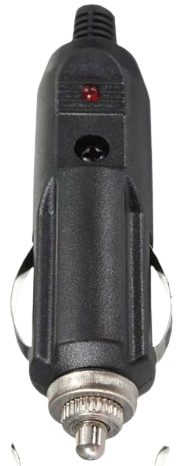
The Tomada 12V Carro is a 12-volt car socket manufactured by Carro with the part ID CAR. This component is a standard automotive power outlet, commonly used to charge and power electronic devices such as smartphones, GPS units, dash cameras, and portable air compressors. It provides a reliable and convenient way to access power from a vehicle's electrical system.
Explore Projects Built with tomada 12V carro
 Open Project in Cirkit Designer
 Open Project in Cirkit Designer
 Open Project in Cirkit Designer
 Open Project in Cirkit Designer
Explore Projects Built with tomada 12V carro
Open Project in Cirkit DesignerOpen Project in Cirkit DesignerOpen Project in Cirkit DesignerOpen Project in Cirkit DesignerCommon Applications and Use Cases
- Charging mobile devices (e.g., phones, tablets, power banks)
- Powering automotive accessories (e.g., dash cams, GPS devices)
- Operating portable appliances (e.g., mini fridges, tire inflators)
- Providing a power source for USB adapters and inverters
Technical Specifications
The Tomada 12V Carro is designed to operate within the standard automotive electrical system. Below are its key technical details:
General Specifications
| Parameter | Value |
|---|---|
| Operating Voltage | 12V DC |
| Maximum Current Rating | 10A |
| Power Output | Up to 120W |
| Material | High-temperature resistant plastic and metal contacts |
| Mounting Style | Panel mount or surface mount |
| Dimensions | 30mm diameter (approx.) |
| Manufacturer Part ID | CAR |
Pin Configuration and Descriptions
The Tomada 12V Carro typically has two connection terminals:
| Pin Name | Description |
|---|---|
| Positive (+) | Connects to the vehicle's 12V power supply (battery positive terminal) |
| Negative (-) | Connects to the vehicle's ground (chassis or battery negative terminal) |
Usage Instructions
How to Use the Component in a Circuit
Mounting the Socket:
- Install the socket in a suitable location on the vehicle's dashboard or panel. Ensure the mounting hole matches the socket's diameter (approximately 30mm).
- Secure the socket using the provided locking nut or screws.
Wiring the Socket:
- Connect the Positive (+) terminal of the socket to the vehicle's 12V power supply using a suitable gauge wire. It is recommended to include a fuse (10A) in series to protect the circuit.
- Connect the Negative (-) terminal to the vehicle's ground (chassis or battery negative terminal).
Testing the Socket:
- After wiring, test the socket by plugging in a compatible 12V device or adapter. Ensure the device powers on correctly.
Using with USB Adapters or Inverters:
- Insert a USB adapter or power inverter into the socket to charge or power devices that require USB or AC power.
Important Considerations and Best Practices
- Fuse Protection: Always use an inline fuse (10A) to prevent damage to the socket or connected devices in case of a short circuit.
- Wire Gauge: Use wires of appropriate gauge (e.g., 16 AWG or thicker) to handle the current without overheating.
- Avoid Overloading: Do not exceed the maximum power rating of 120W to prevent overheating or damage.
- Secure Connections: Ensure all connections are tight and insulated to avoid loose contacts or short circuits.
- Weatherproofing: If the socket is installed in an exposed area, use a weatherproof cover to protect it from moisture and debris.
Example: Using with an Arduino UNO
The Tomada 12V Carro can be used to power an Arduino UNO via a 12V-to-5V USB adapter. Below is an example of how to connect and use it:
- Connect the Positive (+) terminal of the socket to the vehicle's 12V power supply.
- Connect the Negative (-) terminal to the vehicle's ground.
- Insert a 12V-to-5V USB adapter into the socket.
- Use a USB cable to connect the adapter to the Arduino UNO.
// Example Arduino Code: Blink an LED
// This code assumes the Arduino UNO is powered via the 12V car socket
// using a 12V-to-5V USB adapter.

const int ledPin = 13; // Built-in LED pin on Arduino UNO

void setup() {
  pinMode(ledPin, OUTPUT); // Set the LED pin as an output
}

void loop() {
  digitalWrite(ledPin, HIGH); // Turn the LED on
  delay(1000);               // Wait for 1 second
  digitalWrite(ledPin, LOW);  // Turn the LED off
  delay(1000);               // Wait for 1 second
}
Troubleshooting and FAQs
Common Issues and Solutions
| Issue | Possible Cause | Solution |
|---|---|---|
| Socket not powering devices | Loose or incorrect wiring | Check and secure all connections |
| Fuse blows frequently | Overloading or short circuit | Ensure load is within 10A; check for shorts |
| Device not charging properly | Incompatible adapter or device | Use a compatible adapter or device |
| Socket overheats | Exceeding power rating or poor ventilation | Reduce load; ensure proper airflow |
FAQs
Can I use this socket with a 24V system?
No, the Tomada 12V Carro is designed for 12V systems only. Using it with a 24V system may damage the socket or connected devices.What type of fuse should I use?
Use a 10A automotive blade fuse for optimal protection.Can I install this socket in a boat or RV?
Yes, as long as the electrical system operates at 12V DC.Is the socket waterproof?
The socket itself is not waterproof. Use a weatherproof cover if installing in an exposed area.
By following this documentation, you can safely and effectively use the Tomada 12V Carro in your vehicle or other 12V applications.