
How to Use Waveshare industrial 8-ch (b) analog acquisition module with default voltage mode (0—10v): Examples, Pinouts, and Specs
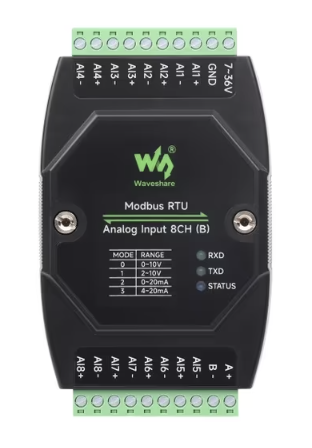
 Design with Waveshare industrial 8-ch (b) analog acquisition module with default voltage mode (0—10v) in Cirkit Designer
Introduction
The Waveshare Industrial 8-CH (B) Analog Acquisition Module is a robust and versatile device designed for industrial applications. It is capable of measuring analog voltages in the range of 0 to 10 volts across 8 independent channels. This module is ideal for scenarios requiring simultaneous data acquisition from multiple analog sources, such as industrial automation, process monitoring, and control systems.
Explore Projects Built with Waveshare industrial 8-ch (b) analog acquisition module with default voltage mode (0—10v)
 Open Project in Cirkit Designer
 Open Project in Cirkit Designer
 Open Project in Cirkit Designer
 Open Project in Cirkit Designer
Explore Projects Built with Waveshare industrial 8-ch (b) analog acquisition module with default voltage mode (0—10v)
Open Project in Cirkit DesignerOpen Project in Cirkit DesignerOpen Project in Cirkit DesignerOpen Project in Cirkit DesignerCommon Applications
- Industrial automation systems
- Process monitoring and control
- Data acquisition in laboratory environments
- Sensor signal measurement and logging
- IoT systems requiring multi-channel analog input
Technical Specifications
The following table outlines the key technical details of the Waveshare Industrial 8-CH (B) Analog Acquisition Module:
| Parameter | Specification |
|---|---|
| Input Voltage Range | 0–10 V |
| Number of Channels | 8 |
| Communication Interface | RS485 (Modbus RTU protocol) |
| Power Supply Voltage | 9–24 V DC |
| Sampling Rate | Up to 10 Hz per channel |
| Resolution | 12-bit |
| Operating Temperature | -40°C to 85°C |
| Dimensions | 115 mm × 90 mm × 40 mm |
| Mounting | DIN rail or wall-mounted |
Pin Configuration and Descriptions
The module features a terminal block for power, communication, and analog input connections. Below is the pin configuration:
| Pin | Label | Description |
|---|---|---|
| 1 | V+ | Positive terminal for power supply (9–24 V DC) |
| 2 | GND | Ground terminal for power supply |
| 3 | A+ | RS485 communication line (positive) |
| 4 | B- | RS485 communication line (negative) |
| 5–12 | CH1–CH8 | Analog input channels (0–10 V) |
Usage Instructions
How to Use the Module in a Circuit
- Power Connection: Connect a DC power supply (9–24 V) to the
V+andGNDterminals. - Analog Input: Connect the analog signal sources (e.g., sensors) to the
CH1–CH8terminals. Ensure the input voltage does not exceed the 0–10 V range. - Communication: Connect the
A+andB-terminals to an RS485-compatible device (e.g., PLC, computer with RS485 adapter, or microcontroller). - Configuration: Use Modbus RTU commands to configure and read data from the module. Refer to the Modbus register map provided in the manufacturer's documentation.
Important Considerations and Best Practices
- Ensure the input voltage for each channel remains within the 0–10 V range to avoid damage to the module.
- Use shielded cables for RS485 communication to minimize noise and interference.
- Terminate the RS485 bus with a 120-ohm resistor at both ends for reliable communication.
- Mount the module securely on a DIN rail or wall to prevent vibration-related issues.
- If using with a microcontroller like Arduino, ensure the RS485 adapter is properly connected and configured.
Example: Connecting to Arduino UNO
To interface the module with an Arduino UNO, you will need an RS485-to-TTL adapter. Below is an example Arduino sketch for reading data from the module:
#include <ModbusMaster.h>

// Instantiate ModbusMaster object
ModbusMaster node;

// RS485 communication pins
#define RE_PIN 2  // Receiver Enable pin
#define DE_PIN 3  // Driver Enable pin

void preTransmission() {
  digitalWrite(RE_PIN, HIGH); // Enable RS485 driver
  digitalWrite(DE_PIN, HIGH);
}

void postTransmission() {
  digitalWrite(RE_PIN, LOW);  // Disable RS485 driver
  digitalWrite(DE_PIN, LOW);
}

void setup() {
  // Initialize serial communication
  Serial.begin(9600); // For debugging
  Serial1.begin(9600); // RS485 communication

  // Configure RS485 control pins
  pinMode(RE_PIN, OUTPUT);
  pinMode(DE_PIN, OUTPUT);
  digitalWrite(RE_PIN, LOW);
  digitalWrite(DE_PIN, LOW);

  // Modbus communication setup
  node.begin(1, Serial1); // Set Modbus slave ID to 1
  node.preTransmission(preTransmission);
  node.postTransmission(postTransmission);
}

void loop() {
  uint8_t result;
  uint16_t data[8];

  // Read 8 registers starting from address 0x0000
  result = node.readInputRegisters(0x0000, 8);

  if (result == node.ku8MBSuccess) {
    for (int i = 0; i < 8; i++) {
      data[i] = node.getResponseBuffer(i);
      Serial.print("Channel ");
      Serial.print(i + 1);
      Serial.print(": ");
      Serial.println(data[i] * (10.0 / 4095.0)); // Convert to voltage
    }
  } else {
    Serial.print("Error: ");
    Serial.println(result);
  }

  delay(1000); // Wait 1 second before next read
}
Troubleshooting and FAQs
Common Issues and Solutions
No Communication with the Module
- Verify the RS485 connections (
A+andB-) and ensure they are not swapped. - Check the baud rate and Modbus slave ID in your software configuration.
- Ensure the RS485 bus is properly terminated with 120-ohm resistors.
- Verify the RS485 connections (
Incorrect Voltage Readings
- Confirm that the input voltage is within the 0–10 V range.
- Check for loose or faulty connections on the analog input terminals.
- Ensure the power supply voltage is stable and within the specified range.
Module Not Powering On
- Verify the power supply voltage is between 9–24 V DC.
- Check the polarity of the power connections (
V+andGND).
FAQs
Q: Can this module measure negative voltages?
A: No, the module is designed to measure voltages in the range of 0–10 V only.
Q: What is the maximum cable length for RS485 communication?
A: RS485 supports cable lengths up to 1200 meters, but this may vary depending on baud rate and environmental noise.
Q: Can I use this module with a Raspberry Pi?
A: Yes, you can use an RS485-to-USB or RS485-to-TTL adapter to connect the module to a Raspberry Pi.
Q: Is the module compatible with 4–20 mA sensors?
A: Yes, but you will need a 250-ohm resistor to convert the 4–20 mA current signal to a 1–5 V voltage signal.