
How to Use JST XH 3A Male: Examples, Pinouts, and Specs
 Design with JST XH 3A Male in Cirkit Designer
Introduction
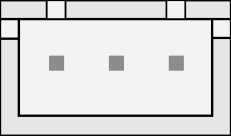
The JST XH 3A Male connector is a 3-pin male connector designed for secure and reliable electrical connections in electronic circuits. Its compact design and locking mechanism make it a popular choice for applications requiring stable and durable connections. This connector is widely used in battery packs, PCBs, and other electronic devices where space-saving and dependable connections are essential.
Explore Projects Built with JST XH 3A Male
 Open Project in Cirkit Designer
 Open Project in Cirkit Designer
 Open Project in Cirkit Designer
 Open Project in Cirkit Designer
Explore Projects Built with JST XH 3A Male
Open Project in Cirkit DesignerOpen Project in Cirkit DesignerOpen Project in Cirkit DesignerOpen Project in Cirkit DesignerCommon Applications and Use Cases
- Battery connections in RC vehicles, drones, and robotics
- Power supply connections in small electronic devices
- Signal transmission in PCBs and control boards
- Interfacing with sensors and modules in embedded systems
Technical Specifications
The JST XH 3A Male connector is designed to meet the needs of compact and reliable electrical connections. Below are its key technical details:
Key Technical Details
- Number of Pins: 3
- Rated Current: 3A (maximum)
- Rated Voltage: 250V AC/DC
- Contact Resistance: ≤ 10 mΩ
- Insulation Resistance: ≥ 1000 MΩ
- Operating Temperature: -25°C to +85°C
- Pitch (Pin Spacing): 2.5 mm
- Material:
- Housing: Nylon 66 (UL94V-0 flame retardant)
- Contacts: Tin-plated copper alloy
- Locking Mechanism: Friction lock for secure connections
Pin Configuration and Descriptions
The JST XH 3A Male connector has three pins arranged in a single row. Below is the pin configuration:
| Pin Number | Description | Typical Use |
|---|---|---|
| 1 | VCC (Power) | Positive power supply |
| 2 | Signal/Data | Signal or data transmission |
| 3 | GND (Ground) | Ground connection |
Usage Instructions
The JST XH 3A Male connector is straightforward to use in electronic circuits. Follow the steps below to ensure proper usage:
How to Use the Component in a Circuit
- Prepare the Wires: Strip the insulation from the wires you intend to connect to the JST XH 3A Male connector.
- Crimp the Contacts: Use a crimping tool to attach the wires to the metal contacts. Ensure a secure and firm crimp for reliable connections.
- Insert Contacts into the Housing: Push the crimped contacts into the connector housing until they click into place. Verify that the contacts are fully seated.
- Connect to the Female Counterpart: Align the JST XH 3A Male connector with its female counterpart and push them together until the locking mechanism engages.
- Verify the Connection: Check the connection for stability and ensure there is no loose wiring.
Important Considerations and Best Practices
- Wire Gauge: Use wires with an appropriate gauge (typically 22-28 AWG) to ensure compatibility with the connector.
- Crimping Tool: Always use a proper crimping tool designed for JST connectors to avoid poor connections.
- Avoid Overcurrent: Do not exceed the rated current of 3A to prevent overheating or damage.
- Secure Mounting: If the connector is used on a PCB, ensure it is securely soldered to avoid mechanical stress.
Example: Connecting to an Arduino UNO
The JST XH 3A Male connector can be used to connect a sensor or module to an Arduino UNO. Below is an example of how to use it:
Circuit Setup
- Pin 1 (VCC) connects to the Arduino's 5V pin.
- Pin 2 (Signal) connects to a digital or analog input pin on the Arduino (e.g., D2).
- Pin 3 (GND) connects to the Arduino's GND pin.
Sample Code
// Example code for reading a signal from a sensor connected via JST XH 3A Male
const int signalPin = 2; // Pin connected to the Signal pin of the JST connector
int sensorValue = 0;     // Variable to store the sensor reading

void setup() {
  pinMode(signalPin, INPUT); // Set the signal pin as input
  Serial.begin(9600);        // Initialize serial communication
}

void loop() {
  sensorValue = digitalRead(signalPin); // Read the signal value
  Serial.print("Sensor Value: ");       // Print the sensor value to the serial monitor
  Serial.println(sensorValue);
  delay(500); // Wait for 500ms before the next reading
}
Troubleshooting and FAQs
Common Issues Users Might Face
- Loose Connections: The connector may not lock securely if the contacts are not fully inserted into the housing.
- Solution: Ensure the contacts click into place when inserted into the housing.
- Intermittent Signal Loss: Poor crimping can lead to intermittent connections.
- Solution: Use a proper crimping tool and verify the quality of the crimp.
- Overheating: Exceeding the rated current can cause the connector to overheat.
- Solution: Ensure the current does not exceed 3A during operation.
- Connector Misalignment: The male and female connectors may not align properly.
- Solution: Align the connectors carefully and ensure the locking mechanism engages.
FAQs
Q1: Can I solder wires directly to the JST XH 3A Male connector?
A1: While it is possible, it is not recommended. Crimping provides a more reliable and durable connection.
Q2: What is the maximum wire length I can use with this connector?
A2: The maximum wire length depends on the application and current requirements. For most low-power applications, wires up to 1 meter are typically acceptable.
Q3: Can this connector handle high-frequency signals?
A3: The JST XH 3A Male connector is suitable for low- to medium-frequency signals. For high-frequency applications, consider using connectors designed for RF or high-speed data.
Q4: Is the connector waterproof?
A4: No, the JST XH 3A Male connector is not waterproof. For outdoor or moisture-prone environments, use a waterproof connector.