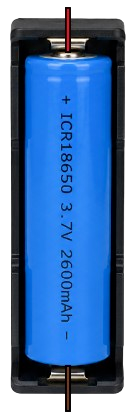
The 18650 in case is a cylindrical lithium-ion rechargeable battery housed in a protective case. This design ensures safe operation and prevents physical damage to the battery, making it ideal for applications requiring durability and reliability. The 18650 battery is widely used in portable electronics, power banks, flashlights, and DIY electronics projects due to its high energy density, long cycle life, and compact size.
Explore Projects Built with 18650 in case
Use Cirkit Designer to design, explore, and prototype these projects online. Some projects support real-time simulation. Click "Open Project" to start designing instantly!
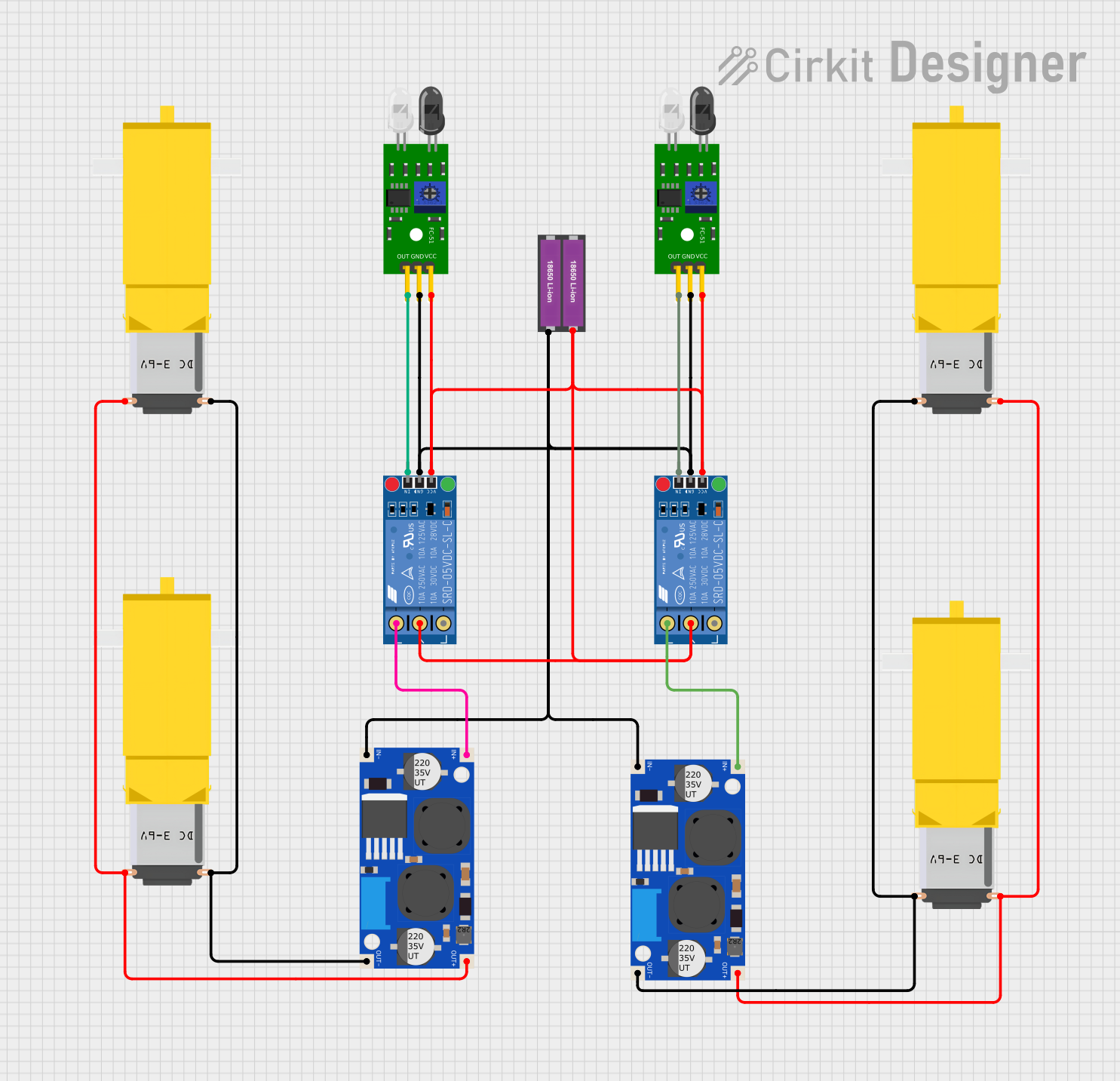
This circuit consists of two FC-51 IR Obstacle Sensors connected to two KF-301 relays, which likely serve as triggers for switching the relays. Four gearmotors are powered through two XL6009E1 Boost Converters, which are likely used to step up the voltage from a 2-cell 18650 Li-ion battery pack. The relays appear to control the power flow to the boost converters, and thus to the gearmotors, based on the obstacle detection inputs.
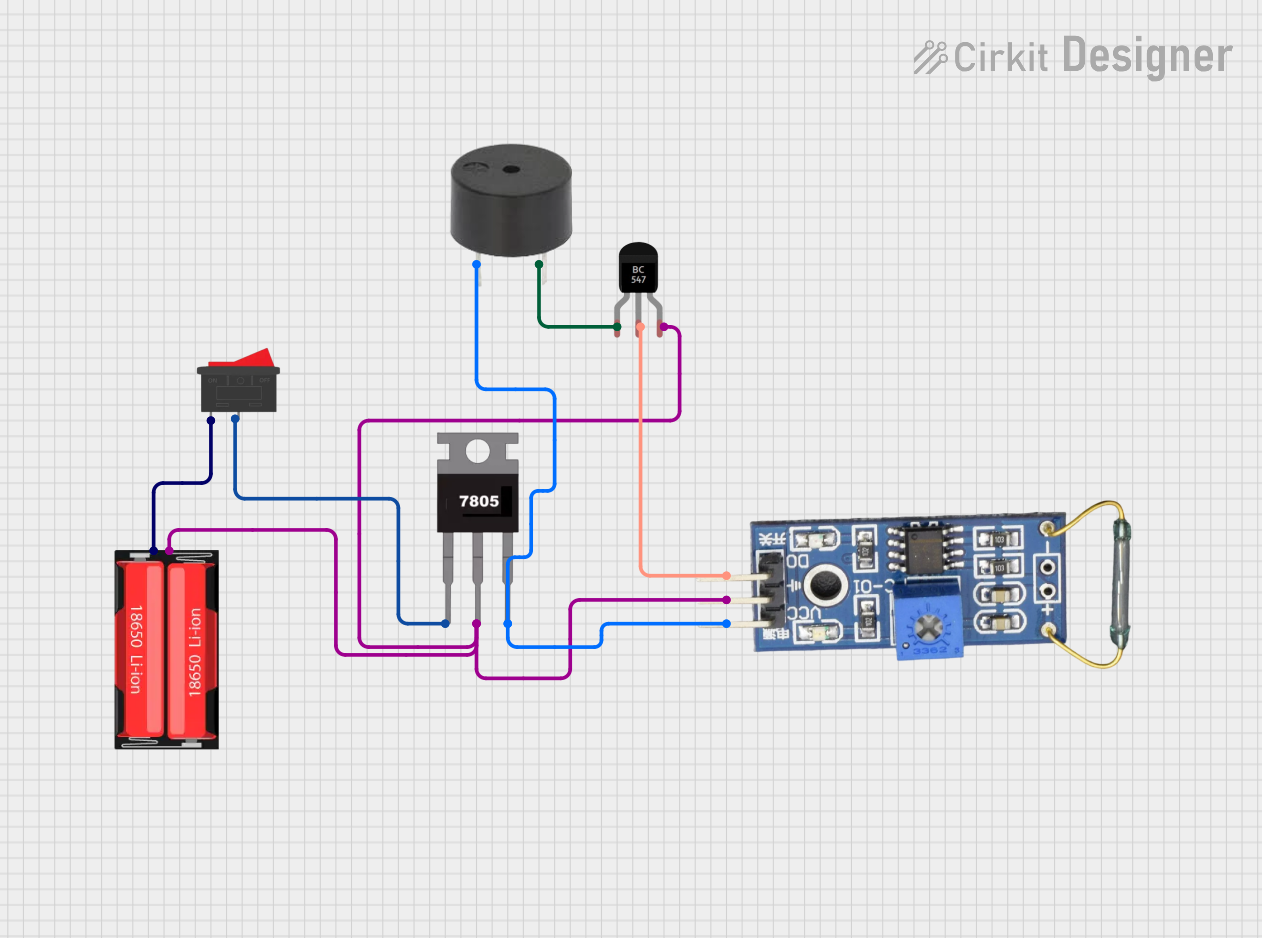
This circuit is a simple alarm system powered by a 18650 Li-Ion battery, regulated to 5V by a 7805 voltage regulator. It uses a reed switch to detect magnetic fields, which triggers a BC547 transistor to activate a buzzer when the switch is closed.
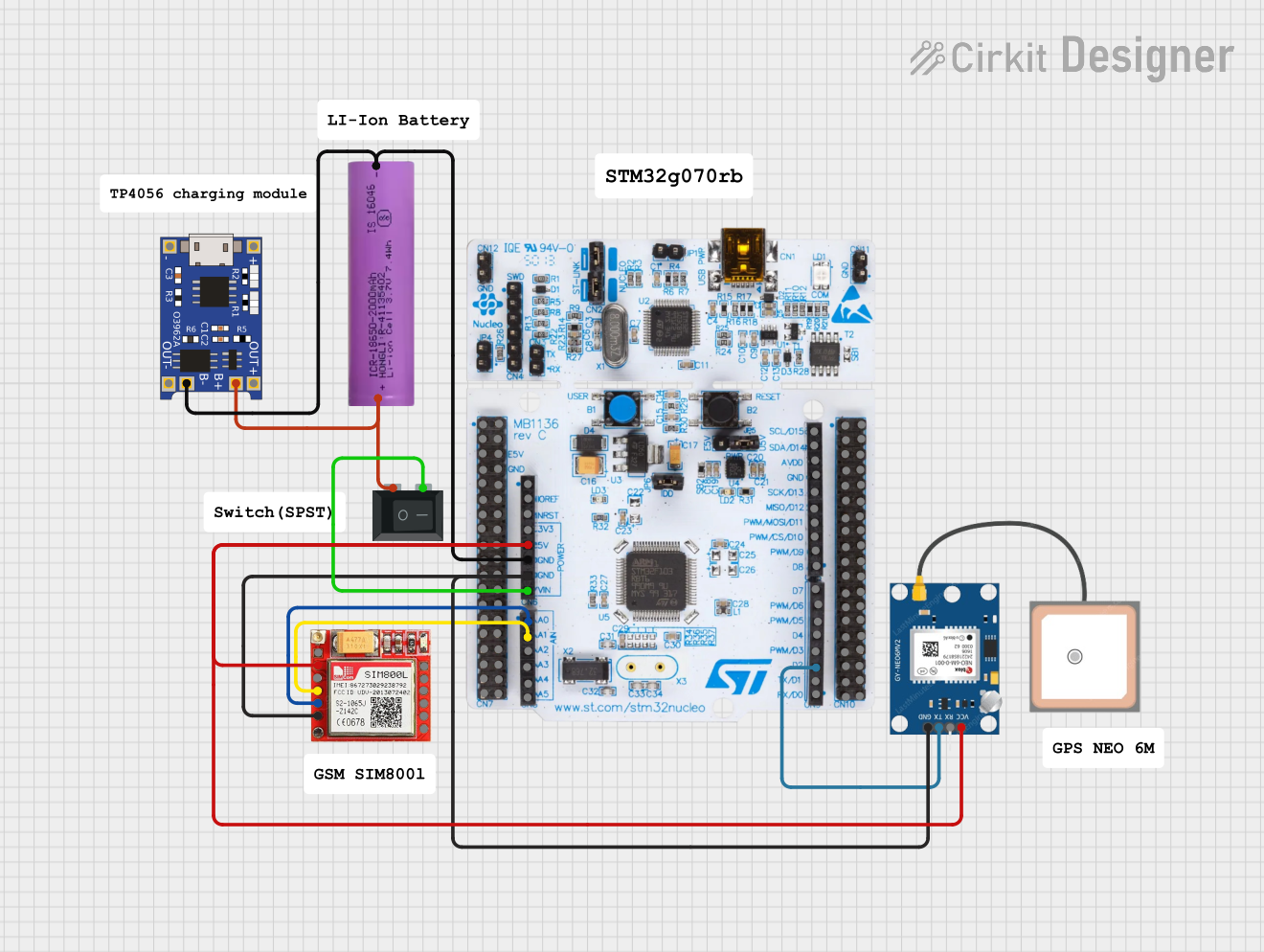
This circuit is an emergency alert system that uses a NUCLEO-F072RB microcontroller to send SMS alerts and make calls via a SIM800L GSM module, while obtaining location data from a GPS NEO 6M module. The system is powered by a Li-ion battery and includes a TP4056 module for battery charging and protection, with a rocker switch to control power to the microcontroller.
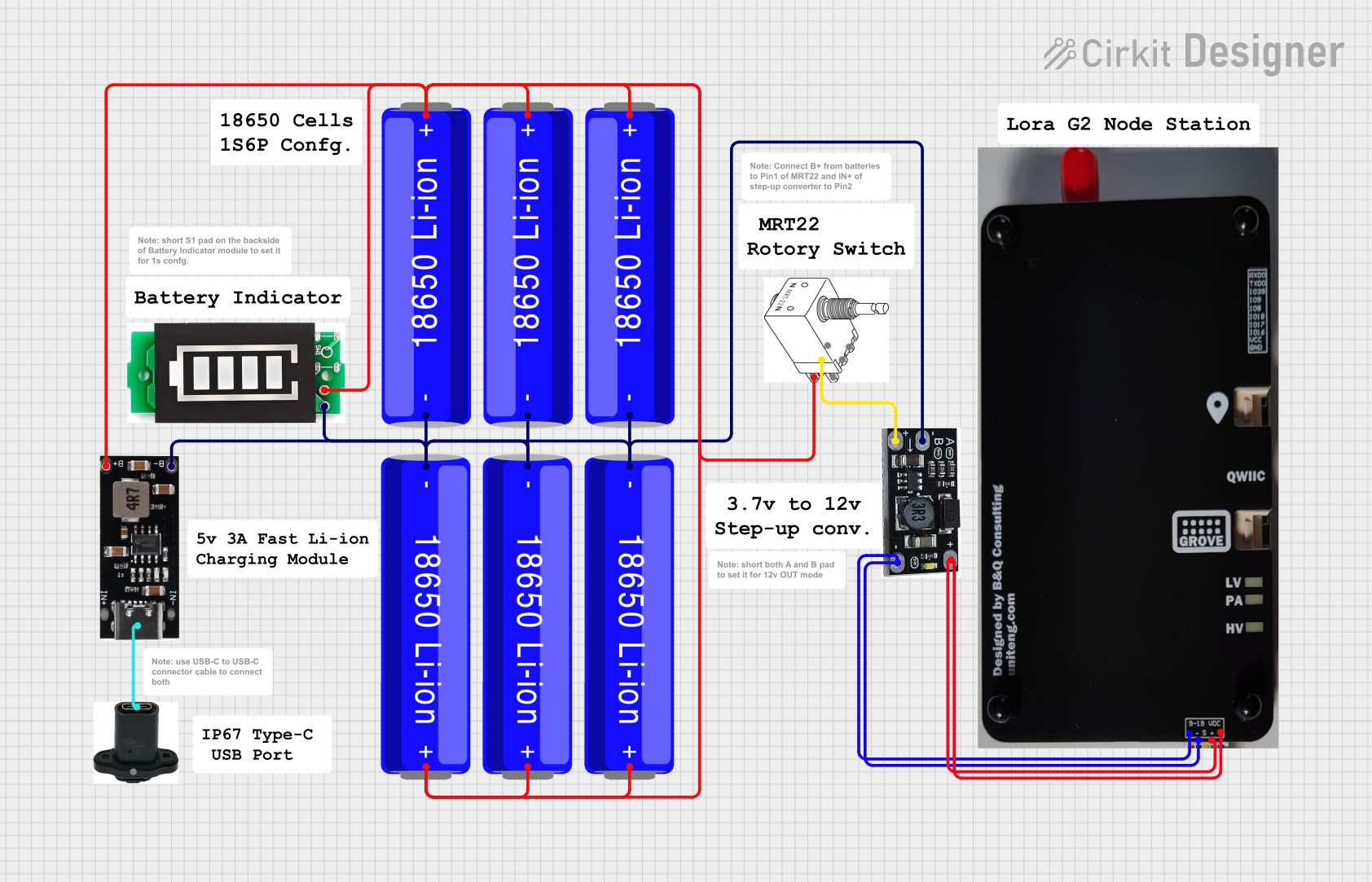
This circuit is a portable power supply system that uses multiple 18650 Li-ion batteries to provide a stable 5V output through a boost converter. It includes a fast charging module with a USB-C input for recharging the batteries and a battery indicator for monitoring the battery status. The system powers a Lora G2 Node Station, making it suitable for wireless communication applications.
The following table outlines the key technical specifications of a standard 18650 battery in a protective case:
Parameter
Value
Nominal Voltage
3.7V
Fully Charged Voltage
4.2V
Capacity Range
2000mAh to 3500mAh (varies by model)
Maximum Discharge Current
10A to 30A (depending on model)
Dimensions (with case)
~18.6mm (diameter) x 70mm (length)
Weight (with case)
~50g
Operating Temperature
-20°C to 60°C
Cycle Life
~300-500 cycles
Protection Features
Overcharge, over-discharge, and short-circuit protection
Pin Configuration and Descriptions
The 18650 in case typically has two terminals for electrical connections:
Pin
Label
Description
1
Positive (+)
Positive terminal for connecting to the load or charger.
2
Negative (-)
Negative terminal for connecting to the load or charger.
Usage Instructions
How to Use the 18650 in a Circuit
Connect the Terminals Properly: Ensure the positive terminal (+) is connected to the positive side of the circuit, and the negative terminal (-) is connected to the ground or negative side.
Use a Battery Holder or Case: For safety and convenience, use a battery holder or case designed for 18650 batteries. This prevents accidental short circuits and ensures secure connections.
Charge Safely: Use a dedicated lithium-ion battery charger with overcharge protection to charge the 18650 battery. Avoid charging beyond 4.2V.
Discharge Safely: Do not discharge the battery below 2.5V to prevent damage and capacity loss.
Monitor Temperature: Avoid using the battery in environments exceeding its operating temperature range (-20°C to 60°C).
Important Considerations and Best Practices
Avoid Short Circuits: Never connect the positive and negative terminals directly, as this can cause overheating or damage.
Inspect the Case: Regularly check the protective case for cracks or damage. Replace the case if necessary.
Store Properly: Store the battery in a cool, dry place when not in use. Avoid exposure to direct sunlight or high humidity.
Use a Protection Circuit Module (PCM): For added safety, use a PCM to prevent overcharging, over-discharging, and short circuits.
Example: Using the 18650 with an Arduino UNO
The 18650 battery can be used to power an Arduino UNO via its VIN pin. Below is an example circuit and code to read the battery voltage using a voltage divider and the Arduino's analog input.
Circuit Setup:
Connect the positive terminal of the 18650 to one end of a voltage divider (e.g., two resistors: 10kΩ and 10kΩ).
Connect the midpoint of the voltage divider to the Arduino's analog pin (e.g., A0).
Connect the negative terminal of the 18650 to the Arduino's GND pin.
Arduino Code:
// Define the analog pin connected to the voltage divider
const int voltagePin = A0;

// Define the voltage divider ratio (e.g., 10kΩ and 10kΩ resistors)
const float dividerRatio = 2.0;

// Define the reference voltage of the Arduino (5V for most boards)
const float referenceVoltage = 5.0;

void setup() {
  Serial.begin(9600); // Initialize serial communication at 9600 baud
}

void loop() {
  int rawValue = analogRead(voltagePin); // Read the analog value
  float batteryVoltage = (rawValue / 1023.0) * referenceVoltage * dividerRatio;

  // Print the battery voltage to the Serial Monitor
  Serial.print("Battery Voltage: ");
  Serial.print(batteryVoltage);
  Serial.println(" V");

  delay(1000); // Wait for 1 second before the next reading
}
Note: Ensure the voltage divider reduces the battery voltage to a safe level for the Arduino's analog input (0-5V).
Troubleshooting and FAQs
Common Issues and Solutions
Battery Not Charging:
Cause: Faulty charger or damaged battery.
Solution: Verify the charger is functioning correctly. Check the battery's voltage with a multimeter. Replace the battery if it is below 2.5V and cannot be recharged.
Battery Overheating:
Cause: Excessive current draw or short circuit.
Solution: Ensure the load does not exceed the battery's maximum discharge current. Check for short circuits in the circuit.
Low Battery Life:
Cause: Overcharging, over-discharging, or aging.
Solution: Avoid overcharging or discharging the battery below 2.5V. Replace the battery if it has reached the end of its cycle life.
Voltage Readings Are Inaccurate:
Cause: Incorrect voltage divider ratio or loose connections.
Solution: Verify the resistor values in the voltage divider and ensure all connections are secure.
FAQs
Q: Can I use the 18650 battery without a protective case?
A: It is not recommended. The protective case prevents physical damage and includes safety features like overcharge and short-circuit protection.
Q: How do I know when the battery is fully charged?
A: A fully charged 18650 battery will have a voltage of approximately 4.2V. Use a charger with an indicator light or a multimeter to check the voltage.
Q: Can I connect multiple 18650 batteries in series or parallel?
A: Yes, but ensure all batteries have the same capacity and charge level. Use a battery management system (BMS) for safety.
Q: What is the shelf life of an 18650 battery?
A: When stored properly, an 18650 battery can retain its charge for several months to a year. Store it at ~50% charge in a cool, dry place for optimal shelf life.

 Open Project in Cirkit Designer