
How to Use IC NOT Gate 7404: Examples, Pinouts, and Specs
 Design with IC NOT Gate 7404 in Cirkit Designer
Introduction
The 7404 is an integrated circuit (IC) that contains six independent NOT gates, also known as inverters. Each gate inverts the input signal, producing a high output when the input is low and a low output when the input is high. This IC is a fundamental building block in digital logic design and is widely used in various applications requiring signal inversion.
Explore Projects Built with IC NOT Gate 7404
 Open Project in Cirkit Designer
 Open Project in Cirkit Designer
 Open Project in Cirkit Designer
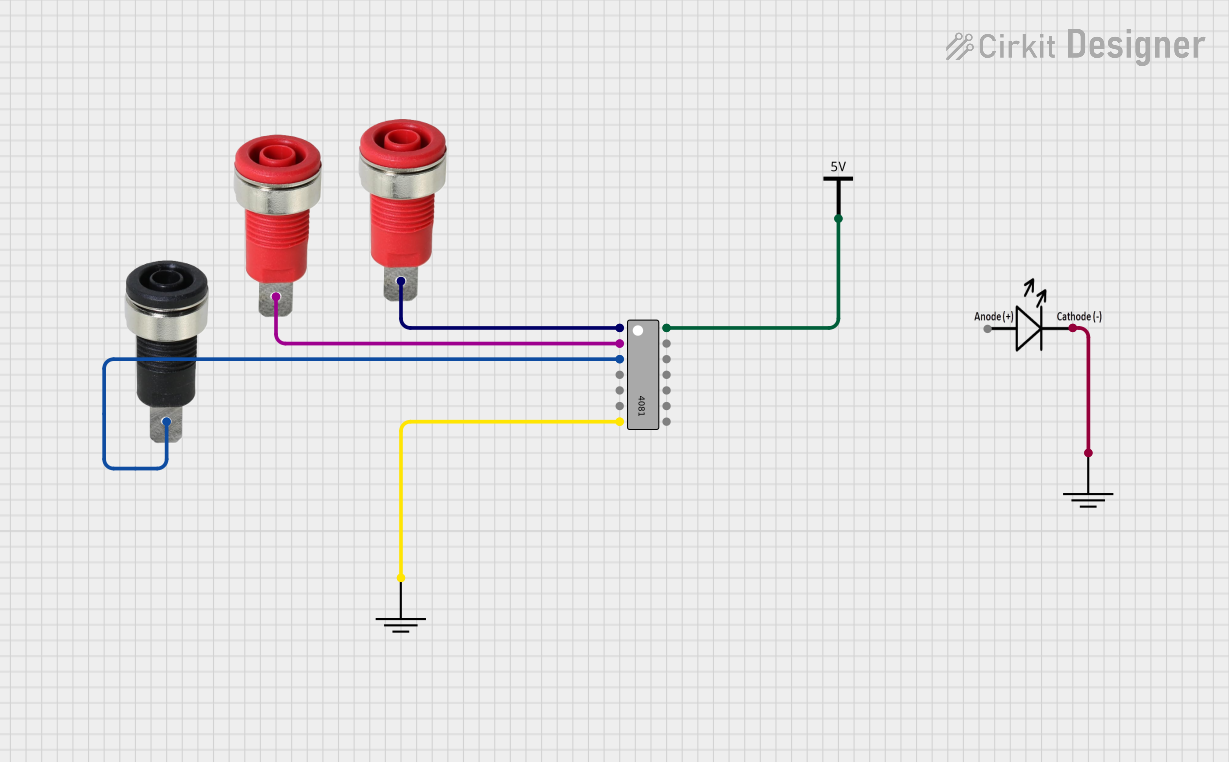 Open Project in Cirkit Designer
Explore Projects Built with IC NOT Gate 7404
Open Project in Cirkit DesignerOpen Project in Cirkit DesignerOpen Project in Cirkit DesignerOpen Project in Cirkit DesignerCommon Applications and Use Cases
- Digital logic circuits
- Signal inversion in microcontroller-based systems
- Oscillator circuits
- Waveform generation and shaping
- Buffering and signal conditioning
Technical Specifications
The 7404 IC is part of the 74xx series of TTL (Transistor-Transistor Logic) devices. Below are its key technical specifications:
| Parameter | Value |
|---|---|
| Supply Voltage (Vcc) | 4.75V to 5.25V |
| Input Voltage (VI) | 0V (Low) to 5V (High) |
| Output Voltage (VO) | 0V (Low) to 5V (High) |
| High-Level Output Current | -0.4 mA |
| Low-Level Output Current | 16 mA |
| Propagation Delay | ~10 ns |
| Power Dissipation | 20 mW (typical) |
| Operating Temperature | 0°C to 70°C |
| Number of Gates | 6 |
Pin Configuration and Descriptions
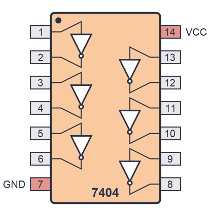
The 7404 IC comes in a 14-pin Dual Inline Package (DIP). Below is the pinout and description:
| Pin Number | Pin Name | Description |
|---|---|---|
| 1 | A1 | Input to NOT Gate 1 |
| 2 | Y1 | Output of NOT Gate 1 |
| 3 | A2 | Input to NOT Gate 2 |
| 4 | Y2 | Output of NOT Gate 2 |
| 5 | A3 | Input to NOT Gate 3 |
| 6 | Y3 | Output of NOT Gate 3 |
| 7 | GND | Ground (0V) |
| 8 | Y4 | Output of NOT Gate 4 |
| 9 | A4 | Input to NOT Gate 4 |
| 10 | Y5 | Output of NOT Gate 5 |
| 11 | A5 | Input to NOT Gate 5 |
| 12 | Y6 | Output of NOT Gate 6 |
| 13 | A6 | Input to NOT Gate 6 |
| 14 | Vcc | Positive Supply Voltage (4.75V to 5.25V) |
Usage Instructions
How to Use the 7404 in a Circuit
- Power Supply: Connect pin 14 (Vcc) to a +5V power supply and pin 7 (GND) to ground.
- Input and Output: Connect the input signal to one of the input pins (A1 to A6). The corresponding output pin (Y1 to Y6) will provide the inverted signal.
- Load Considerations: Ensure the output current does not exceed the IC's maximum ratings to avoid damage.
- Bypass Capacitor: Place a 0.1 µF ceramic capacitor between Vcc and GND to filter noise and stabilize the power supply.
Example Circuit
Below is an example of connecting a single NOT gate from the 7404 IC to invert a digital signal:
- Input: A push-button switch connected to A1.
- Output: An LED connected to Y1.
+5V -----> [Push Button] -----> A1 (Pin 1)
Y1 (Pin 2) -----> [Resistor] -----> LED -----> GND
Using the 7404 with Arduino UNO
The 7404 can be used with an Arduino UNO to invert a digital signal. Below is an example code snippet:
// Example: Using 7404 IC to invert a digital signal with Arduino UNO

const int inputPin = 2;  // Arduino pin connected to 7404 input (e.g., A1)
const int outputPin = 3; // Arduino pin connected to 7404 output (e.g., Y1)

void setup() {
  pinMode(inputPin, OUTPUT); // Set inputPin as output to drive the 7404
  pinMode(outputPin, INPUT); // Set outputPin as input to read the inverted signal
}

void loop() {
  digitalWrite(inputPin, HIGH); // Send HIGH signal to 7404 input
  delay(1000);                  // Wait for 1 second
  int invertedSignal = digitalRead(outputPin); // Read inverted signal
  // Use the invertedSignal variable as needed
  delay(1000);                  // Wait for 1 second
}
Important Considerations and Best Practices
- Avoid exceeding the maximum voltage and current ratings to prevent damage.
- Use pull-up or pull-down resistors on input pins to ensure stable logic levels.
- Always connect unused input pins to GND or Vcc to avoid floating inputs, which can cause erratic behavior.
Troubleshooting and FAQs
Common Issues and Solutions
No Output Signal:
- Ensure the IC is powered correctly (Vcc and GND connections).
- Verify that the input signal is within the acceptable voltage range (0V to 5V).
Erratic Behavior:
- Check for floating input pins and connect them to a defined logic level (GND or Vcc).
- Add a bypass capacitor (0.1 µF) across Vcc and GND to reduce noise.
Overheating:
- Ensure the output current does not exceed the maximum rating (16 mA for low-level output).
- Verify that the IC is not short-circuited.
FAQs
Q1: Can the 7404 IC operate at 3.3V?
A1: No, the 7404 is designed for TTL logic levels and requires a supply voltage between 4.75V and 5.25V.
Q2: What happens if I leave an input pin unconnected?
A2: Floating input pins can cause unpredictable behavior. Always connect unused inputs to GND or Vcc.
Q3: Can I use multiple gates simultaneously?
A3: Yes, all six NOT gates in the 7404 IC can be used independently in the same circuit.
By following this documentation, you can effectively integrate the 7404 IC into your digital logic designs.