
How to Use xh-m203: Examples, Pinouts, and Specs
 Design with xh-m203 in Cirkit Designer
Introduction
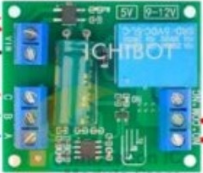
The XH-M203 is a temperature and humidity sensor module designed for accurate environmental monitoring. It is commonly used in applications such as weather stations, HVAC (Heating, Ventilation, and Air Conditioning) systems, and other projects requiring precise temperature and humidity data. The module is easy to interface with microcontrollers, making it a popular choice for both hobbyists and professionals.
Explore Projects Built with xh-m203
 Open Project in Cirkit Designer
 Open Project in Cirkit Designer
 Open Project in Cirkit Designer
 Open Project in Cirkit Designer
Explore Projects Built with xh-m203
Open Project in Cirkit DesignerOpen Project in Cirkit DesignerOpen Project in Cirkit DesignerOpen Project in Cirkit DesignerCommon Applications
- Weather monitoring systems
- HVAC control systems
- Greenhouse environmental monitoring
- IoT-based environmental sensing
- Industrial process monitoring
Technical Specifications
The XH-M203 module is designed to provide reliable and accurate readings for temperature and humidity. Below are its key technical details:
Key Technical Details
| Parameter | Specification |
|---|---|
| Operating Voltage | 5V DC |
| Operating Current | ≤ 20mA |
| Temperature Range | -40°C to 80°C |
| Humidity Range | 0% to 100% RH |
| Temperature Accuracy | ±0.5°C |
| Humidity Accuracy | ±2% RH |
| Communication Protocol | Digital (1-Wire or I2C, depending on configuration) |
| Dimensions | 42mm x 24mm x 12mm |
Pin Configuration
The XH-M203 module typically has a 4-pin interface. Below is the pinout description:
| Pin Number | Pin Name | Description |
|---|---|---|
| 1 | VCC | Power supply input (5V DC) |
| 2 | GND | Ground connection |
| 3 | DATA | Digital data output for temperature and humidity |
| 4 | NC | Not connected (reserved for future use) |
Usage Instructions
The XH-M203 module is straightforward to use and can be easily integrated into a circuit. Below are the steps and best practices for using the module:
Connecting the XH-M203 to a Microcontroller
- Power the Module: Connect the
VCCpin to a 5V power supply and theGNDpin to the ground of your circuit. - Data Connection: Connect the
DATApin to a digital input pin on your microcontroller. If using an Arduino, you can use any GPIO pin. - Pull-Up Resistor: Use a 10kΩ pull-up resistor between the
DATApin andVCCto ensure reliable communication. - Code Implementation: Use a compatible library (e.g., DHT library for Arduino) to read temperature and humidity data.
Sample Arduino Code
Below is an example of how to use the XH-M203 module with an Arduino UNO:
#include <DHT.h>

// Define the pin where the DATA pin of the XH-M203 is connected
#define DATA_PIN 2

// Define the sensor type (DHT11 or DHT22, depending on your module)
#define SENSOR_TYPE DHT22

// Initialize the DHT sensor
DHT dht(DATA_PIN, SENSOR_TYPE);

void setup() {
  Serial.begin(9600); // Start serial communication at 9600 baud
  dht.begin();        // Initialize the DHT sensor
  Serial.println("XH-M203 Temperature and Humidity Sensor Initialized");
}

void loop() {
  // Read temperature and humidity values
  float humidity = dht.readHumidity();
  float temperature = dht.readTemperature();

  // Check if the readings are valid
  if (isnan(humidity) || isnan(temperature)) {
    Serial.println("Failed to read from XH-M203 sensor!");
    return;
  }

  // Print the readings to the Serial Monitor
  Serial.print("Humidity: ");
  Serial.print(humidity);
  Serial.print("%, Temperature: ");
  Serial.print(temperature);
  Serial.println("°C");

  delay(2000); // Wait 2 seconds before the next reading
}
Best Practices
- Ensure the module is placed in an environment free from condensation or water droplets to avoid damage.
- Use proper pull-up resistors for stable communication.
- Avoid placing the module near heat sources or direct sunlight, as this may affect accuracy.
- Calibrate the sensor if required for high-precision applications.
Troubleshooting and FAQs
Common Issues and Solutions
| Issue | Possible Cause | Solution |
|---|---|---|
| No data output | Incorrect wiring or loose connections | Verify all connections and wiring. |
| Inaccurate readings | Environmental interference | Place the module in a stable environment. |
| Failed to initialize the sensor | Incorrect library or sensor type | Ensure the correct library and sensor type are used. |
Data output is always NaN |
Faulty sensor or incorrect pull-up | Check the pull-up resistor and replace the sensor if needed. |
FAQs
Can the XH-M203 be powered with 3.3V?
No, the module requires a 5V power supply for proper operation.What is the maximum cable length for the DATA pin?
The maximum cable length depends on the pull-up resistor value and environmental noise. For most cases, keep the cable length under 20 meters.Can the XH-M203 measure dew point?
The module itself does not calculate dew point, but you can calculate it using the temperature and humidity readings with appropriate formulas.Is the XH-M203 waterproof?
No, the module is not waterproof. Avoid exposing it to water or high humidity levels beyond its rated range.
By following this documentation, you can effectively integrate and use the XH-M203 module in your projects.