Cirkit Designer Logo
Cirkit Designer
Your all-in-one circuit design IDE
Home / 
Component Documentation

How to Use DC MCB: Examples, Pinouts, and Specs

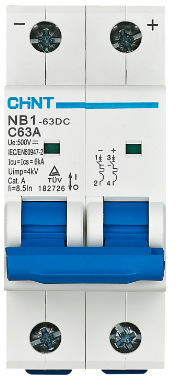
Image of DC MCB
Cirkit Designer LogoDesign with DC MCB in Cirkit Designer

Introduction

The DC MCB (Miniature Circuit Breaker), model NB1-63DC, manufactured by CHINT, is a protective device specifically designed for direct current (DC) applications. It automatically disconnects a circuit in the event of an overload or short circuit, ensuring the safety of electrical systems and preventing potential damage to connected equipment.

DC MCBs are widely used in renewable energy systems, battery banks, electric vehicles, and other DC-powered applications where reliable circuit protection is critical.

Explore Projects Built with DC MCB

Use Cirkit Designer to design, explore, and prototype these projects online. Some projects support real-time simulation. Click "Open Project" to start designing instantly!
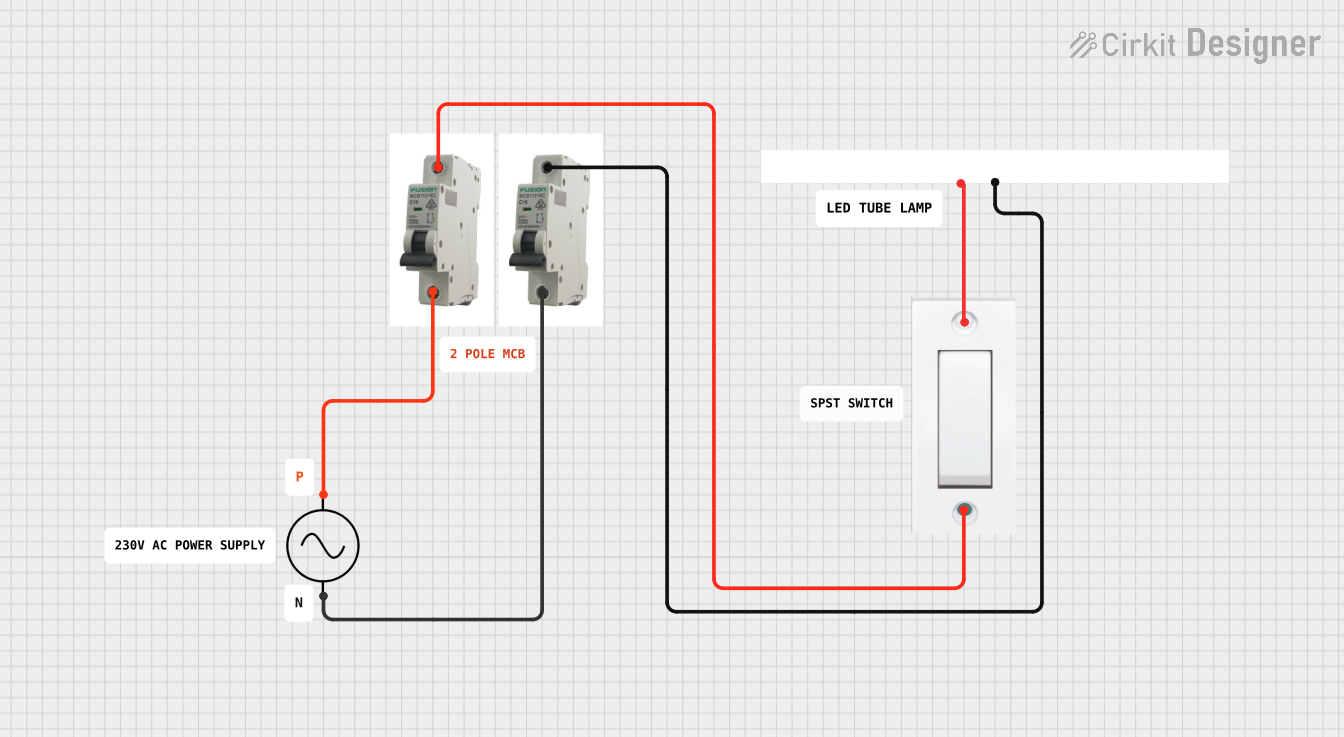
Flush Switch Controlled Lamp Circuit with AC Power Supply and MCB Protection
Image of LAMP CONTROLE WITH MCB: A project utilizing DC MCB in a practical application
This circuit is designed to control a lamp using a flush switch and is protected by two MCBs (Miniature Circuit Breakers). The AC supply is connected to the input of the first MCB, whose output is connected to the flush switch. The flush switch then controls the power to the lamp, with the second MCB placed in the neutral line for additional safety.
Cirkit Designer LogoOpen Project in Cirkit Designer
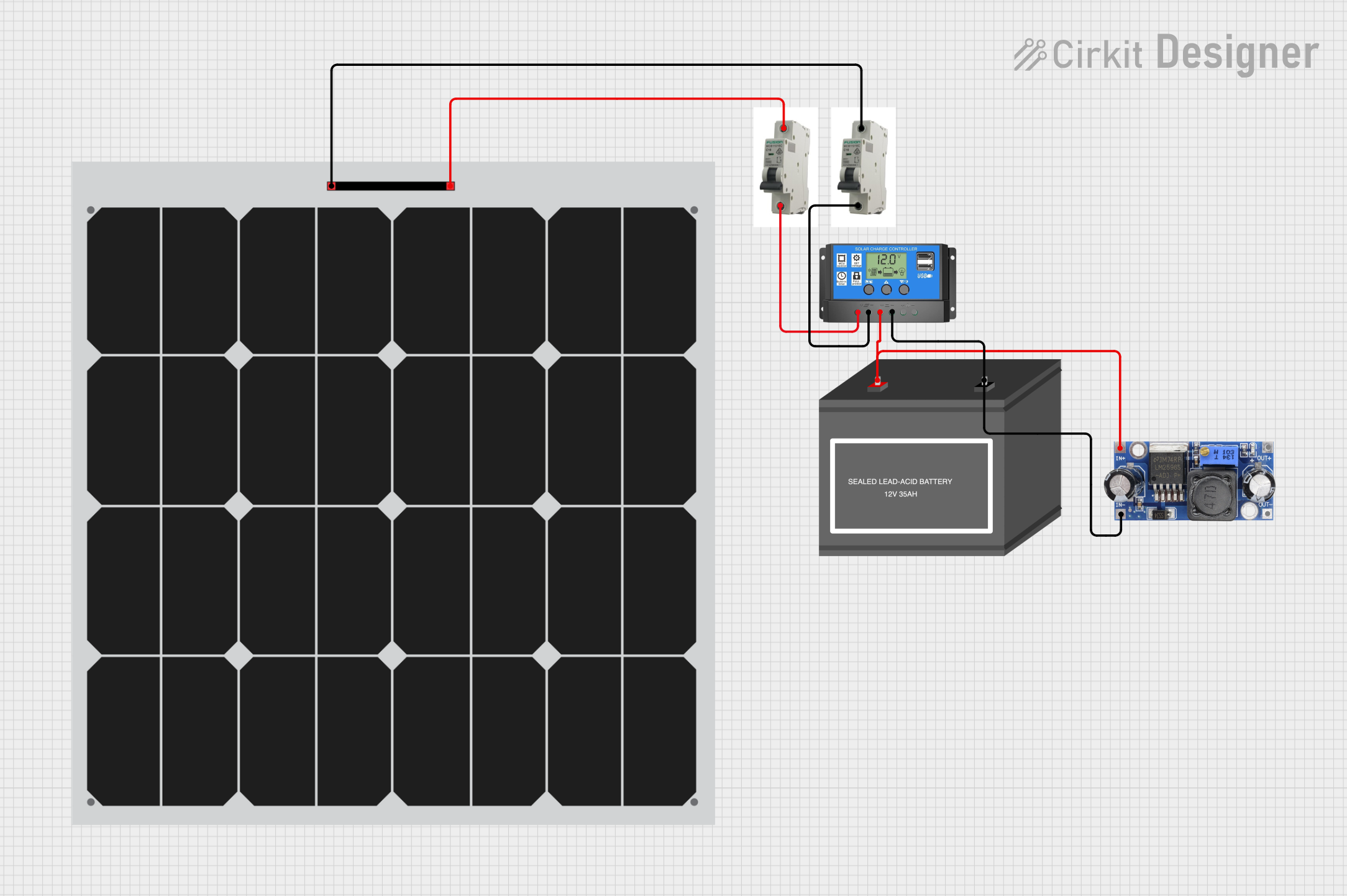
Solar-Powered Battery Charging System with DC-DC Converter
Image of TA1: A project utilizing DC MCB in a practical application
This circuit is a solar power system that uses two solar panels connected through MCBs to a solar charge controller. The charge controller manages the charging of a 12V battery and powers a DC-DC converter, which provides a regulated output voltage.
Cirkit Designer LogoOpen Project in Cirkit Designer
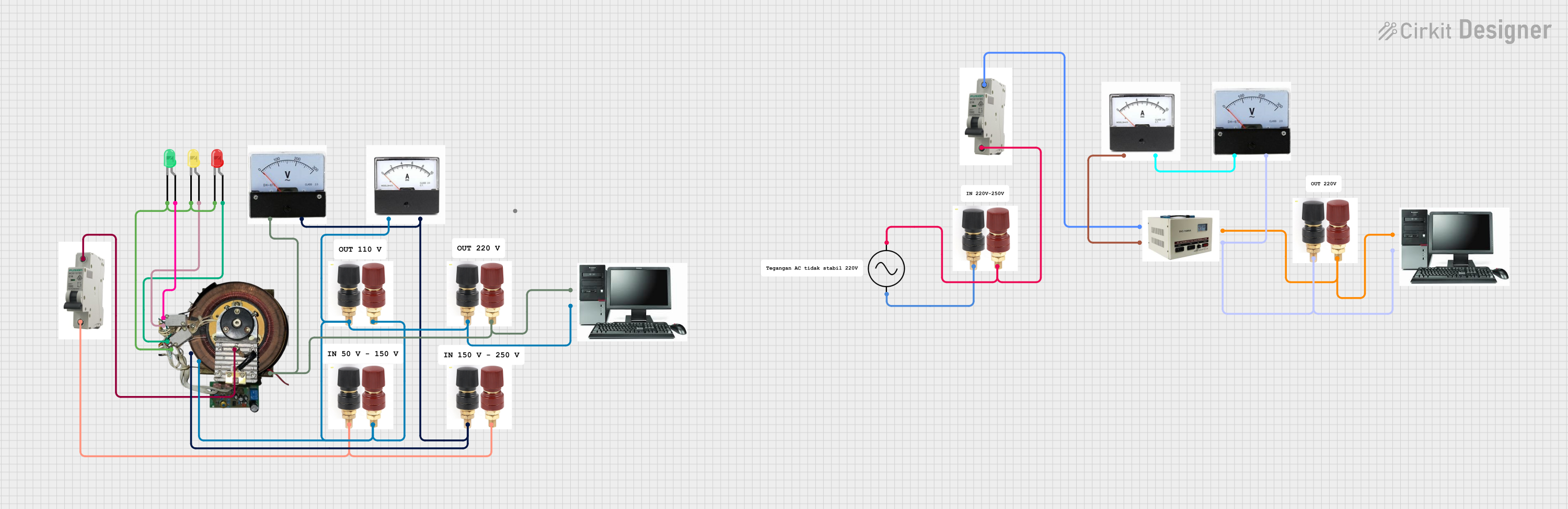
LED Indicator System with Power Stabilizer and Measurement Meters
Image of MEMEK: A project utilizing DC MCB in a practical application
This circuit is a power distribution and monitoring system that includes multiple LEDs for status indication, a stabilizer module, and measurement instruments such as voltmeters and ammeters. It is designed to supply power to a computer and monitor the power quality and current flow, with protection provided by MCBs (Miniature Circuit Breakers).
Cirkit Designer LogoOpen Project in Cirkit Designer
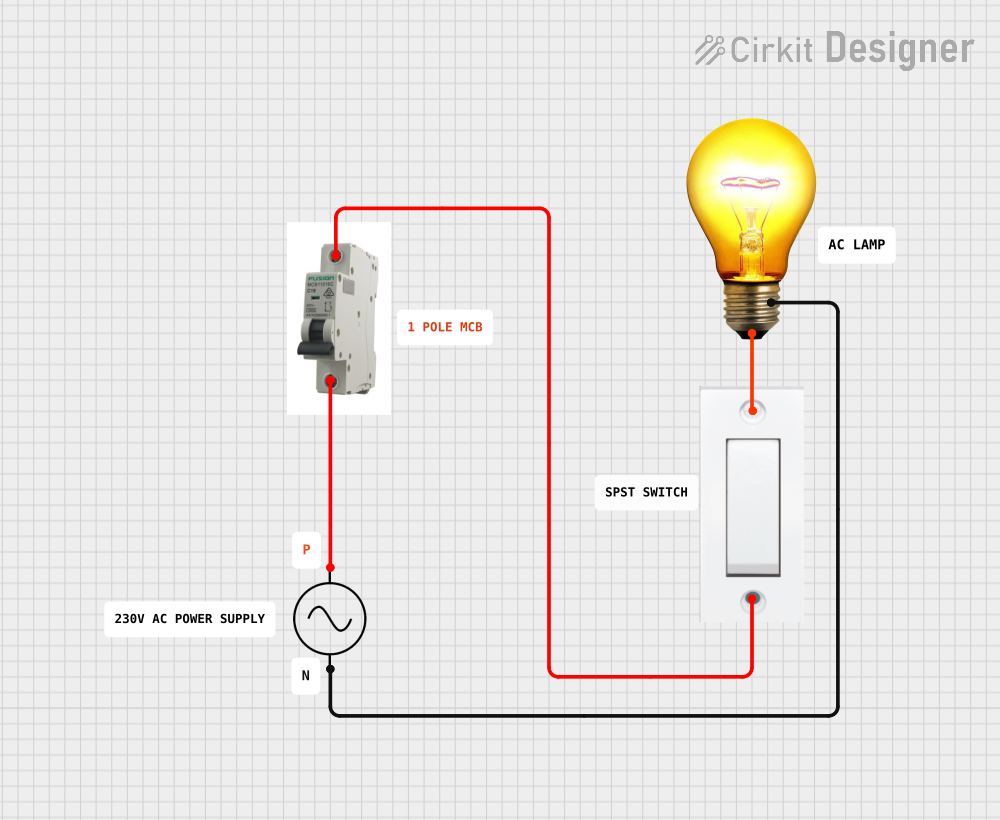
AC Bulb Control Circuit with Flush Switch and MCB Protection
Image of LAMP CONTROLE WITH MCB 1: A project utilizing DC MCB in a practical application
This circuit is designed to control an AC bulb using a flush switch. The AC power supply is connected through an MCB (Miniature Circuit Breaker) for protection, and the flush switch acts as an on/off control for the bulb. There is no microcontroller or embedded code involved in this simple power control circuit.
Cirkit Designer LogoOpen Project in Cirkit Designer

Explore Projects Built with DC MCB

Use Cirkit Designer to design, explore, and prototype these projects online. Some projects support real-time simulation. Click "Open Project" to start designing instantly!
Image of LAMP CONTROLE WITH MCB: A project utilizing DC MCB in a practical application
Flush Switch Controlled Lamp Circuit with AC Power Supply and MCB Protection
This circuit is designed to control a lamp using a flush switch and is protected by two MCBs (Miniature Circuit Breakers). The AC supply is connected to the input of the first MCB, whose output is connected to the flush switch. The flush switch then controls the power to the lamp, with the second MCB placed in the neutral line for additional safety.
Cirkit Designer LogoOpen Project in Cirkit Designer
Image of TA1: A project utilizing DC MCB in a practical application
Solar-Powered Battery Charging System with DC-DC Converter
This circuit is a solar power system that uses two solar panels connected through MCBs to a solar charge controller. The charge controller manages the charging of a 12V battery and powers a DC-DC converter, which provides a regulated output voltage.
Cirkit Designer LogoOpen Project in Cirkit Designer
Image of MEMEK: A project utilizing DC MCB in a practical application
LED Indicator System with Power Stabilizer and Measurement Meters
This circuit is a power distribution and monitoring system that includes multiple LEDs for status indication, a stabilizer module, and measurement instruments such as voltmeters and ammeters. It is designed to supply power to a computer and monitor the power quality and current flow, with protection provided by MCBs (Miniature Circuit Breakers).
Cirkit Designer LogoOpen Project in Cirkit Designer
Image of LAMP CONTROLE WITH MCB 1: A project utilizing DC MCB in a practical application
AC Bulb Control Circuit with Flush Switch and MCB Protection
This circuit is designed to control an AC bulb using a flush switch. The AC power supply is connected through an MCB (Miniature Circuit Breaker) for protection, and the flush switch acts as an on/off control for the bulb. There is no microcontroller or embedded code involved in this simple power control circuit.
Cirkit Designer LogoOpen Project in Cirkit Designer

Common Applications and Use Cases

  • Solar power systems (e.g., photovoltaic arrays)
  • Battery energy storage systems
  • Electric vehicle charging stations
  • DC distribution panels
  • Industrial control systems
  • Telecommunications equipment

Technical Specifications

Key Technical Details

Parameter Specification
Manufacturer CHINT
Model NB1-63DC
Rated Voltage 250V DC (1-pole), 500V DC (2-pole)
Rated Current 1A to 63A (varies by model)
Breaking Capacity 10kA
Tripping Curve C and D curves available
Number of Poles 1P, 2P
Operating Temperature Range -30°C to +70°C
Mounting DIN rail (35mm)
Standards Compliance IEC/EN 60947-2, GB/T 14048.2

Pin Configuration and Descriptions

The DC MCB does not have traditional "pins" like an IC but instead features terminal connections for input and output wiring. Below is a description of the terminals:

Terminal Name Description
Line (L) Connects to the positive DC input voltage
Load (OUT) Connects to the positive DC output voltage
Neutral (N) For 2-pole models, connects to the DC negative

Usage Instructions

How to Use the DC MCB in a Circuit

  1. Determine the Rated Current: Select the appropriate MCB model based on the current rating of your circuit. Ensure the rated current of the MCB matches or slightly exceeds the maximum current of the load.
  2. Mounting: Install the MCB on a standard 35mm DIN rail in your distribution panel or enclosure.
  3. Wiring:
    • Connect the positive DC input voltage to the Line (L) terminal.
    • Connect the positive DC output voltage to the Load (OUT) terminal.
    • For 2-pole models, connect the DC negative to the Neutral (N) terminal.
  4. Tighten Connections: Ensure all terminal screws are securely tightened to prevent loose connections.
  5. Power On: Once all connections are verified, switch the MCB to the "ON" position to energize the circuit.

Important Considerations and Best Practices

  • Polarity: Ensure correct polarity when wiring the MCB, as DC circuits are polarity-sensitive.
  • Breaking Capacity: Verify that the MCB's breaking capacity (10kA) is sufficient for the fault current in your system.
  • Ambient Temperature: Consider the operating temperature range (-30°C to +70°C) when installing the MCB in extreme environments.
  • Regular Maintenance: Periodically inspect the MCB for signs of wear, overheating, or loose connections.
  • Avoid Overloading: Do not exceed the rated current of the MCB, as this may cause nuisance tripping or damage.

Example: Using the DC MCB in a Solar Power System

In a solar power system, the DC MCB can be installed between the solar panels and the charge controller to protect the circuit from overcurrent or short circuits. Below is a simplified wiring diagram:

Solar Panel (+) ----> Line (L) Terminal of MCB
Solar Panel (-) ----> Neutral (N) Terminal of MCB (for 2-pole models)
Load (+) ---------> Load (OUT) Terminal of MCB
Load (-) ---------> Neutral (N) Terminal of MCB (for 2-pole models)

Troubleshooting and FAQs

Common Issues and Solutions

Issue Possible Cause Solution
MCB trips frequently Overloaded circuit Reduce the load or use an MCB with a higher current rating (if safe).
MCB does not trip during a fault Fault current below tripping threshold Verify the fault current and ensure the MCB's rating matches the system requirements.
Loose connections Improper tightening of terminal screws Re-tighten all terminal screws securely.
Overheating of MCB High ambient temperature or poor ventilation Improve ventilation or relocate the MCB to a cooler environment.

FAQs

  1. Can the NB1-63DC be used in AC circuits?

    • No, this MCB is specifically designed for DC circuits. For AC applications, use an AC-rated MCB.
  2. What is the difference between C and D tripping curves?

    • The C curve is suitable for general-purpose loads with moderate inrush currents, while the D curve is designed for high inrush current loads, such as motors or transformers.
  3. How do I select the correct MCB for my application?

    • Determine the maximum current and voltage of your circuit, and choose an MCB with a matching or slightly higher rating. Also, consider the breaking capacity and tripping curve.
  4. Can I use the NB1-63DC in a solar PV system?

    • Yes, the NB1-63DC is ideal for solar PV systems and can protect circuits between solar panels, charge controllers, and inverters.

By following this documentation, users can safely and effectively integrate the CHINT NB1-63DC DC MCB into their electrical systems.