
How to Use Motor DC PG45: Examples, Pinouts, and Specs
 Design with Motor DC PG45 in Cirkit Designer
Introduction
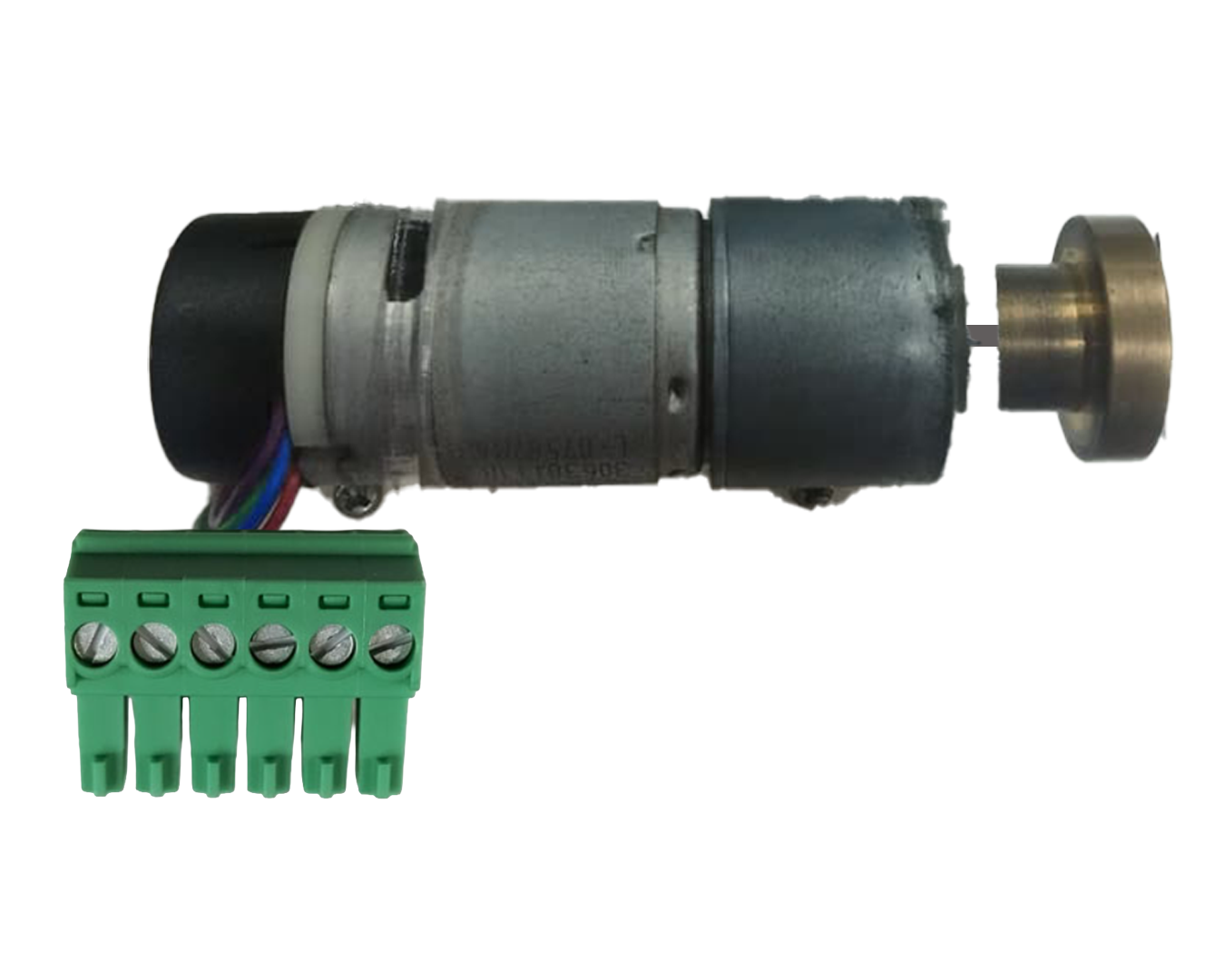
The Motor DC PG45, manufactured by Arduino (Part ID: MEGA 2560), is a compact and efficient DC motor designed for a wide range of applications. Its robust design and reliable performance make it ideal for driving small machinery, robotics, and other motion control systems. The PG45 motor is particularly well-suited for projects requiring precise speed and torque control, thanks to its integrated planetary gearbox.
Explore Projects Built with Motor DC PG45
 Open Project in Cirkit Designer
 Open Project in Cirkit Designer
 Open Project in Cirkit Designer
 Open Project in Cirkit Designer
Explore Projects Built with Motor DC PG45
Open Project in Cirkit DesignerOpen Project in Cirkit DesignerOpen Project in Cirkit DesignerOpen Project in Cirkit DesignerCommon Applications
- Robotics (e.g., mobile robots, robotic arms)
- Conveyor systems
- Automated machinery
- DIY electronics projects
- Educational and prototyping purposes
Technical Specifications
The following table outlines the key technical details of the Motor DC PG45:
| Parameter | Value |
|---|---|
| Operating Voltage | 6V - 12V |
| Rated Current | 0.5A (no load) |
| Stall Current | 2.5A |
| Rated Speed | 150 RPM (at 12V) |
| Gear Ratio | 45:1 |
| Torque (Max) | 10 kg·cm |
| Shaft Diameter | 6 mm |
| Motor Dimensions | 45 mm (diameter) x 90 mm (length) |
| Weight | 300 g |
Pin Configuration and Descriptions
The Motor DC PG45 has two terminals for electrical connections. These terminals are used to control the motor's direction and speed.
| Pin | Description |
|---|---|
| + | Positive terminal for power input |
| - | Negative terminal for power input |
Note: The motor's direction of rotation can be reversed by swapping the polarity of the power supply.
Usage Instructions
How to Use the Motor in a Circuit
- Power Supply: Connect the motor to a DC power supply within the operating voltage range (6V - 12V). Ensure the power supply can provide sufficient current (at least 2.5A for stall conditions).
- Motor Driver: Use a motor driver (e.g., L298N or L293D) or an H-bridge circuit to control the motor's speed and direction. Directly connecting the motor to a microcontroller is not recommended due to high current requirements.
- PWM Control: To control the motor's speed, use Pulse Width Modulation (PWM) signals. Most motor drivers support PWM input for speed regulation.
Example: Connecting to Arduino UNO
Below is an example of how to control the Motor DC PG45 using an Arduino UNO and an L298N motor driver.
Circuit Connections
- Connect the motor's + and - terminals to the L298N motor driver's output pins (e.g., OUT1 and OUT2).
- Connect the L298N's input pins (e.g., IN1 and IN2) to Arduino digital pins (e.g., D9 and D10).
- Connect the L298N's enable pin (e.g., ENA) to an Arduino PWM pin (e.g., D5).
- Provide a separate power supply for the motor (e.g., 12V) to the L298N's motor power input.
Arduino Code
// Define motor control pins
const int IN1 = 9;  // Motor direction pin 1
const int IN2 = 10; // Motor direction pin 2
const int ENA = 5;  // Motor speed control (PWM)

// Setup function to initialize pins
void setup() {
  pinMode(IN1, OUTPUT); // Set IN1 as output
  pinMode(IN2, OUTPUT); // Set IN2 as output
  pinMode(ENA, OUTPUT); // Set ENA as output
}

// Function to control motor direction and speed
void loop() {
  // Rotate motor forward at 50% speed
  digitalWrite(IN1, HIGH); // Set IN1 high
  digitalWrite(IN2, LOW);  // Set IN2 low
  analogWrite(ENA, 128);   // Set PWM duty cycle to 50% (128/255)

  delay(2000); // Run motor for 2 seconds

  // Rotate motor backward at 75% speed
  digitalWrite(IN1, LOW);  // Set IN1 low
  digitalWrite(IN2, HIGH); // Set IN2 high
  analogWrite(ENA, 192);   // Set PWM duty cycle to 75% (192/255)

  delay(2000); // Run motor for 2 seconds

  // Stop the motor
  digitalWrite(IN1, LOW);  // Set IN1 low
  digitalWrite(IN2, LOW);  // Set IN2 low
  analogWrite(ENA, 0);     // Set PWM duty cycle to 0%

  delay(2000); // Wait for 2 seconds before repeating
}
Important Considerations
- Current Handling: Ensure the motor driver can handle the motor's stall current (2.5A). Use heat sinks or cooling if necessary.
- Power Supply: Use a stable and adequately rated power supply to avoid voltage drops or overheating.
- Mechanical Load: Avoid overloading the motor beyond its maximum torque (10 kg·cm) to prevent damage.
Troubleshooting and FAQs
Common Issues
Motor Does Not Spin
- Cause: Insufficient power supply or incorrect wiring.
- Solution: Verify the power supply voltage and current. Check all connections.
Motor Spins in the Wrong Direction
- Cause: Polarity of the motor terminals is reversed.
- Solution: Swap the + and - connections to reverse the direction.
Motor Overheats
- Cause: Excessive load or prolonged operation at high current.
- Solution: Reduce the load or provide cooling. Ensure the motor is not stalled.
PWM Control Not Working
- Cause: Incorrect PWM pin or signal configuration.
- Solution: Verify the Arduino code and ensure the correct pin is used for PWM.
FAQs
Can I connect the motor directly to an Arduino?
- No, the motor requires more current than the Arduino can supply. Use a motor driver or H-bridge.
What is the maximum speed of the motor?
- The motor's maximum speed is approximately 150 RPM at 12V.
Can I use the motor with a 5V power supply?
- No, the motor requires a minimum of 6V for proper operation.
How do I increase the motor's torque?
- The torque is determined by the motor's design and gear ratio. To increase torque, reduce the load or use a motor with a higher gear ratio.
By following this documentation, users can effectively integrate the Motor DC PG45 into their projects and troubleshoot common issues.