
How to Use 30A XL74610 Ideal Diode: Examples, Pinouts, and Specs
 Design with 30A XL74610 Ideal Diode in Cirkit Designer
Introduction
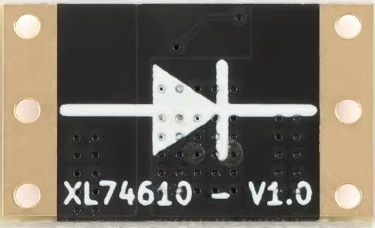
The 30A XL74610 Ideal Diode is a high-performance electronic component designed to handle up to 30A of current. Manufactured by Generic, this diode offers a low forward voltage drop and fast switching capabilities, making it an excellent choice for power management applications. Unlike traditional diodes, the XL74610 minimizes power loss and heat generation, ensuring efficient operation in high-current circuits.
Explore Projects Built with 30A XL74610 Ideal Diode
 Open Project in Cirkit Designer
 Open Project in Cirkit Designer
 Open Project in Cirkit Designer
 Open Project in Cirkit Designer
Explore Projects Built with 30A XL74610 Ideal Diode
Open Project in Cirkit DesignerOpen Project in Cirkit DesignerOpen Project in Cirkit DesignerOpen Project in Cirkit DesignerCommon Applications and Use Cases
- Reverse polarity protection in power supplies
- Battery charging and discharging circuits
- Solar panel systems to prevent backflow of current
- Automotive electronics for efficient power distribution
- High-current DC power management in industrial systems
Technical Specifications
The following table outlines the key technical details of the 30A XL74610 Ideal Diode:
| Parameter | Value |
|---|---|
| Maximum Current (IMAX) | 30A |
| Forward Voltage Drop (VF) | 0.02V (typical) |
| Reverse Leakage Current (IR) | <10µA |
| Operating Voltage Range | 5V to 60V |
| Switching Speed | <100ns |
| Power Dissipation | 3W (maximum) |
| Operating Temperature | -40°C to +125°C |
| Package Type | TO-220 or D2PAK (varies) |
Pin Configuration and Descriptions
The XL74610 Ideal Diode typically comes in a 3-pin package. The pinout is as follows:
| Pin Number | Pin Name | Description |
|---|---|---|
| 1 | IN | Input terminal for the diode |
| 2 | OUT | Output terminal for the diode |
| 3 | GND | Ground connection for the internal circuit |
Usage Instructions
How to Use the XL74610 in a Circuit
- Connect the Input and Output:
- Connect the IN pin to the positive side of the power source.
- Connect the OUT pin to the load or circuit requiring protection.
- Ground Connection:
- Ensure the GND pin is connected to the system ground for proper operation.
- Heat Dissipation:
- If operating near the maximum current rating, attach a heatsink to the diode's package to manage heat dissipation effectively.
- Voltage Range:
- Ensure the input voltage is within the specified operating range (5V to 60V).
Important Considerations and Best Practices
- Avoid Overloading: Do not exceed the maximum current rating of 30A to prevent damage.
- Thermal Management: Use proper cooling mechanisms, such as heatsinks or fans, to maintain safe operating temperatures.
- Reverse Polarity Protection: The XL74610 automatically blocks reverse current, but ensure proper orientation during installation.
- PCB Design: Use wide traces or copper pours for the input and output connections to handle high currents efficiently.
Example: Using the XL74610 with an Arduino UNO
The XL74610 can be used to protect an Arduino UNO from reverse polarity or voltage spikes. Below is an example circuit and code:
Circuit Setup
- Connect the IN pin of the XL74610 to the positive terminal of the power supply.
- Connect the OUT pin to the Arduino's VIN pin.
- Connect the GND pin to the Arduino's GND.
Example Code
// Example code to monitor input voltage on an Arduino UNO
// This assumes the XL74610 is protecting the Arduino's power input.

const int voltagePin = A0; // Analog pin to read voltage
float inputVoltage = 0.0;  // Variable to store the input voltage

void setup() {
  Serial.begin(9600); // Initialize serial communication
  pinMode(voltagePin, INPUT); // Set the voltage pin as input
}

void loop() {
  int sensorValue = analogRead(voltagePin); // Read the analog value
  inputVoltage = sensorValue * (5.0 / 1023.0); // Convert to voltage
  Serial.print("Input Voltage: ");
  Serial.print(inputVoltage);
  Serial.println(" V");
  delay(1000); // Wait for 1 second before the next reading
}
Note: Ensure the Arduino's input voltage does not exceed its maximum rating (7-12V recommended for VIN).
Troubleshooting and FAQs
Common Issues and Solutions
No Output Voltage:
- Cause: Incorrect pin connections.
- Solution: Verify that the IN pin is connected to the power source and the OUT pin to the load.
Excessive Heat Generation:
- Cause: Operating near or above the maximum current rating.
- Solution: Use a heatsink or reduce the load current.
Reverse Current Flow:
- Cause: Faulty diode or incorrect installation.
- Solution: Check the orientation of the diode and replace it if necessary.
Voltage Drop Higher Than Expected:
- Cause: High current draw or poor connections.
- Solution: Ensure proper soldering and use thicker wires or PCB traces.
FAQs
Q1: Can the XL74610 handle AC signals?
A1: No, the XL74610 is designed for DC applications only. Using it with AC signals may result in improper operation.
Q2: What happens if the input voltage exceeds 60V?
A2: Exceeding the maximum voltage rating can damage the diode. Use a voltage regulator or protection circuit to limit the input voltage.
Q3: Is the XL74610 suitable for battery charging circuits?
A3: Yes, it is ideal for preventing reverse current flow in battery charging and discharging applications.
Q4: Can I use the XL74610 without a heatsink?
A4: Yes, but only if the current is significantly below the maximum rating. For high-current applications, a heatsink is recommended.
By following this documentation, users can effectively integrate the 30A XL74610 Ideal Diode into their projects, ensuring reliable and efficient performance.