
How to Use GBJ3510: Examples, Pinouts, and Specs
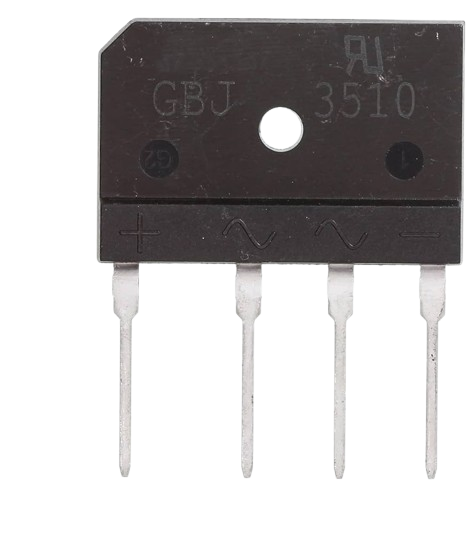
 Design with GBJ3510 in Cirkit Designer
Introduction
The GBJ3510 is a high-power bridge rectifier designed to convert alternating current (AC) into direct current (DC). With a maximum current rating of 35A and a peak reverse voltage of 1000V, it is well-suited for applications requiring efficient and reliable AC-to-DC conversion. Its robust design makes it ideal for use in power supplies, motor drives, battery chargers, and other high-power electronic systems.
Explore Projects Built with GBJ3510
 Open Project in Cirkit Designer
 Open Project in Cirkit Designer
 Open Project in Cirkit Designer
 Open Project in Cirkit Designer
Explore Projects Built with GBJ3510
Open Project in Cirkit DesignerOpen Project in Cirkit DesignerOpen Project in Cirkit DesignerOpen Project in Cirkit DesignerCommon Applications and Use Cases
- Power supplies for industrial and consumer electronics
- Motor control circuits
- Battery charging systems
- Renewable energy systems (e.g., solar inverters)
- Uninterruptible Power Supplies (UPS)
Technical Specifications
The GBJ3510 is a single-phase bridge rectifier with the following key specifications:
| Parameter | Value |
|---|---|
| Maximum Repetitive Reverse Voltage (VRRM) | 1000V |
| Maximum Average Forward Current (IF(AV)) | 35A |
| Peak Forward Surge Current (IFSM) | 400A (8.3ms single half-sine) |
| Forward Voltage Drop (VF) | 1.1V (typical) |
| Operating Temperature Range | -55°C to +150°C |
| Storage Temperature Range | -55°C to +150°C |
| Package Type | GBJ (flat, compact design) |
Pin Configuration and Descriptions
The GBJ3510 has four pins, as shown in the table below:
| Pin Number | Pin Name | Description |
|---|---|---|
| 1 | AC~ | AC input terminal 1 |
| 2 | AC~ | AC input terminal 2 |
| 3 | + (Positive) | Positive DC output terminal |
| 4 | - (Negative) | Negative DC output terminal |
The pin layout is typically marked on the component body for easy identification.
Usage Instructions
How to Use the GBJ3510 in a Circuit
Connect the AC Input:
- Connect the two AC input terminals (pins 1 and 2) to the AC voltage source. Ensure the voltage does not exceed the maximum reverse voltage rating of 1000V.
Connect the DC Output:
- Connect the positive DC output terminal (pin 3) to the positive side of the load.
- Connect the negative DC output terminal (pin 4) to the negative side of the load.
Add Filtering Capacitors:
- To smooth the rectified DC output, connect a suitable capacitor (e.g., electrolytic capacitor) across the DC output terminals. The capacitor value depends on the load requirements and ripple tolerance.
Heat Dissipation:
- The GBJ3510 can generate significant heat during operation. Mount the rectifier on a heatsink or ensure proper ventilation to maintain safe operating temperatures.
Important Considerations and Best Practices
- Voltage and Current Ratings: Ensure the input AC voltage and load current do not exceed the component's maximum ratings.
- Polarity: Double-check the polarity of the DC output connections to avoid damage to the load.
- Surge Protection: Use a fuse or circuit breaker to protect the rectifier from overcurrent or short-circuit conditions.
- Mounting: Secure the rectifier to a heatsink using thermal paste to improve heat dissipation.
Example: Using the GBJ3510 with an Arduino UNO
The GBJ3510 is not directly connected to an Arduino UNO but can be used in circuits that power the Arduino. For example, it can be part of a power supply circuit that converts AC mains to DC voltage for the Arduino.
Here is an example of a simple rectifier circuit with the GBJ3510:
// This code demonstrates how to read a DC voltage from a rectified power supply
// using the Arduino UNO's analog input pin.

const int voltagePin = A0; // Analog pin connected to the DC output of the rectifier
float voltage = 0.0;       // Variable to store the measured voltage

void setup() {
  Serial.begin(9600); // Initialize serial communication at 9600 baud
}

void loop() {
  int sensorValue = analogRead(voltagePin); // Read the analog input
  voltage = sensorValue * (5.0 / 1023.0);   // Convert the reading to voltage
  Serial.print("Measured Voltage: ");
  Serial.print(voltage);
  Serial.println(" V");
  delay(1000); // Wait for 1 second before the next reading
}
Note: Ensure the DC voltage from the rectifier is within the Arduino's input voltage range (0-5V). Use a voltage divider if necessary.
Troubleshooting and FAQs
Common Issues and Solutions
No Output Voltage:
- Cause: Incorrect wiring of the AC input or DC output terminals.
- Solution: Verify the connections and ensure the AC input is applied to pins 1 and 2, and the DC output is taken from pins 3 and 4.
Excessive Heat Generation:
- Cause: High load current or insufficient heat dissipation.
- Solution: Use a heatsink or improve ventilation. Ensure the load current does not exceed 35A.
High Ripple in DC Output:
- Cause: Insufficient filtering.
- Solution: Add a larger or additional capacitor across the DC output terminals.
Component Damage:
- Cause: Overvoltage, overcurrent, or reverse polarity.
- Solution: Ensure the input voltage and load current are within the specified limits. Double-check the polarity of connections.
FAQs
Q1: Can the GBJ3510 handle 3-phase AC input?
A1: No, the GBJ3510 is designed for single-phase AC input only. For 3-phase systems, use a 3-phase rectifier.
Q2: What type of capacitor should I use for filtering?
A2: Use an electrolytic capacitor with a voltage rating higher than the DC output voltage. The capacitance value depends on the load current and desired ripple voltage.
Q3: Can I use the GBJ3510 without a heatsink?
A3: It is not recommended for high-current applications. A heatsink is necessary to prevent overheating and ensure reliable operation.
Q4: How do I test if the GBJ3510 is working?
A4: Use a multimeter in diode mode to check the forward and reverse bias of the internal diodes. Alternatively, measure the DC output voltage when an AC input is applied.