
How to Use LiFePO4 Charger 14.6V 20A: Examples, Pinouts, and Specs
 Design with LiFePO4 Charger 14.6V 20A in Cirkit Designer
Introduction
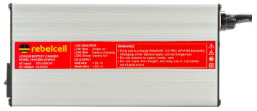
The LiFePO4 Charger 14.6V 20A is a specialized charging device designed for Lithium Iron Phosphate (LiFePO4) batteries. It provides a maximum output voltage of 14.6V and a current of 20A, ensuring safe, efficient, and reliable charging. This charger is equipped with advanced safety features such as overvoltage, overcurrent, and thermal protection, making it ideal for both personal and industrial applications.
Explore Projects Built with LiFePO4 Charger 14.6V 20A
 Open Project in Cirkit Designer
 Open Project in Cirkit Designer
 Open Project in Cirkit Designer
 Open Project in Cirkit Designer
Explore Projects Built with LiFePO4 Charger 14.6V 20A
Open Project in Cirkit DesignerOpen Project in Cirkit DesignerOpen Project in Cirkit DesignerOpen Project in Cirkit DesignerCommon Applications and Use Cases
- Charging LiFePO4 batteries in electric vehicles (EVs), solar energy systems, and backup power supplies.
- Use in battery packs for robotics, drones, and portable power stations.
- Applications requiring high-capacity and fast-charging battery systems.
Technical Specifications
Below are the key technical details and pin configuration for the LiFePO4 Charger 14.6V 20A:
Key Technical Details
| Parameter | Specification |
|---|---|
| Input Voltage Range | 100V - 240V AC |
| Output Voltage | 14.6V DC |
| Maximum Output Current | 20A |
| Charging Algorithm | CC (Constant Current) / CV (Constant Voltage) |
| Efficiency | ≥ 90% |
| Operating Temperature | -10°C to 50°C |
| Storage Temperature | -20°C to 70°C |
| Dimensions | 200mm x 100mm x 60mm |
| Weight | 1.5 kg |
| Safety Features | Overvoltage, Overcurrent, Overtemperature, Short Circuit Protection |
Pin Configuration and Descriptions
| Pin Name | Description |
|---|---|
| AC Input (L) | Live wire connection for AC input (100V - 240V). |
| AC Input (N) | Neutral wire connection for AC input. |
| Ground (GND) | Ground connection for safety. |
| DC Output (+) | Positive terminal for connecting to the LiFePO4 battery. |
| DC Output (-) | Negative terminal for connecting to the LiFePO4 battery. |
| Status LED | Indicates charging status (e.g., charging, fully charged, or error state). |
Usage Instructions
How to Use the Component in a Circuit
Connect the AC Input:
- Ensure the charger is powered off before making any connections.
- Connect the AC Input (L) and (N) pins to a 100V - 240V AC power source.
- Connect the Ground (GND) pin to the earth ground for safety.
Connect the DC Output:
- Identify the positive (+) and negative (-) terminals of the LiFePO4 battery.
- Connect the DC Output (+) pin of the charger to the positive terminal of the battery.
- Connect the DC Output (-) pin of the charger to the negative terminal of the battery.
Power On the Charger:
- Plug the charger into the AC power source and switch it on.
- The Status LED will indicate the charging state:
- Red LED: Charging in progress.
- Green LED: Charging complete.
- Flashing LED: Error detected (e.g., overvoltage or short circuit).
Monitor the Charging Process:
- Allow the charger to complete the charging cycle. The charger will automatically switch to constant voltage mode as the battery approaches full charge.
Disconnect Safely:
- Once the battery is fully charged (Green LED), turn off the charger and disconnect the battery.
Important Considerations and Best Practices
- Battery Compatibility: Ensure the charger is used only with LiFePO4 batteries rated for 14.6V.
- Ventilation: Operate the charger in a well-ventilated area to prevent overheating.
- Connection Polarity: Double-check the polarity of the DC output connections to avoid damage to the battery or charger.
- Avoid Overcharging: Do not leave the charger connected to the battery for extended periods after charging is complete.
- Environmental Conditions: Avoid using the charger in extreme temperatures or humid environments.
Arduino Integration (Optional Monitoring)
While the charger itself does not directly interface with an Arduino, you can monitor the charging process using an Arduino and a voltage/current sensor. Below is an example code snippet for monitoring the battery voltage:
// Arduino Code for Monitoring Battery Voltage
// This code uses an analog input pin to read the battery voltage
// through a voltage divider circuit.

const int voltagePin = A0; // Analog pin connected to the voltage divider
const float voltageDividerRatio = 5.7; // Adjust based on your resistor values
const float referenceVoltage = 5.0; // Arduino reference voltage (5V for most boards)

void setup() {
  Serial.begin(9600); // Initialize serial communication
  pinMode(voltagePin, INPUT); // Set the voltage pin as input
}

void loop() {
  int rawValue = analogRead(voltagePin); // Read the analog value
  float batteryVoltage = (rawValue / 1023.0) * referenceVoltage * voltageDividerRatio;

  // Print the battery voltage to the Serial Monitor
  Serial.print("Battery Voltage: ");
  Serial.print(batteryVoltage);
  Serial.println(" V");

  delay(1000); // Wait for 1 second before the next reading
}
Note: Use a voltage divider circuit to scale down the battery voltage to a safe range for the Arduino's analog input (0-5V). Adjust the
voltageDividerRatiobased on the resistor values used.
Troubleshooting and FAQs
Common Issues and Solutions
| Issue | Possible Cause | Solution |
|---|---|---|
| Charger does not power on | No AC input or loose connection | Check the AC power source and ensure all connections are secure. |
| Battery not charging | Incorrect polarity or loose connection | Verify the DC output connections and ensure correct polarity. |
| Status LED flashing | Overvoltage, short circuit, or overheating | Disconnect the charger, check the battery, and allow the charger to cool. |
| Charger overheating | Poor ventilation or high ambient temperature | Ensure proper ventilation and operate within the specified temperature range. |
FAQs
Can this charger be used with other battery chemistries?
No, this charger is specifically designed for LiFePO4 batteries. Using it with other chemistries may result in damage or unsafe operation.What happens if the battery is left connected after charging?
The charger will switch to constant voltage mode, but it is recommended to disconnect the battery to prevent overcharging.How can I monitor the charging process remotely?
Use a voltage/current sensor with an Arduino or similar microcontroller to monitor the battery's charging status.Is the charger waterproof?
No, the charger is not waterproof. Avoid exposing it to water or moisture.
By following this documentation, users can safely and effectively use the LiFePO4 Charger 14.6V 20A for their battery charging needs.