
How to Use QF-RD21H Time Delayed Relay: Examples, Pinouts, and Specs
 Design with QF-RD21H Time Delayed Relay in Cirkit Designer
Introduction
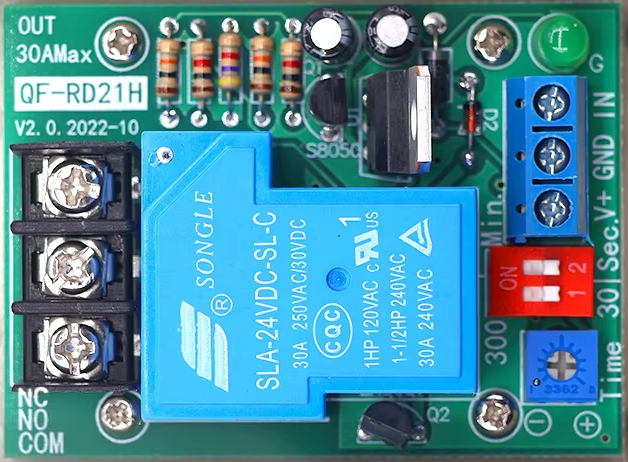
The QF-RD21H Time Delayed Relay is a versatile electronic component designed to activate after a preset delay, enabling precise timed control of electrical circuits. This relay is widely used in automation, industrial control systems, and home automation projects where timing functions are critical. Its ability to delay activation makes it ideal for applications such as motor control, lighting systems, and sequential circuit operations.
Explore Projects Built with QF-RD21H Time Delayed Relay
 Open Project in Cirkit Designer
 Open Project in Cirkit Designer
 Open Project in Cirkit Designer
 Open Project in Cirkit Designer
Explore Projects Built with QF-RD21H Time Delayed Relay
Open Project in Cirkit DesignerOpen Project in Cirkit DesignerOpen Project in Cirkit DesignerOpen Project in Cirkit DesignerTechnical Specifications
The QF-RD21H Time Delayed Relay is built to handle a variety of timing and load requirements. Below are its key technical details:
General Specifications
| Parameter | Value |
|---|---|
| Operating Voltage | 12V DC / 24V DC / 110V AC / 220V AC (varies by model) |
| Contact Type | SPDT (Single Pole Double Throw) |
| Contact Rating | 10A @ 250V AC / 10A @ 30V DC |
| Timing Range | 0.1 seconds to 10 minutes (adjustable) |
| Power Consumption | < 1W |
| Operating Temperature | -20°C to +60°C |
| Dimensions | 70mm x 40mm x 25mm |
Pin Configuration and Descriptions
The QF-RD21H relay typically has 5 pins for connection. Below is the pinout description:
| Pin Number | Label | Description |
|---|---|---|
| 1 | VCC | Positive power supply input |
| 2 | GND | Ground connection |
| 3 | Trigger | Input signal to start the delay timer |
| 4 | NO (Normally Open) | Connect to the load; closes after delay |
| 5 | COM (Common) | Common terminal for the relay contacts |
Usage Instructions
How to Use the QF-RD21H in a Circuit
- Power Supply: Connect the VCC pin to the positive terminal of your power source and the GND pin to the negative terminal. Ensure the voltage matches the relay's operating voltage (e.g., 12V DC or 220V AC).
- Trigger Signal: Apply a trigger signal to the Trigger pin. This signal can be a high logic level (e.g., 5V for DC models) or a momentary pulse, depending on your application.
- Load Connection:
- Connect one terminal of your load to the NO (Normally Open) pin.
- Connect the other terminal of the load to the power source.
- The COM (Common) pin serves as the shared connection for the relay contacts.
- Adjust Timing: Use the onboard potentiometer to set the desired delay time. Turn clockwise to increase the delay and counterclockwise to decrease it.
Important Considerations and Best Practices
- Voltage Compatibility: Ensure the relay's operating voltage matches your circuit's power supply.
- Load Ratings: Do not exceed the relay's contact rating (10A @ 250V AC or 10A @ 30V DC) to avoid damage.
- Trigger Signal: Use a clean and stable trigger signal to ensure reliable operation.
- Isolation: For high-voltage applications, ensure proper isolation between the relay and low-voltage control circuits.
Example: Using the QF-RD21H with an Arduino UNO
The QF-RD21H can be easily integrated with an Arduino UNO for automated timing control. Below is an example code snippet:
// Example: Controlling the QF-RD21H Time Delayed Relay with Arduino UNO

const int relayTriggerPin = 7; // Pin connected to the Trigger pin of the relay
const int delayTime = 5000;    // Delay time in milliseconds (5 seconds)

void setup() {
  pinMode(relayTriggerPin, OUTPUT); // Set the relay trigger pin as an output
  digitalWrite(relayTriggerPin, LOW); // Ensure the relay is off initially
}

void loop() {
  digitalWrite(relayTriggerPin, HIGH); // Send a trigger signal to the relay
  delay(100); // Keep the trigger signal high for 100ms
  digitalWrite(relayTriggerPin, LOW); // Turn off the trigger signal

  delay(delayTime); // Wait for the delay time before repeating
}
Notes:
- Connect the relay's Trigger pin to the Arduino's
relayTriggerPin(e.g., pin 7). - Ensure the relay's power supply is separate from the Arduino's power supply if using a high-voltage model.
Troubleshooting and FAQs
Common Issues and Solutions
Relay Does Not Activate:
- Cause: Insufficient power supply or incorrect wiring.
- Solution: Verify the power supply voltage and ensure all connections are secure.
Relay Activates Immediately Without Delay:
- Cause: Faulty trigger signal or incorrect timing adjustment.
- Solution: Check the trigger signal for stability and adjust the potentiometer to set the desired delay.
Load Does Not Operate:
- Cause: Load exceeds the relay's contact rating or incorrect wiring.
- Solution: Ensure the load is within the relay's rated capacity and verify the wiring.
Relay Overheats:
- Cause: Continuous operation at maximum load or poor ventilation.
- Solution: Reduce the load or improve ventilation around the relay.
FAQs
Q: Can the QF-RD21H handle AC and DC loads?
A: Yes, the relay can handle both AC and DC loads, provided they are within the rated voltage and current limits.Q: How do I reset the delay timer?
A: The delay timer resets automatically when the trigger signal is removed and reapplied.Q: Can I use the relay for high-power devices like motors?
A: Yes, but ensure the motor's starting current does not exceed the relay's contact rating.
By following this documentation, you can effectively integrate the QF-RD21H Time Delayed Relay into your projects for reliable and precise timing control.