
How to Use Bateria 12V: Examples, Pinouts, and Specs
 Design with Bateria 12V in Cirkit Designer
Introduction
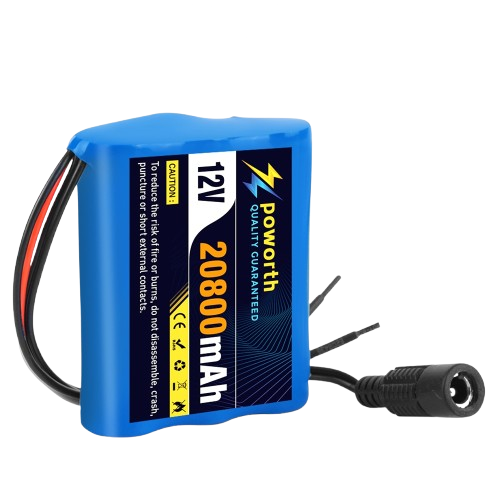
A 12V battery is a power source that provides a nominal voltage of 12 volts. It is available in both rechargeable (e.g., lead-acid, lithium-ion) and non-rechargeable (e.g., alkaline) variants. These batteries are widely used in automotive systems, solar power setups, uninterruptible power supplies (UPS), and various electronic devices. Their versatility and reliability make them a popular choice for applications requiring stable and portable power.
Common applications include:
- Automotive systems (e.g., starting, lighting, and ignition)
- Solar energy storage
- Backup power for electronics and appliances
- Robotics and DIY electronics projects
- Portable power tools and equipment
Explore Projects Built with Bateria 12V
 Open Project in Cirkit Designer
 Open Project in Cirkit Designer
 Open Project in Cirkit Designer
 Open Project in Cirkit Designer
Explore Projects Built with Bateria 12V
Open Project in Cirkit DesignerOpen Project in Cirkit DesignerOpen Project in Cirkit DesignerOpen Project in Cirkit DesignerTechnical Specifications
The technical specifications of a 12V battery can vary depending on the type and model. Below are general specifications for a typical 12V lead-acid battery:
| Parameter | Specification |
|---|---|
| Nominal Voltage | 12V |
| Capacity (Ah) | 1.2Ah to 200Ah (varies by model) |
| Chemistry | Lead-acid, Lithium-ion, or Alkaline |
| Maximum Charging Voltage | 14.4V to 14.8V (for lead-acid types) |
| Discharge Cutoff Voltage | 10.5V (varies by application) |
| Operating Temperature | -20°C to 50°C |
| Weight | 0.5kg to 30kg (varies by capacity) |
| Cycle Life | 300–500 cycles (lead-acid) |
Pin Configuration and Descriptions
A 12V battery typically has two terminals:
| Terminal | Description |
|---|---|
| Positive (+) | Connects to the positive side of the circuit. |
| Negative (-) | Connects to the negative side of the circuit. |
Usage Instructions
How to Use the Component in a Circuit
- Identify the Terminals: Locate the positive (+) and negative (-) terminals on the battery.
- Connect to the Load: Use appropriate wires to connect the positive terminal to the positive input of your circuit and the negative terminal to the ground or negative input.
- Fuse Protection: Always include a fuse in series with the positive terminal to protect the circuit from overcurrent.
- Charging (for Rechargeable Batteries):
- Use a compatible charger designed for the specific battery chemistry (e.g., lead-acid or lithium-ion).
- Ensure the charging voltage and current do not exceed the battery's specifications.
- Discharge: Avoid discharging the battery below its cutoff voltage to prevent damage or reduced lifespan.
Important Considerations and Best Practices
- Polarity: Always double-check the polarity before connecting the battery to a circuit to avoid damage.
- Overcharging: Do not overcharge the battery, as it can lead to overheating, leakage, or reduced lifespan.
- Storage: Store the battery in a cool, dry place when not in use. Rechargeable batteries should be stored at 50–70% charge for optimal longevity.
- Ventilation: For lead-acid batteries, ensure proper ventilation to avoid the buildup of hydrogen gas during charging.
- Load Matching: Ensure the battery's capacity (Ah) is sufficient for the intended load to avoid excessive discharge.
Example: Connecting a 12V Battery to an Arduino UNO
A 12V battery can be used to power an Arduino UNO via its barrel jack or VIN pin. Below is an example of how to connect and use it:
- Connect the positive terminal of the 12V battery to the Arduino's VIN pin or barrel jack's center pin.
- Connect the negative terminal of the battery to the Arduino's GND pin.
Sample Code for Arduino UNO
// This code demonstrates reading a sensor value and controlling an LED
// while powered by a 12V battery connected to the Arduino UNO.

const int sensorPin = A0;  // Analog pin connected to the sensor
const int ledPin = 13;     // Digital pin connected to the LED

void setup() {
  pinMode(ledPin, OUTPUT);  // Set LED pin as output
  Serial.begin(9600);       // Initialize serial communication
}

void loop() {
  int sensorValue = analogRead(sensorPin);  // Read sensor value
  Serial.print("Sensor Value: ");
  Serial.println(sensorValue);             // Print sensor value to Serial Monitor

  if (sensorValue > 500) {                 // If sensor value exceeds threshold
    digitalWrite(ledPin, HIGH);            // Turn on the LED
  } else {
    digitalWrite(ledPin, LOW);             // Turn off the LED
  }

  delay(500);  // Wait for 500 milliseconds
}
Troubleshooting and FAQs
Common Issues Users Might Face
Battery Not Powering the Circuit:
- Cause: Incorrect polarity or loose connections.
- Solution: Verify the connections and ensure proper polarity.
Battery Drains Quickly:
- Cause: Excessive load or aging battery.
- Solution: Check the load's power requirements and replace the battery if it has degraded.
Overheating During Charging:
- Cause: Overcharging or using an incompatible charger.
- Solution: Use a charger with the correct voltage and current ratings.
Low Voltage Output:
- Cause: Battery is discharged or damaged.
- Solution: Recharge the battery or replace it if it no longer holds a charge.
Solutions and Tips for Troubleshooting
- Use a multimeter to measure the battery's voltage and ensure it is within the expected range.
- Inspect the terminals for corrosion or dirt, and clean them if necessary.
- For rechargeable batteries, ensure the charger is functioning correctly and matches the battery's specifications.
- Avoid short-circuiting the terminals, as this can damage the battery and connected devices.
By following these guidelines and best practices, you can ensure the safe and efficient use of a 12V battery in your projects.