
How to Use MCB 1 Phase: Examples, Pinouts, and Specs
 Design with MCB 1 Phase in Cirkit Designer
Introduction
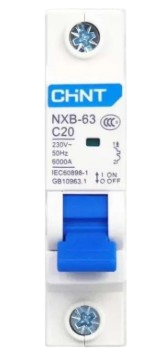
The MCB 1 Phase (Miniature Circuit Breaker) is an essential safety device designed for single-phase electrical circuits. It provides overcurrent protection by automatically disconnecting the circuit when excessive current flows, thereby preventing damage to electrical devices and reducing the risk of fire. MCBs are widely used in residential, commercial, and industrial applications to ensure the safety and reliability of electrical systems.
Explore Projects Built with MCB 1 Phase
 Open Project in Cirkit Designer
 Open Project in Cirkit Designer
 Open Project in Cirkit Designer
 Open Project in Cirkit Designer
Explore Projects Built with MCB 1 Phase
Open Project in Cirkit DesignerOpen Project in Cirkit DesignerOpen Project in Cirkit DesignerOpen Project in Cirkit DesignerCommon Applications and Use Cases
- Protection of household electrical circuits from overloads and short circuits.
- Safeguarding sensitive electronic devices from current surges.
- Use in distribution boards for residential and commercial buildings.
- Industrial machinery and equipment protection in single-phase systems.
Technical Specifications
The following table outlines the key technical specifications of the MCB 1 Phase:
| Parameter | Specification |
|---|---|
| Rated Voltage | 230V AC |
| Rated Current | 6A, 10A, 16A, 20A, 32A (varies by model) |
| Breaking Capacity | 6kA |
| Number of Poles | 1 (Single Phase) |
| Tripping Curve | B, C, or D (depending on application) |
| Frequency | 50/60 Hz |
| Operating Temperature | -5°C to +55°C |
| Mounting Type | DIN Rail |
| Standards Compliance | IEC 60898-1 |
Pin Configuration and Descriptions
The MCB 1 Phase does not have traditional pins but instead features terminals for wiring. Below is a description of the terminals:
| Terminal | Description |
|---|---|
| Line (Input) | Connects to the incoming live wire (phase). |
| Load (Output) | Connects to the outgoing live wire to the load. |
Usage Instructions
How to Use the MCB 1 Phase in a Circuit
- Mounting the MCB: Securely mount the MCB onto a DIN rail in the distribution board.
- Wiring:
- Connect the incoming live wire (phase) to the Line (Input) terminal.
- Connect the outgoing live wire to the Load (Output) terminal.
- Ensure all connections are tight and secure to avoid loose contacts.
- Testing:
- After installation, switch on the MCB and test its functionality by simulating an overload or short circuit (if safe to do so).
- Verify that the MCB trips as expected to disconnect the circuit.
- Resetting:
- After a trip, identify and resolve the cause of the fault.
- Reset the MCB by switching it back to the "ON" position.
Important Considerations and Best Practices
- Always ensure the MCB's rated current matches the circuit's load requirements.
- Use the appropriate tripping curve (B, C, or D) based on the application:
- B Curve: For residential and light commercial use.
- C Curve: For moderate inrush currents (e.g., motors).
- D Curve: For high inrush currents (e.g., transformers).
- Avoid over-tightening the terminal screws to prevent damage.
- Periodically inspect the MCB for signs of wear or damage.
- Do not use the MCB as a regular switch for turning circuits on and off.
Arduino UNO Integration
While MCBs are not directly connected to microcontrollers like the Arduino UNO, they can be used in conjunction with relays or other control circuits to protect the system. Below is an example of how an Arduino can control a relay to manage a circuit protected by an MCB:
// Example: Controlling a relay to manage an MCB-protected circuit
const int relayPin = 7; // Pin connected to the relay module

void setup() {
  pinMode(relayPin, OUTPUT); // Set relay pin as output
  digitalWrite(relayPin, LOW); // Ensure relay is off initially
}

void loop() {
  // Turn on the relay (simulate turning on the circuit)
  digitalWrite(relayPin, HIGH);
  delay(5000); // Keep the circuit on for 5 seconds

  // Turn off the relay (simulate turning off the circuit)
  digitalWrite(relayPin, LOW);
  delay(5000); // Keep the circuit off for 5 seconds
}
Troubleshooting and FAQs
Common Issues and Solutions
| Issue | Possible Cause | Solution |
|---|---|---|
| MCB trips frequently | Overload or short circuit in the circuit. | Check the load and wiring for faults. |
| MCB does not trip during a fault | Faulty MCB or incorrect wiring. | Replace the MCB or verify connections. |
| MCB cannot be reset | Persistent fault in the circuit. | Identify and resolve the fault before resetting. |
| Loose connections at terminals | Improper tightening of screws. | Ensure terminals are securely tightened. |
FAQs
Can I use an MCB for DC circuits?
- No, the MCB 1 Phase is designed for AC circuits. Use a DC-rated breaker for DC applications.
What is the difference between B, C, and D curve MCBs?
- The tripping curve defines the MCB's response to inrush currents:
- B Curve: Trips at 3-5 times the rated current.
- C Curve: Trips at 5-10 times the rated current.
- D Curve: Trips at 10-20 times the rated current.
- The tripping curve defines the MCB's response to inrush currents:
How do I select the correct MCB rating?
- Calculate the total load current of the circuit and choose an MCB with a slightly higher rated current.
Can I use an MCB as a switch?
- While possible, it is not recommended as frequent switching can reduce the MCB's lifespan.
By following this documentation, users can safely and effectively integrate the MCB 1 Phase into their electrical systems.