
How to Use 4 pack 1s4p battery: Examples, Pinouts, and Specs
 Design with 4 pack 1s4p battery in Cirkit Designer
Introduction
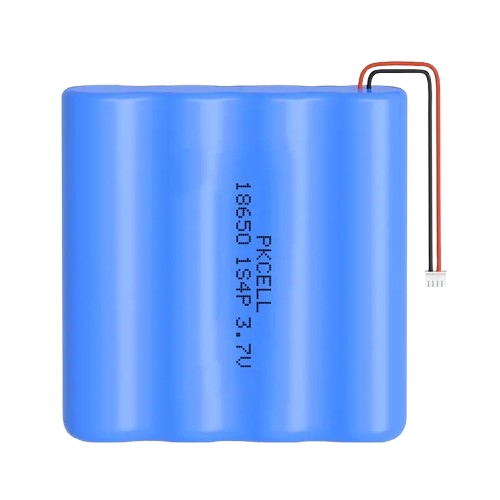
The 4 Pack 1S4P Battery is a configuration of four individual cells connected in parallel (4P) with a single series connection (1S). This arrangement increases the overall capacity of the battery while maintaining the same voltage as a single cell. It is commonly used in applications requiring extended runtime without increasing the voltage, such as portable electronics, power banks, and low-power IoT devices.
Explore Projects Built with 4 pack 1s4p battery
 Open Project in Cirkit Designer
 Open Project in Cirkit Designer
 Open Project in Cirkit Designer
 Open Project in Cirkit Designer
Explore Projects Built with 4 pack 1s4p battery
Open Project in Cirkit DesignerOpen Project in Cirkit DesignerOpen Project in Cirkit DesignerOpen Project in Cirkit DesignerCommon Applications and Use Cases
- Power banks and portable chargers
- Low-power IoT devices
- LED lighting systems
- Small robotics and RC vehicles
- Backup power supplies for microcontrollers and sensors
Technical Specifications
The following table outlines the key technical specifications of the 4 Pack 1S4P Battery:
| Parameter | Specification |
|---|---|
| Nominal Voltage | Same as a single cell (e.g., 3.7V for Li-ion) |
| Capacity | 4x the capacity of a single cell |
| Configuration | 1 Series, 4 Parallel (1S4P) |
| Maximum Discharge Current | Sum of the maximum discharge currents of all cells |
| Charging Voltage | Same as a single cell (e.g., 4.2V for Li-ion) |
| Charging Current | Typically 4x the single-cell charging current |
| Dimensions | Varies based on cell size and packaging |
| Weight | Approximately 4x the weight of a single cell |
Pin Configuration and Descriptions
The 4 Pack 1S4P Battery typically has two terminals for connection:
| Pin | Label | Description |
|---|---|---|
| 1 | + (Positive) | Positive terminal of the battery pack |
| 2 | - (Negative) | Negative terminal of the battery pack |
Some battery packs may include additional pins for features like temperature monitoring or balancing. Refer to the specific datasheet for details.
Usage Instructions
How to Use the 4 Pack 1S4P Battery in a Circuit
- Connect the Terminals: Ensure the positive terminal (+) of the battery is connected to the positive rail of your circuit, and the negative terminal (-) is connected to the ground.
- Use a Battery Management System (BMS): To ensure safe operation, always use a BMS designed for 1S4P configurations. The BMS will handle overcharging, over-discharging, and balancing.
- Charging the Battery: Use a charger compatible with the nominal voltage and capacity of the battery pack. For example, a 3.7V Li-ion 1S4P battery requires a charger with a 4.2V output.
- Monitor Temperature: Avoid operating the battery in extreme temperatures. Most batteries perform optimally between 0°C and 45°C.
Important Considerations and Best Practices
- Avoid Overcharging and Over-discharging: Always use a BMS to prevent damage to the cells.
- Check Compatibility: Ensure the battery's voltage and capacity meet the requirements of your circuit.
- Secure the Battery: Use proper enclosures or holders to prevent physical damage.
- Avoid Short Circuits: Double-check connections to prevent accidental short circuits, which can damage the battery or cause safety hazards.
Example: Using the 4 Pack 1S4P Battery with an Arduino UNO
To power an Arduino UNO with a 1S4P battery pack:
- Connect the positive terminal of the battery to the VIN pin of the Arduino.
- Connect the negative terminal of the battery to the GND pin of the Arduino.
- Ensure the battery voltage is within the acceptable range for the Arduino UNO (7-12V recommended for VIN).
Here is an example Arduino sketch to read a sensor while powered by the battery:
// Example code to read a sensor and print the value to the Serial Monitor
// Ensure the battery voltage is within the Arduino's operating range

const int sensorPin = A0; // Analog pin connected to the sensor
int sensorValue = 0;      // Variable to store the sensor reading

void setup() {
  Serial.begin(9600); // Initialize serial communication at 9600 baud
}

void loop() {
  sensorValue = analogRead(sensorPin); // Read the sensor value
  Serial.print("Sensor Value: ");
  Serial.println(sensorValue); // Print the sensor value to the Serial Monitor
  delay(1000); // Wait for 1 second before the next reading
}
Troubleshooting and FAQs
Common Issues and Solutions
Battery Not Charging:
- Cause: Incorrect charger or damaged cells.
- Solution: Verify the charger is compatible with the battery's voltage and capacity. Check the BMS for faults.
Short Runtime:
- Cause: Degraded cells or excessive load.
- Solution: Test the individual cells for capacity. Reduce the load or replace the battery pack if necessary.
Overheating:
- Cause: High discharge current or poor ventilation.
- Solution: Ensure the load does not exceed the maximum discharge current. Improve ventilation around the battery.
Voltage Drop Under Load:
- Cause: High internal resistance or low charge.
- Solution: Fully charge the battery and check for damaged cells.
FAQs
Can I use this battery pack without a BMS?
- It is not recommended. A BMS ensures safe operation by preventing overcharging, over-discharging, and balancing the cells.
How do I calculate the total capacity of the battery pack?
- Multiply the capacity of a single cell by 4 (e.g., if a single cell has 2500mAh, the total capacity is 10,000mAh).
What is the lifespan of a 1S4P battery pack?
- The lifespan depends on the type of cells used and the operating conditions. Typically, Li-ion cells last 300-500 charge cycles under normal use.
Can I replace individual cells in the pack?
- Yes, but ensure the replacement cells have the same specifications (capacity, voltage, and chemistry) as the original ones.
By following this documentation, you can safely and effectively use the 4 Pack 1S4P Battery in your projects.