
How to Use Hobbywing Seaking 60A: Examples, Pinouts, and Specs
 Design with Hobbywing Seaking 60A in Cirkit Designer
Introduction
The Hobbywing Seaking 60A is a high-performance electronic speed controller (ESC) designed for brushless motors. Manufactured by ESC, this component is widely used in remote-controlled (RC) vehicles, including boats, cars, and drones. It provides efficient power management, smooth throttle response, and reliable operation under demanding conditions. With a 60A current rating, it is suitable for medium to high-power applications.
Explore Projects Built with Hobbywing Seaking 60A
 Open Project in Cirkit Designer
 Open Project in Cirkit Designer
 Open Project in Cirkit Designer
 Open Project in Cirkit Designer
Explore Projects Built with Hobbywing Seaking 60A
Open Project in Cirkit DesignerOpen Project in Cirkit DesignerOpen Project in Cirkit DesignerOpen Project in Cirkit DesignerCommon Applications
- RC boats and marine vehicles
- RC cars and trucks
- Drones and other unmanned aerial vehicles (UAVs)
- Robotics and hobbyist projects requiring brushless motor control
Technical Specifications
The following table outlines the key technical details of the Hobbywing Seaking 60A ESC:
| Parameter | Specification |
|---|---|
| Continuous Current | 60A |
| Burst Current | 360A (up to 10 seconds) |
| Input Voltage Range | 2S–6S LiPo (7.4V–22.2V) |
| BEC Output | 6V/5A (Switch Mode) |
| Motor Compatibility | Brushless motors |
| Waterproof Rating | Fully waterproof |
| Dimensions | 92mm x 31mm x 16mm |
| Weight | 105g (including wires) |
| Operating Temperature | -20°C to 105°C |
| Throttle Signal Range | 1100µs–1900µs |
Pin Configuration and Descriptions
The Hobbywing Seaking 60A ESC has the following key connections:
| Pin/Connector | Description |
|---|---|
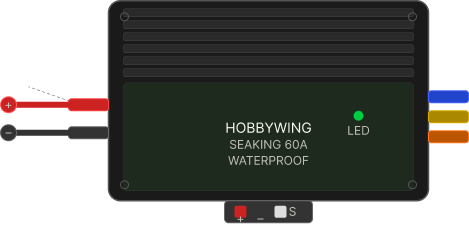
| Battery Input (Red/Black) | Connects to the power source (LiPo battery) |
| Motor Output (3 Wires) | Connects to the brushless motor |
| Receiver Signal Wire | Connects to the RC receiver throttle channel (PWM) |
| BEC Output (Red/Black) | Provides regulated 6V power for the receiver or servos |
Usage Instructions
How to Use the Hobbywing Seaking 60A in a Circuit
- Connect the Battery: Attach the red and black battery input wires to a compatible LiPo battery (2S–6S). Ensure correct polarity to avoid damage.
- Connect the Motor: Attach the three motor output wires to the brushless motor. If the motor spins in the wrong direction, swap any two of the three wires.
- Connect the Receiver: Plug the signal wire into the throttle channel of your RC receiver. The ESC will interpret the PWM signal to control motor speed.
- Power On: Turn on the transmitter first, then connect the battery to the ESC. The ESC will emit a series of beeps to indicate initialization.
- Calibrate Throttle: Follow the ESC's throttle calibration procedure to ensure proper response to the transmitter.
Important Considerations and Best Practices
- Cooling: Ensure adequate airflow or cooling to prevent overheating during operation.
- Waterproofing: While the ESC is waterproof, ensure all connections are secure and protected in wet environments.
- Battery Selection: Use a battery within the specified voltage range (2S–6S LiPo) to avoid damage.
- Throttle Calibration: Always calibrate the throttle when using the ESC with a new transmitter or receiver.
- Programming: Use the Hobbywing programming card (sold separately) to customize settings such as throttle curve, timing, and cutoff voltage.
Example: Connecting to an Arduino UNO
The Hobbywing Seaking 60A ESC can be controlled using an Arduino UNO by generating a PWM signal. Below is an example code snippet:
#include <Servo.h> // Include the Servo library to generate PWM signals

Servo esc; // Create a Servo object to control the ESC

void setup() {
  esc.attach(9); // Attach the ESC signal wire to pin 9 on the Arduino
  esc.writeMicroseconds(1000); // Send minimum throttle signal (1000µs)
  delay(2000); // Wait for 2 seconds to allow ESC initialization
}

void loop() {
  esc.writeMicroseconds(1500); // Send mid-throttle signal (1500µs)
  delay(5000); // Run motor at mid-speed for 5 seconds

  esc.writeMicroseconds(1000); // Send minimum throttle signal (stop motor)
  delay(5000); // Wait for 5 seconds before repeating
}
Note: Ensure the ESC is properly calibrated before using it with an Arduino. Always test the setup with the motor disconnected to avoid accidental movement.
Troubleshooting and FAQs
Common Issues and Solutions
Motor Does Not Spin
- Cause: Incorrect wiring or throttle signal.
- Solution: Verify all connections. Ensure the signal wire is connected to the correct receiver channel or Arduino pin.
ESC Emits Continuous Beeping
- Cause: Throttle signal is not detected or is out of range.
- Solution: Check the transmitter and receiver. Calibrate the throttle range.
Overheating
- Cause: Prolonged high current or insufficient cooling.
- Solution: Ensure proper airflow or use a cooling fan. Avoid exceeding the ESC's current rating.
Motor Spins in the Wrong Direction
- Cause: Incorrect motor wiring.
- Solution: Swap any two of the three motor wires.
No Power to Receiver
- Cause: Faulty BEC or wiring.
- Solution: Check the BEC output wires and ensure proper connection to the receiver.
FAQs
Q: Can I use the Hobbywing Seaking 60A ESC with a brushed motor?
A: No, this ESC is designed specifically for brushless motors.Q: Is the ESC compatible with 7.2V NiMH batteries?
A: No, the ESC is designed for 2S–6S LiPo batteries only.Q: How do I program the ESC?
A: Use the Hobbywing programming card to adjust settings such as timing, throttle curve, and cutoff voltage.Q: Can I use this ESC for aerial drones?
A: Yes, but ensure the ESC's specifications meet the power requirements of your drone.
By following this documentation, users can effectively integrate the Hobbywing Seaking 60A ESC into their projects and troubleshoot common issues with ease.