
How to Use Boost Converter: Examples, Pinouts, and Specs
 Design with Boost Converter in Cirkit Designer
Introduction
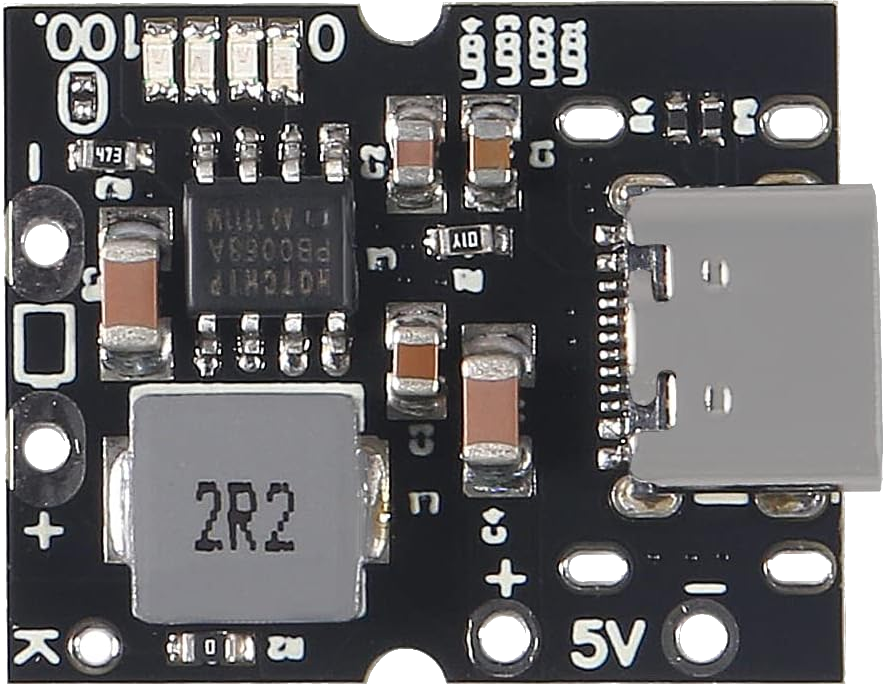
The DWEII 3.3V to 5V Voltage Boost Converter is a compact and efficient DC-DC converter designed to step up an input voltage of 3.3V to a stable output voltage of 5V. This component is ideal for applications requiring a higher voltage than the available input, such as powering microcontrollers, sensors, or small electronic devices from low-voltage sources like batteries.
Explore Projects Built with Boost Converter
 Open Project in Cirkit Designer
 Open Project in Cirkit Designer
 Open Project in Cirkit Designer
 Open Project in Cirkit Designer
Explore Projects Built with Boost Converter
Open Project in Cirkit DesignerOpen Project in Cirkit DesignerOpen Project in Cirkit DesignerOpen Project in Cirkit DesignerCommon Applications and Use Cases
- Powering 5V devices from 3.3V battery sources (e.g., Li-ion or AA batteries)
- Portable electronics and wearables
- IoT devices and low-power systems
- Arduino and microcontroller-based projects
- USB power supply for small peripherals
Technical Specifications
The following table outlines the key technical details of the DWEII 3.3V to 5V Voltage Boost Converter:
| Parameter | Value |
|---|---|
| Input Voltage Range | 2.5V to 5V |
| Output Voltage | 5V ± 0.1V |
| Maximum Output Current | 1A (depending on input voltage) |
| Efficiency | Up to 90% (varies with load) |
| Switching Frequency | 1 MHz |
| Dimensions | 22mm x 17mm x 4mm |
| Operating Temperature | -40°C to +85°C |
Pin Configuration and Descriptions
The DWEII 3.3V to 5V Voltage Boost Converter has the following pinout:
| Pin Name | Description |
|---|---|
| VIN | Input voltage pin (connect to 3.3V source) |
| GND | Ground pin (common ground for input and output) |
| VOUT | Output voltage pin (provides 5V output) |
Usage Instructions
How to Use the Component in a Circuit
Connect the Input Voltage (VIN):
Attach the positive terminal of your 3.3V power source to the VIN pin. Ensure the input voltage is within the specified range (2.5V to 5V).Connect the Ground (GND):
Connect the ground terminal of your power source to the GND pin of the boost converter. This serves as the common ground for the circuit.Connect the Output Voltage (VOUT):
Use the VOUT pin to power your 5V device. Ensure the connected load does not exceed the maximum output current of 1A.Add Decoupling Capacitors (Optional):
For improved stability, you can add a capacitor (e.g., 10µF) across the VOUT and GND pins.
Important Considerations and Best Practices
- Input Voltage Range: Ensure the input voltage is within the specified range (2.5V to 5V). Exceeding this range may damage the component.
- Load Current: The maximum output current depends on the input voltage. For example, at lower input voltages, the output current capability decreases.
- Heat Dissipation: Although the converter is efficient, it may generate heat under high loads. Ensure proper ventilation or heat dissipation if used in a confined space.
- Polarity Protection: Double-check the polarity of your connections. Reversing the input voltage may damage the component.
Example: Using the Boost Converter with an Arduino UNO
The following example demonstrates how to use the DWEII 3.3V to 5V Voltage Boost Converter to power an Arduino UNO from a 3.3V battery source.
Circuit Diagram
- Connect the 3.3V battery's positive terminal to the VIN pin of the boost converter.
- Connect the battery's ground terminal to the GND pin of the boost converter.
- Connect the VOUT pin of the boost converter to the 5V pin of the Arduino UNO.
- Connect the GND pin of the boost converter to the GND pin of the Arduino UNO.
Arduino Code Example
// Example code to blink an LED connected to pin 13 of the Arduino UNO
// Ensure the Arduino is powered via the Boost Converter (3.3V to 5V)

void setup() {
  pinMode(13, OUTPUT); // Set pin 13 as an output
}

void loop() {
  digitalWrite(13, HIGH); // Turn the LED on
  delay(1000);            // Wait for 1 second
  digitalWrite(13, LOW);  // Turn the LED off
  delay(1000);            // Wait for 1 second
}
Troubleshooting and FAQs
Common Issues and Solutions
No Output Voltage:
- Cause: Incorrect wiring or insufficient input voltage.
- Solution: Verify the connections and ensure the input voltage is within the specified range (2.5V to 5V).
Output Voltage Drops Under Load:
- Cause: Load current exceeds the maximum output current capability.
- Solution: Reduce the load or ensure the input voltage is closer to 5V for higher output current capability.
Excessive Heat Generation:
- Cause: High load current or poor ventilation.
- Solution: Reduce the load or improve heat dissipation by adding a heatsink or ensuring proper airflow.
Device Not Powering On:
- Cause: Polarity of connections is reversed.
- Solution: Double-check the polarity of the input and output connections.
FAQs
Q1: Can I use this boost converter with a 2.5V input?
A1: Yes, the converter supports input voltages as low as 2.5V. However, the maximum output current will be lower at this input voltage.
Q2: Is the output voltage adjustable?
A2: No, the output voltage is fixed at 5V ± 0.1V.
Q3: Can I use this boost converter to power a Raspberry Pi?
A3: This boost converter is not recommended for powering a Raspberry Pi, as the current requirements of the Raspberry Pi may exceed the maximum output current of 1A.
Q4: What is the efficiency of the boost converter?
A4: The efficiency can reach up to 90%, depending on the input voltage and load conditions.