
How to Use Rocker Switch: Examples, Pinouts, and Specs
 Design with Rocker Switch in Cirkit Designer
Introduction
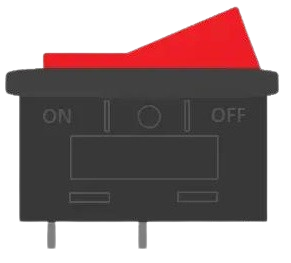
A rocker switch is a type of electrical switch that operates by rocking a lever back and forth. It is commonly used to control the power supply to devices and is characterized by its simple on/off functionality. Rocker switches are widely used in household appliances, automotive systems, and industrial equipment due to their durability and ease of use.
Explore Projects Built with Rocker Switch
 Open Project in Cirkit Designer
 Open Project in Cirkit Designer
 Open Project in Cirkit Designer
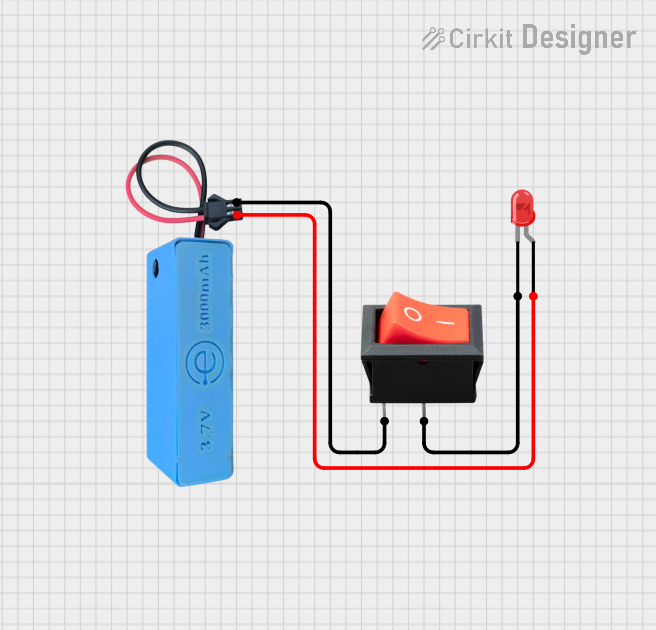 Open Project in Cirkit Designer
Explore Projects Built with Rocker Switch
Open Project in Cirkit DesignerOpen Project in Cirkit DesignerOpen Project in Cirkit DesignerOpen Project in Cirkit DesignerCommon Applications and Use Cases
- Power control for electronic devices and appliances
- Automotive systems (e.g., headlights, auxiliary lights)
- Industrial machinery and equipment
- Audio and video equipment
- Marine and aviation control panels
Technical Specifications
Below are the general technical specifications for a standard rocker switch. Note that specific values may vary depending on the manufacturer and model.
| Parameter | Specification |
|---|---|
| Voltage Rating | 12V DC, 24V DC, or 120V/240V AC |
| Current Rating | 5A, 10A, or 15A (depending on model) |
| Contact Resistance | ≤ 50 mΩ |
| Insulation Resistance | ≥ 100 MΩ |
| Operating Temperature | -25°C to +85°C |
| Mechanical Life | 10,000 to 50,000 cycles |
| Mounting Style | Panel mount |
| Actuator Type | Rocker lever |
Pin Configuration and Descriptions
Rocker switches typically have two or three pins, depending on whether they are single-pole single-throw (SPST) or single-pole double-throw (SPDT). Below is a table describing the pin configuration:
SPST Rocker Switch
| Pin Number | Description |
|---|---|
| 1 | Input (Power Source) |
| 2 | Output (Load Connection) |
SPDT Rocker Switch
| Pin Number | Description |
|---|---|
| 1 | Input (Power Source) |
| 2 | Output 1 (Load 1) |
| 3 | Output 2 (Load 2) |
Usage Instructions
How to Use the Component in a Circuit
- Identify the Pins: Determine the type of rocker switch (SPST or SPDT) and identify the pins based on the configuration table above.
- Connect the Power Source: Connect the positive terminal of the power source to the input pin (Pin 1).
- Connect the Load: For SPST switches, connect the load to the output pin (Pin 2). For SPDT switches, connect the loads to Output 1 (Pin 2) and Output 2 (Pin 3) as needed.
- Secure the Switch: Mount the rocker switch onto a panel or enclosure using the provided mounting slot.
- Test the Circuit: Toggle the switch to ensure proper operation.
Important Considerations and Best Practices
- Voltage and Current Ratings: Ensure the switch's voltage and current ratings match the requirements of your circuit to avoid damage or overheating.
- Debouncing: If the switch is used in a digital circuit, consider implementing debouncing to prevent false triggering.
- Polarity: For DC circuits, ensure correct polarity when connecting the power source and load.
- Safety: Always disconnect the power supply before wiring or modifying the circuit.
Example: Connecting a Rocker Switch to an Arduino UNO
Below is an example of how to use a rocker switch to control an LED with an Arduino UNO:
// Define pin connections
const int rockerSwitchPin = 2; // Rocker switch connected to digital pin 2
const int ledPin = 13;         // LED connected to digital pin 13

void setup() {
  pinMode(rockerSwitchPin, INPUT); // Set rocker switch pin as input
  pinMode(ledPin, OUTPUT);         // Set LED pin as output
}

void loop() {
  int switchState = digitalRead(rockerSwitchPin); // Read the state of the switch

  if (switchState == HIGH) {
    digitalWrite(ledPin, HIGH); // Turn on the LED if switch is ON
  } else {
    digitalWrite(ledPin, LOW);  // Turn off the LED if switch is OFF
  }
}
Troubleshooting and FAQs
Common Issues and Solutions
Switch Does Not Toggle the Circuit:
- Cause: Incorrect wiring or loose connections.
- Solution: Verify the wiring and ensure all connections are secure.
Switch Overheats:
- Cause: Exceeding the voltage or current rating of the switch.
- Solution: Use a switch with appropriate ratings for your circuit.
Intermittent Operation:
- Cause: Contact wear or dirt accumulation.
- Solution: Clean the switch contacts or replace the switch if necessary.
LED Does Not Respond in Arduino Circuit:
- Cause: Incorrect pin configuration or faulty code.
- Solution: Double-check the pin connections and ensure the code matches the wiring.
FAQs
Q: Can a rocker switch be used for AC circuits?
A: Yes, as long as the switch is rated for the voltage and current of the AC circuit.
Q: How do I know if my rocker switch is SPST or SPDT?
A: Check the number of pins on the switch. SPST switches have two pins, while SPDT switches have three.
Q: Can I use a rocker switch to control multiple devices?
A: Yes, an SPDT rocker switch can control two devices by toggling between Output 1 and Output 2.