
How to Use XT90FEMALE: Examples, Pinouts, and Specs
 Design with XT90FEMALE in Cirkit Designer
Introduction
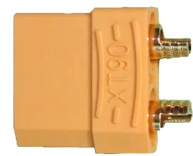
The XT90FEMALE is a high-current connector designed for use in RC (radio-controlled) applications, such as drones, electric vehicles, and high-power battery systems. It features a secure locking mechanism to ensure a reliable connection and is capable of handling up to 90A of continuous current. Its robust design and heat-resistant materials make it ideal for demanding applications where safety and performance are critical.
Explore Projects Built with XT90FEMALE
 Open Project in Cirkit Designer
 Open Project in Cirkit Designer
 Open Project in Cirkit Designer
 Open Project in Cirkit Designer
Explore Projects Built with XT90FEMALE
Open Project in Cirkit DesignerOpen Project in Cirkit DesignerOpen Project in Cirkit DesignerOpen Project in Cirkit DesignerCommon Applications
- RC vehicles (cars, boats, drones, and planes)
- High-power lithium battery packs
- Electric bikes and scooters
- Solar power systems
- DIY electronics requiring high-current connections
Technical Specifications
The XT90FEMALE connector is engineered to provide a safe and efficient connection for high-current applications. Below are its key technical details:
| Parameter | Specification |
|---|---|
| Rated Current | 90A (continuous) |
| Peak Current | 120A (for short durations) |
| Voltage Rating | Up to 500V DC |
| Contact Resistance | ≤ 0.6 mΩ |
| Material (Housing) | Nylon/Polyamide (heat-resistant) |
| Material (Contacts) | Gold-plated copper |
| Operating Temperature | -20°C to 120°C |
| Connector Type | Female |
| Dimensions | 21.5mm x 8mm x 15mm |
| Weight | ~7.5g |
Pin Configuration and Descriptions
The XT90FEMALE connector has two primary terminals for power connections:
| Pin | Description | Notes |
|---|---|---|
| + | Positive terminal | Connect to the positive lead of the battery |
| - | Negative terminal | Connect to the negative lead of the battery |
The connector is keyed to prevent reverse polarity connections, ensuring safe and correct usage.
Usage Instructions
How to Use the XT90FEMALE in a Circuit
Soldering the Wires:
- Strip the insulation from the wires you intend to connect to the XT90FEMALE.
- Tin the exposed wire ends with solder to ensure a strong connection.
- Insert the tinned wire ends into the connector's solder cups.
- Heat the solder cups with a soldering iron and apply solder until the wire is securely attached.
- Allow the solder to cool before handling.
Connecting to a Male XT90 Connector:
- Align the XT90FEMALE with the XT90MALE connector, ensuring the polarity matches.
- Push the connectors together until the locking mechanism clicks into place.
Mounting:
- If needed, secure the XT90FEMALE connector to your device or enclosure using adhesive or a mounting bracket.
Important Considerations
- Wire Gauge: Use appropriately sized wires (e.g., 10-12 AWG) to handle the current without overheating.
- Heat Management: Avoid prolonged exposure to currents exceeding the rated 90A to prevent overheating.
- Polarity: Double-check the polarity before connecting to avoid damage to your circuit or battery.
- Soldering Temperature: Use a soldering iron with a temperature of 350-400°C for optimal results.
Example: Connecting to an Arduino UNO
While the XT90FEMALE is not directly used with low-power devices like the Arduino UNO, it can be part of a power delivery system. For example, you can use it to connect a high-power battery to a voltage regulator, which then powers the Arduino.
// Example: Reading battery voltage via a voltage divider connected to Arduino UNO
// Ensure the XT90FEMALE is securely connected to the battery and voltage regulator.

const int voltagePin = A0; // Analog pin connected to the voltage divider
float voltage = 0.0;

void setup() {
  Serial.begin(9600); // Initialize serial communication
}

void loop() {
  int sensorValue = analogRead(voltagePin); // Read the analog input
  voltage = sensorValue * (5.0 / 1023.0) * 11;
  // Assuming a 10:1 voltage divider, adjust multiplier as needed
  Serial.print("Battery Voltage: ");
  Serial.print(voltage);
  Serial.println(" V");
  delay(1000); // Wait 1 second before the next reading
}
Note: Use a voltage divider to step down the battery voltage to a safe level for the Arduino's analog input (0-5V).
Troubleshooting and FAQs
Common Issues
Loose Connection:
- Cause: Improper mating of the XT90FEMALE and XT90MALE connectors.
- Solution: Ensure the connectors are fully inserted until the locking mechanism clicks.
Overheating:
- Cause: Exceeding the rated current or using undersized wires.
- Solution: Use wires with the correct gauge and avoid exceeding the 90A continuous current rating.
Reverse Polarity Connection:
- Cause: Forcing the connectors together incorrectly.
- Solution: Verify the polarity markings (+ and -) before connecting.
Poor Solder Joint:
- Cause: Insufficient solder or improper soldering technique.
- Solution: Re-solder the connection, ensuring the solder fully covers the wire and solder cup.
FAQs
Q1: Can the XT90FEMALE handle AC currents?
A1: While the XT90FEMALE is primarily designed for DC applications, it can handle AC currents within its voltage and current ratings. However, it is not commonly used for AC systems.
Q2: Is the XT90FEMALE waterproof?
A2: No, the XT90FEMALE is not waterproof. For outdoor or wet environments, consider using additional waterproofing measures, such as heat shrink tubing or silicone sealant.
Q3: Can I use the XT90FEMALE with lower current applications?
A3: Yes, the XT90FEMALE can be used with lower current applications, but it may be overkill for such use cases. Consider smaller connectors for low-power systems.
Q4: How do I disconnect the XT90FEMALE from the XT90MALE?
A4: Firmly grip both connectors and pull them apart while pressing the locking tabs to release the connection.
By following this documentation, you can safely and effectively use the XT90FEMALE connector in your high-current applications.