
How to Use battery charger 14.6v: Examples, Pinouts, and Specs
 Design with battery charger 14.6v in Cirkit Designer
Introduction
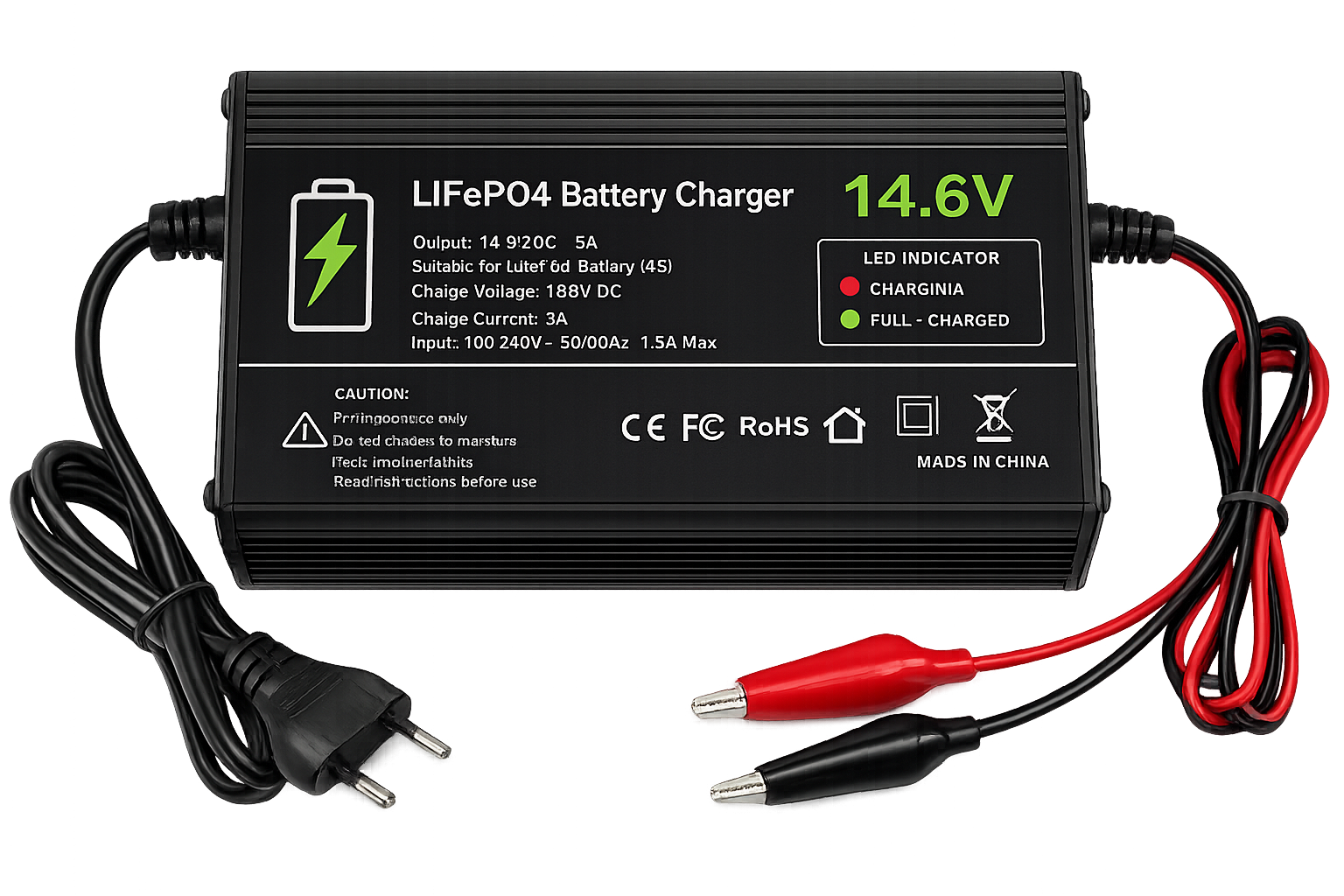
The Quartz 123 Battery Charger is a high-performance device designed to recharge batteries with a nominal voltage of 14.6 volts. It is specifically optimized for lithium-ion or lithium-polymer battery packs, ensuring safe, efficient, and reliable charging. This charger incorporates advanced safety features to protect against overcharging, overheating, and short circuits, making it ideal for a wide range of applications.
Explore Projects Built with battery charger 14.6v
 Open Project in Cirkit Designer
 Open Project in Cirkit Designer
 Open Project in Cirkit Designer
 Open Project in Cirkit Designer
Explore Projects Built with battery charger 14.6v
Open Project in Cirkit DesignerOpen Project in Cirkit DesignerOpen Project in Cirkit DesignerOpen Project in Cirkit DesignerCommon Applications and Use Cases
- Charging lithium-ion or lithium-polymer battery packs in portable electronics
- Powering electric bicycles, scooters, and other personal mobility devices
- Backup power systems and uninterruptible power supplies (UPS)
- Robotics and hobbyist projects requiring 14.6V battery packs
Technical Specifications
The following table outlines the key technical details of the Quartz 123 Battery Charger:
| Parameter | Value |
|---|---|
| Input Voltage Range | 100-240V AC, 50/60Hz |
| Output Voltage | 14.6V DC |
| Maximum Output Current | 5A |
| Charging Method | CC/CV (Constant Current/Constant Voltage) |
| Efficiency | ≥ 85% |
| Operating Temperature | 0°C to 40°C |
| Storage Temperature | -20°C to 60°C |
| Dimensions | 120mm x 60mm x 35mm |
| Weight | 250g |
| Safety Features | Overcharge protection, short circuit protection, over-temperature protection |
Pin Configuration and Descriptions
The Quartz 123 Battery Charger has a simple interface with the following connections:
| Pin/Connector | Description |
|---|---|
| AC Input | Standard AC power input (100-240V AC) |
| DC Output (+) | Positive terminal for 14.6V DC output |
| DC Output (-) | Negative terminal for 14.6V DC output |
| LED Indicator | Status indicator (e.g., charging, fully charged) |
Usage Instructions
How to Use the Component in a Circuit
Connect the Charger to the Battery Pack:
- Ensure the battery pack is rated for 14.6V nominal voltage.
- Connect the positive terminal of the charger to the positive terminal of the battery pack.
- Connect the negative terminal of the charger to the negative terminal of the battery pack.
Power the Charger:
- Plug the AC input of the charger into a standard wall outlet (100-240V AC).
- The LED indicator will light up to show the charging status:
- Red LED: Charging in progress.
- Green LED: Charging complete.
Monitor the Charging Process:
- Allow the charger to complete the charging cycle. The charger will automatically switch to a safe trickle charge or stop charging once the battery is fully charged.
Disconnect the Charger:
- Unplug the charger from the wall outlet.
- Disconnect the charger from the battery pack.
Important Considerations and Best Practices
- Verify Compatibility: Ensure the battery pack is compatible with a 14.6V charger. Using the wrong charger can damage the battery or pose safety risks.
- Avoid Overloading: Do not exceed the charger's maximum output current of 5A.
- Ventilation: Operate the charger in a well-ventilated area to prevent overheating.
- Inspect Connections: Check all connections for proper polarity before powering the charger.
- Do Not Modify: Avoid modifying the charger, as this may void the warranty and compromise safety.
Arduino UNO Integration Example
While the Quartz 123 Battery Charger is not directly programmable, it can be monitored using an Arduino UNO to track the charging status via the LED indicator. Below is an example code snippet to monitor the charger's LED status:
// Arduino code to monitor the LED status of the Quartz 123 Battery Charger
// Connect the charger's LED indicator to Arduino pin 2 via a voltage divider
// to ensure the voltage is within the Arduino's input range.

const int ledPin = 2; // Pin connected to the charger's LED indicator

void setup() {
  pinMode(ledPin, INPUT); // Set the LED pin as input
  Serial.begin(9600);     // Initialize serial communication
}

void loop() {
  int ledState = digitalRead(ledPin); // Read the LED state

  if (ledState == HIGH) {
    Serial.println("Charging in progress...");
  } else {
    Serial.println("Charging complete or no battery connected.");
  }

  delay(1000); // Wait for 1 second before checking again
}
Troubleshooting and FAQs
Common Issues Users Might Face
Charger Does Not Turn On:
- Cause: No power supply or faulty AC connection.
- Solution: Check the AC power source and ensure the charger is properly plugged in.
Battery Does Not Charge:
- Cause: Incorrect connection or incompatible battery pack.
- Solution: Verify the battery pack's voltage and polarity. Ensure the battery is rated for 14.6V.
LED Indicator Does Not Light Up:
- Cause: Faulty LED or internal charger issue.
- Solution: Inspect the LED connection. If the issue persists, contact the manufacturer.
Charger Overheats:
- Cause: Poor ventilation or excessive ambient temperature.
- Solution: Operate the charger in a cooler, well-ventilated area.
Solutions and Tips for Troubleshooting
- Always double-check connections and polarity before powering the charger.
- If the charger fails to operate, test it with a different battery pack to rule out battery-related issues.
- For persistent problems, consult the Quartz 123 Battery Charger user manual or contact Quartz customer support.
By following this documentation, users can safely and effectively utilize the Quartz 123 Battery Charger for their 14.6V battery packs.