
How to Use regulator: Examples, Pinouts, and Specs
 Design with regulator in Cirkit Designer
Introduction
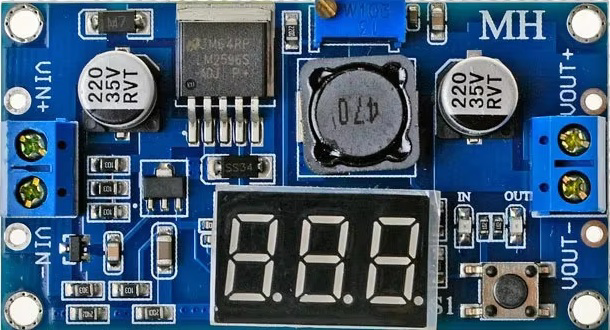
A regulator is an electronic component designed to maintain a constant output voltage or current, regardless of fluctuations in input voltage or load conditions. This ensures stable and reliable operation of electronic circuits, protecting sensitive components from damage caused by voltage variations. Regulators are widely used in power supply systems, embedded systems, and various electronic devices to provide a steady voltage source.
Explore Projects Built with regulator
 Open Project in Cirkit Designer
 Open Project in Cirkit Designer
 Open Project in Cirkit Designer
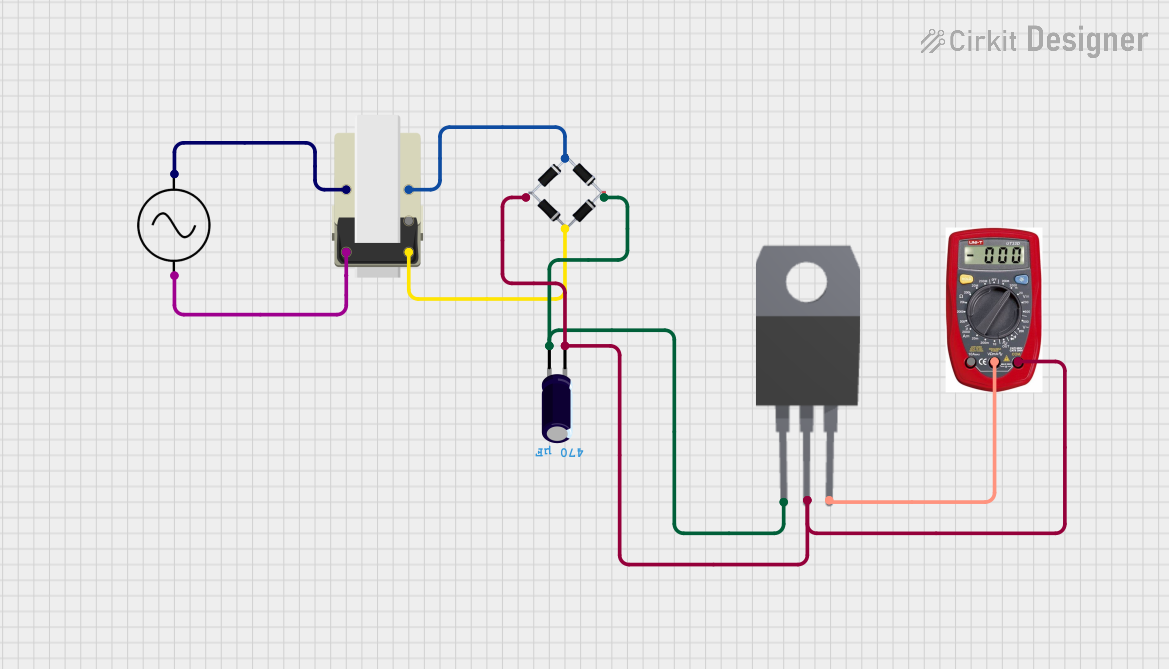 Open Project in Cirkit Designer
Explore Projects Built with regulator
Open Project in Cirkit DesignerOpen Project in Cirkit DesignerOpen Project in Cirkit DesignerOpen Project in Cirkit DesignerCommon Applications and Use Cases
- Power supply circuits for microcontrollers and sensors
- Voltage stabilization in battery-powered devices
- Protection of sensitive electronic components
- DC-DC conversion in portable electronics
- Ensuring stable operation of communication and audio equipment
Technical Specifications
The technical specifications of a regulator vary depending on its type (e.g., linear or switching regulator) and model. Below are general specifications for a common linear voltage regulator, the LM7805, which outputs a fixed 5V:
Key Technical Details
- Input Voltage Range: 7V to 35V
- Output Voltage: 5V (fixed)
- Output Current: Up to 1.5A
- Dropout Voltage: Typically 2V
- Thermal Shutdown: Yes
- Short-Circuit Protection: Yes
- Operating Temperature Range: -40°C to +125°C
Pin Configuration and Descriptions
The LM7805 regulator has three pins, as described in the table below:
| Pin Number | Name | Description |
|---|---|---|
| 1 | Input (IN) | Connects to the unregulated input voltage source |
| 2 | Ground (GND) | Common ground for input and output |
| 3 | Output (OUT) | Provides the regulated 5V output |
Usage Instructions
How to Use the Component in a Circuit
- Connect the Input Voltage: Attach the unregulated DC voltage source (e.g., 9V battery or adapter) to the Input (IN) pin.
- Connect the Ground: Link the Ground (GND) pin to the circuit's ground.
- Connect the Output Voltage: Use the Output (OUT) pin to power your load or circuit requiring a stable 5V supply.
- Add Capacitors: Place a capacitor (e.g., 0.33µF) between the Input (IN) pin and ground, and another capacitor (e.g., 0.1µF) between the Output (OUT) pin and ground. These capacitors help filter noise and improve stability.
Important Considerations and Best Practices
- Ensure the input voltage is at least 2V higher than the desired output voltage (e.g., 7V for a 5V output).
- Use a heatsink if the regulator is expected to dissipate significant heat due to high input voltage or current.
- Avoid exceeding the maximum input voltage or output current ratings to prevent damage.
- For switching regulators, follow the specific datasheet recommendations for external components like inductors and diodes.
Example: Connecting the LM7805 to an Arduino UNO
The LM7805 can be used to provide a stable 5V supply to an Arduino UNO. Below is an example circuit and code:
Circuit Setup
- Connect a 9V battery to the Input (IN) pin of the LM7805.
- Connect the Ground (GND) pin to the Arduino's GND pin.
- Connect the Output (OUT) pin to the Arduino's 5V pin.
Arduino Code Example
// This code blinks an LED connected to pin 13 of the Arduino UNO.
// The LM7805 regulator provides a stable 5V supply to the Arduino.

void setup() {
  pinMode(13, OUTPUT); // Set pin 13 as an output
}

void loop() {
  digitalWrite(13, HIGH); // Turn the LED on
  delay(1000);            // Wait for 1 second
  digitalWrite(13, LOW);  // Turn the LED off
  delay(1000);            // Wait for 1 second
}
Troubleshooting and FAQs
Common Issues Users Might Face
Regulator Overheating:
- Cause: Excessive input voltage or current draw.
- Solution: Use a heatsink or reduce the input voltage to within the recommended range.
No Output Voltage:
- Cause: Incorrect wiring or damaged regulator.
- Solution: Verify connections and ensure the input voltage is within the specified range.
Output Voltage Fluctuations:
- Cause: Insufficient input/output capacitors or unstable input voltage.
- Solution: Add the recommended capacitors and ensure a stable input source.
Short Circuit on Output:
- Cause: Faulty load or wiring.
- Solution: Disconnect the load, check for shorts, and reconnect after resolving the issue.
FAQs
Q1: Can I use the LM7805 to power a 3.3V device?
A1: No, the LM7805 outputs a fixed 5V. Use a 3.3V regulator (e.g., LM7833) or a DC-DC converter for 3.3V devices.
Q2: What is the maximum current the LM7805 can supply?
A2: The LM7805 can supply up to 1.5A, but this depends on proper heat dissipation and input voltage.
Q3: Can I use the LM7805 with an AC input?
A3: No, the LM7805 requires a DC input. Use a rectifier and filter circuit to convert AC to DC before connecting to the regulator.
Q4: Do I always need capacitors with the LM7805?
A4: Yes, capacitors are recommended to stabilize the output and filter noise, as specified in the datasheet.