
How to Use AC to 12V DC 20A: Examples, Pinouts, and Specs
 Design with AC to 12V DC 20A in Cirkit Designer
Introduction
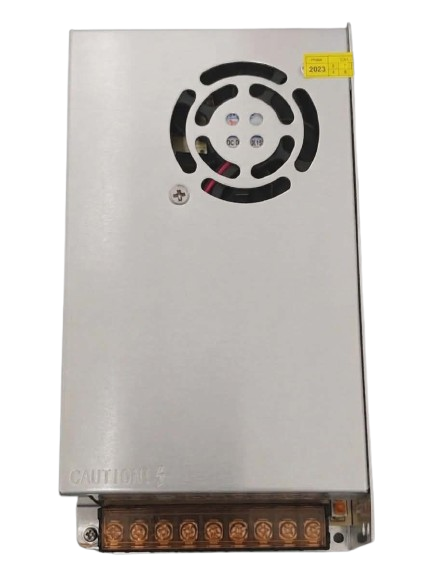
The WEIYU S120-12 240W is a high-performance power supply converter designed to transform alternating current (AC) voltage into a stable 12 volts direct current (DC) output. With a maximum current capacity of 20 amps, this power supply is ideal for powering a wide range of electronic devices, including LED lighting systems, industrial equipment, and high-current DC motors. Its robust design ensures reliable operation in demanding environments.
Explore Projects Built with AC to 12V DC 20A
 Open Project in Cirkit Designer
 Open Project in Cirkit Designer
 Open Project in Cirkit Designer
 Open Project in Cirkit Designer
Explore Projects Built with AC to 12V DC 20A
Open Project in Cirkit DesignerOpen Project in Cirkit DesignerOpen Project in Cirkit DesignerOpen Project in Cirkit DesignerCommon Applications
- LED strip lighting and signage
- CCTV camera systems
- Industrial automation equipment
- 3D printers and CNC machines
- High-current DC motor drives
- Battery charging systems
Technical Specifications
Key Technical Details
| Parameter | Specification |
|---|---|
| Manufacturer | WEIYU |
| Part ID | S120-12 240W |
| Input Voltage Range | 110V AC or 220V AC (switchable) |
| Output Voltage | 12V DC |
| Maximum Output Current | 20A |
| Maximum Output Power | 240W |
| Efficiency | ≥85% |
| Operating Temperature | -10°C to +60°C |
| Cooling Method | Built-in fan |
| Dimensions | 215mm x 115mm x 50mm |
| Weight | ~800g |
| Safety Features | Overload, overvoltage, and short-circuit protection |
Pin Configuration and Descriptions
| Pin Label | Description |
|---|---|
| L | Live AC input (110V or 220V, depending on switch setting) |
| N | Neutral AC input |
| GND | Earth/ground connection |
| +V | Positive DC output (12V) |
| -V | Negative DC output (ground) |
Usage Instructions
How to Use the Component in a Circuit
Input Voltage Selection:
- Before connecting the power supply to AC mains, ensure the input voltage selector switch is set to the correct voltage (110V or 220V) based on your local power grid.
- Failure to set the correct input voltage may damage the power supply.
Wiring Connections:
- Connect the AC mains wires to the
L(Live),N(Neutral), andGND(Earth) terminals. - Connect the load to the
+V(positive) and-V(negative) terminals. Ensure the load does not exceed the maximum current rating of 20A.
- Connect the AC mains wires to the
Power On:
- After verifying all connections, plug the power supply into the AC mains and switch it on.
- The built-in fan will activate, and the output terminals will provide a stable 12V DC.
Load Testing:
- Use a multimeter to confirm the output voltage is 12V DC before connecting sensitive devices.
- Gradually increase the load to ensure the power supply operates within its rated capacity.
Important Considerations and Best Practices
- Ventilation: Ensure adequate airflow around the power supply to prevent overheating. Do not block the fan or ventilation holes.
- Load Capacity: Avoid exceeding the maximum output current of 20A to prevent damage to the power supply or connected devices.
- Safety: Always disconnect the power supply from the AC mains before making any wiring changes.
- Polarity: Double-check the polarity of the output connections to avoid damaging connected devices.
Example: Connecting to an Arduino UNO
The WEIYU S120-12 240W can be used to power an Arduino UNO and other peripherals. Below is an example of how to connect the power supply to an Arduino UNO:
- Connect the
+Vterminal of the power supply to the Arduino's VIN pin. - Connect the
-Vterminal of the power supply to the Arduino's GND pin.
Sample Arduino Code
// Example code to blink an LED connected to pin 13
// Ensure the Arduino is powered via the WEIYU S120-12 240W power supply

void setup() {
  pinMode(13, OUTPUT); // Set pin 13 as an output
}

void loop() {
  digitalWrite(13, HIGH); // Turn the LED on
  delay(1000);            // Wait for 1 second
  digitalWrite(13, LOW);  // Turn the LED off
  delay(1000);            // Wait for 1 second
}
Troubleshooting and FAQs
Common Issues and Solutions
| Issue | Possible Cause | Solution |
|---|---|---|
| No output voltage | Incorrect input voltage setting | Verify and set the input voltage selector switch correctly. |
| Overheating | Insufficient ventilation | Ensure proper airflow and avoid blocking the fan. |
| Output voltage fluctuates | Overloaded power supply | Reduce the load to within the 20A limit. |
| Device not powering on | Loose or incorrect wiring | Double-check all connections for proper polarity and secure attachment. |
| Short-circuit protection triggered | Faulty or shorted load device | Disconnect the load, check for faults, and reconnect after resolving the issue. |
FAQs
Can this power supply be used outdoors?
- No, the WEIYU S120-12 240W is not waterproof or weatherproof. Use it only in dry, indoor environments.
What happens if I exceed the 20A current limit?
- The power supply's overload protection will activate, shutting down the output to prevent damage. Reduce the load and restart the power supply.
Can I use this power supply to charge a 12V battery?
- Yes, but ensure the battery charging current does not exceed 20A. Use a charge controller for optimal battery charging.
Is the fan always running?
- Yes, the built-in fan operates continuously to maintain proper cooling.
What is the efficiency of this power supply?
- The efficiency is rated at ≥85%, ensuring minimal energy loss during operation.
This concludes the documentation for the WEIYU S120-12 240W power supply. For further assistance, refer to the manufacturer's user manual or contact technical support.