
How to Use PV Portabel: Examples, Pinouts, and Specs
 Design with PV Portabel in Cirkit Designer
Introduction
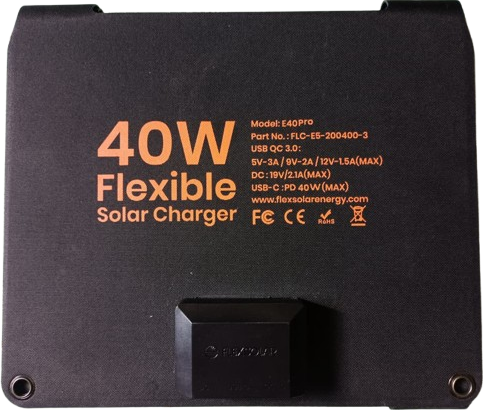
The PV Portable is a compact and portable photovoltaic (PV) system designed to convert sunlight into electrical energy. It is ideal for off-grid applications or as a mobile power source for outdoor activities, emergency backup, or remote installations. This component integrates solar panels, a charge controller, and output interfaces, making it a versatile and user-friendly solution for renewable energy needs.
Explore Projects Built with PV Portabel
 Open Project in Cirkit Designer
 Open Project in Cirkit Designer
 Open Project in Cirkit Designer
 Open Project in Cirkit Designer
Explore Projects Built with PV Portabel
Open Project in Cirkit DesignerOpen Project in Cirkit DesignerOpen Project in Cirkit DesignerOpen Project in Cirkit DesignerCommon Applications and Use Cases
- Powering small electronic devices in remote or off-grid locations
- Emergency backup power during outages
- Charging batteries for portable devices (e.g., smartphones, tablets, or power banks)
- Outdoor activities such as camping, hiking, or RV trips
- Temporary power supply for fieldwork or construction sites
Technical Specifications
Key Technical Details
| Parameter | Value |
|---|---|
| Maximum Power Output | 50W (varies by model) |
| Operating Voltage Range | 12V DC |
| Maximum Current Output | 4.2A |
| Solar Panel Type | Monocrystalline or Polycrystalline |
| Efficiency | Up to 22% |
| Dimensions | 600mm x 400mm x 25mm (typical) |
| Weight | 3.5kg (varies by model) |
| Output Ports | USB (5V), DC (12V), or AC (via inverter) |
| Operating Temperature | -20°C to 60°C |
| Storage Temperature | -30°C to 70°C |
Pin Configuration and Descriptions
The PV Portable typically includes multiple output interfaces for connecting devices. Below is a table describing the common output ports:
| Pin/Port Type | Description |
|---|---|
| USB Port | Provides 5V DC output for charging USB-powered devices (e.g., phones, tablets). |
| DC Port | Provides 12V DC output for powering compatible devices or charging batteries. |
| AC Port | Optional output via an inverter for powering AC devices (e.g., laptops, small appliances). |
| Solar Input | Connects to the integrated solar panel for energy generation. |
Usage Instructions
How to Use the PV Portable in a Circuit
- Positioning the PV Portable: Place the PV Portable in direct sunlight for optimal energy generation. Ensure the solar panel is angled correctly to maximize exposure.
- Connecting Devices:
- For USB-powered devices, connect them to the USB port using a compatible cable.
- For 12V DC devices, use the DC output port with the appropriate connector.
- If using an inverter, connect it to the DC port to convert the output to AC for powering AC devices.
- Monitoring: Many PV Portable systems include an LED indicator or display to show charging status and battery levels. Monitor these indicators to ensure proper operation.
Important Considerations and Best Practices
- Avoid Shading: Ensure the solar panel is not obstructed by shadows, as this can significantly reduce efficiency.
- Overload Protection: Do not connect devices that exceed the maximum power output of the PV Portable.
- Battery Maintenance: If the system includes a built-in battery, follow the manufacturer's guidelines for charging and discharging to prolong battery life.
- Weather Resistance: While many PV Portable systems are weather-resistant, avoid exposing them to heavy rain or submerging them in water unless explicitly rated for such conditions.
- Storage: Store the PV Portable in a cool, dry place when not in use to prevent damage.
Example: Connecting to an Arduino UNO
The PV Portable can be used to power an Arduino UNO via its 12V DC output. Below is an example of how to connect and use it:
- Connect the 12V DC output of the PV Portable to the Arduino UNO's barrel jack input.
- Ensure the PV Portable is placed in direct sunlight to provide sufficient power.
- Upload the following sample code to the Arduino UNO to blink an LED:
// Simple LED Blink Code for Arduino UNO
// This code blinks an LED connected to pin 13 every second.

void setup() {
  pinMode(13, OUTPUT); // Set pin 13 as an output pin
}

void loop() {
  digitalWrite(13, HIGH); // Turn the LED on
  delay(1000);            // Wait for 1 second
  digitalWrite(13, LOW);  // Turn the LED off
  delay(1000);            // Wait for 1 second
}
Note: Ensure the PV Portable provides stable power to the Arduino UNO. If the sunlight is inconsistent, consider using a battery or capacitor for energy storage.
Troubleshooting and FAQs
Common Issues and Solutions
| Issue | Possible Cause | Solution |
|---|---|---|
| No power output | Insufficient sunlight or shading | Place the PV Portable in direct sunlight. |
| Devices not charging properly | Overloaded or incompatible device | Check the device's power requirements and ensure compatibility. |
| LED indicators not working | Faulty connection or discharged battery | Verify all connections and charge the battery if applicable. |
| Low power output | Dirty solar panel surface | Clean the solar panel with a soft, damp cloth. |
FAQs
Can the PV Portable charge multiple devices simultaneously?
- Yes, as long as the total power consumption does not exceed the maximum output capacity.
Is the PV Portable waterproof?
- Many models are weather-resistant but not fully waterproof. Check the manufacturer's specifications for details.
Can I use the PV Portable indoors?
- The PV Portable requires sunlight to generate power. It can be used indoors only if connected to a charged battery or another power source.
What happens if the PV Portable is overloaded?
- Most systems include overload protection and will shut down temporarily. Disconnect some devices and restart the system.
By following this documentation, users can effectively utilize the PV Portable for their renewable energy needs.