
How to Use ESP32-S3 N16R8: Examples, Pinouts, and Specs
 Design with ESP32-S3 N16R8 in Cirkit Designer
Introduction
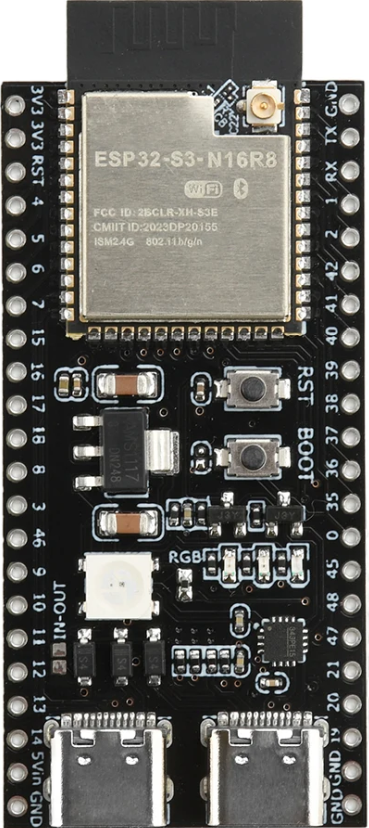
The ESP32-S3 N16R8 is a powerful microcontroller designed for advanced IoT applications and complex processing tasks. It features integrated Wi-Fi and Bluetooth connectivity, making it ideal for wireless communication in smart devices. With 16MB of flash memory and 8MB of RAM, the ESP32-S3 N16R8 is well-suited for applications requiring high processing power, such as AI, machine learning, and multimedia processing.
Explore Projects Built with ESP32-S3 N16R8
 Open Project in Cirkit Designer
 Open Project in Cirkit Designer
 Open Project in Cirkit Designer
 Open Project in Cirkit Designer
Explore Projects Built with ESP32-S3 N16R8
Open Project in Cirkit DesignerOpen Project in Cirkit DesignerOpen Project in Cirkit DesignerOpen Project in Cirkit DesignerCommon Applications and Use Cases
- IoT devices and smart home automation
- Wearable technology
- AI and machine learning applications
- Multimedia streaming and processing
- Industrial automation and control systems
- Wireless communication hubs
Technical Specifications
The ESP32-S3 N16R8 is packed with advanced features and capabilities. Below are its key technical specifications:
General Specifications
| Feature | Specification |
|---|---|
| Processor | Dual-core Xtensa LX7 @ 240 MHz |
| Flash Memory | 16MB |
| RAM | 8MB |
| Wireless Connectivity | Wi-Fi 802.11 b/g/n, Bluetooth 5.0 |
| Operating Voltage | 3.0V to 3.6V |
| GPIO Pins | 45 |
| ADC Channels | 20 |
| Communication Interfaces | UART, SPI, I2C, I2S, CAN, Ethernet |
| Power Consumption | Ultra-low power in deep sleep mode |
Pin Configuration and Descriptions
The ESP32-S3 N16R8 has a versatile pinout. Below is a summary of its key pins:
| Pin Name | Type | Description |
|---|---|---|
| GPIO0 | Input/Output | General-purpose I/O, can be used for boot mode selection |
| GPIO1 | Input/Output | General-purpose I/O, UART TXD (default) |
| GPIO2 | Input/Output | General-purpose I/O, ADC2 channel |
| GPIO3 | Input/Output | General-purpose I/O, UART RXD (default) |
| GPIO4 | Input/Output | General-purpose I/O, ADC2 channel |
| GPIO21 | Input/Output | General-purpose I/O, I2C SDA (default) |
| GPIO22 | Input/Output | General-purpose I/O, I2C SCL (default) |
| EN | Power | Enable pin, active high to enable the chip |
| 3V3 | Power | 3.3V power supply input |
| GND | Power | Ground connection |
For a complete pinout, refer to the official ESP32-S3 datasheet.
Usage Instructions
The ESP32-S3 N16R8 is highly versatile and can be used in a variety of applications. Below are the steps to get started with this microcontroller:
Basic Setup
- Power the ESP32-S3 N16R8: Connect the 3.3V and GND pins to a stable power source.
- Connect to a Computer: Use a USB-to-serial adapter to connect the ESP32-S3 to your computer for programming.
- Install Development Tools:
- Download and install the Arduino IDE or ESP-IDF (Espressif IoT Development Framework).
- Add the ESP32 board package to the Arduino IDE via the Board Manager.
Example: Blinking an LED
The following example demonstrates how to blink an LED connected to GPIO2 using the Arduino IDE:
// Define the GPIO pin where the LED is connected
#define LED_PIN 2

void setup() {
  // Initialize the LED pin as an output
  pinMode(LED_PIN, OUTPUT);
}

void loop() {
  // Turn the LED on
  digitalWrite(LED_PIN, HIGH);
  delay(1000); // Wait for 1 second

  // Turn the LED off
  digitalWrite(LED_PIN, LOW);
  delay(1000); // Wait for 1 second
}
Important Considerations
- Power Supply: Ensure a stable 3.3V power supply to avoid damaging the chip.
- Boot Mode: To enter bootloader mode, hold the BOOT button while pressing the EN button.
- GPIO Voltage Levels: GPIO pins are not 5V tolerant. Use level shifters if interfacing with 5V devices.
- Antenna Placement: For optimal wireless performance, ensure the onboard antenna is not obstructed by metal objects.
Troubleshooting and FAQs
Common Issues
ESP32-S3 Not Detected by Computer:
- Ensure the USB-to-serial adapter drivers are installed.
- Check the USB cable for data transfer capability (some cables are power-only).
Program Upload Fails:
- Verify the correct COM port is selected in the Arduino IDE.
- Ensure the ESP32-S3 is in bootloader mode by holding the BOOT button during upload.
Wi-Fi Connection Issues:
- Double-check the SSID and password in your code.
- Ensure the ESP32-S3 is within range of the Wi-Fi router.
Overheating:
- Check for excessive current draw from peripherals.
- Ensure proper ventilation around the ESP32-S3.
FAQs
Q: Can the ESP32-S3 N16R8 run AI models?
A: Yes, the ESP32-S3 supports AI and machine learning applications, thanks to its powerful dual-core processor and ample RAM.
Q: How do I reset the ESP32-S3?
A: Press the EN button to reset the microcontroller.
Q: Is the ESP32-S3 compatible with Arduino libraries?
A: Yes, the ESP32-S3 is compatible with most Arduino libraries, but some may require modifications for optimal performance.
Q: Can I use the ESP32-S3 with a 5V power supply?
A: No, the ESP32-S3 operates at 3.3V. Use a voltage regulator if your power source is 5V.
By following this documentation, you can effectively utilize the ESP32-S3 N16R8 for your projects. For more advanced features, refer to the official Espressif documentation.