
How to Use hall effect sensor: Examples, Pinouts, and Specs
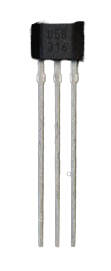
 Design with hall effect sensor in Cirkit Designer
Introduction
A Hall effect sensor is a device that detects the presence and strength of a magnetic field. It operates based on the Hall effect principle, which generates a voltage proportional to the magnetic field when current flows through a conductor. These sensors are widely used in various applications due to their ability to provide contactless and reliable magnetic field detection.
Explore Projects Built with hall effect sensor
 Open Project in Cirkit Designer
 Open Project in Cirkit Designer
 Open Project in Cirkit Designer
 Open Project in Cirkit Designer
Explore Projects Built with hall effect sensor
Open Project in Cirkit DesignerOpen Project in Cirkit DesignerOpen Project in Cirkit DesignerOpen Project in Cirkit DesignerCommon Applications and Use Cases
- Position sensing: Detecting the position of objects in automotive and industrial systems.
- Speed detection: Measuring rotational speed in motors and wheels.
- Current sensing: Monitoring current flow in power systems.
- Proximity sensing: Detecting the presence of nearby objects.
- Magnetic field measurement: Measuring the strength and direction of magnetic fields.
Technical Specifications
Below are the general technical specifications for a typical Hall effect sensor. Note that specific values may vary depending on the model and manufacturer.
Key Technical Details
- Operating Voltage: 3.3V to 5V (typical)
- Output Type: Digital or Analog (depending on the sensor type)
- Sensitivity: Varies by model (e.g., 1.3 mV/G for analog sensors)
- Operating Temperature Range: -40°C to 125°C
- Response Time: Typically less than 10 µs
- Magnetic Field Range: ±1 mT to ±100 mT (varies by model)
Pin Configuration and Descriptions
The pinout for a common 3-pin Hall effect sensor is as follows:
| Pin Number | Pin Name | Description |
|---|---|---|
| 1 | VCC | Power supply input (3.3V to 5V) |
| 2 | GND | Ground connection |
| 3 | OUT | Output signal (digital or analog, depending on the sensor) |
Usage Instructions
How to Use the Component in a Circuit
- Power the Sensor: Connect the VCC pin to a 3.3V or 5V power source and the GND pin to the ground of your circuit.
- Connect the Output: Attach the OUT pin to a microcontroller input pin or an external circuit to read the sensor's output.
- Place the Magnet: Position a magnet near the sensor. The sensor will detect the magnetic field and produce an output signal.
- For digital sensors, the output is typically HIGH or LOW depending on the magnetic field's presence.
- For analog sensors, the output voltage varies proportionally with the magnetic field strength.
Important Considerations and Best Practices
- Magnet Placement: Ensure the magnet is aligned with the sensor's sensitive axis for accurate detection.
- Power Supply: Use a stable power supply to avoid noise in the output signal.
- Interference: Keep the sensor away from strong electromagnetic interference sources.
- Pull-up Resistor: For digital Hall effect sensors, use a pull-up resistor on the output pin if required by the sensor's datasheet.
Example: Connecting a Hall Effect Sensor to an Arduino UNO
Below is an example of how to connect and use a digital Hall effect sensor with an Arduino UNO.
Circuit Connections
- VCC: Connect to the Arduino's 5V pin.
- GND: Connect to the Arduino's GND pin.
- OUT: Connect to digital pin 2 on the Arduino.
Arduino Code
// Define the pin connected to the Hall effect sensor's output
const int hallSensorPin = 2;

// Variable to store the sensor's state
int sensorState = 0;

void setup() {
  // Initialize the serial monitor for debugging
  Serial.begin(9600);

  // Set the Hall sensor pin as an input
  pinMode(hallSensorPin, INPUT);
}

void loop() {
  // Read the state of the Hall effect sensor
  sensorState = digitalRead(hallSensorPin);

  // Check if a magnetic field is detected
  if (sensorState == HIGH) {
    Serial.println("Magnetic field detected!");
  } else {
    Serial.println("No magnetic field detected.");
  }

  // Add a small delay to avoid flooding the serial monitor
  delay(500);
}
Troubleshooting and FAQs
Common Issues and Solutions
No Output Signal:
- Cause: Incorrect wiring or loose connections.
- Solution: Double-check all connections and ensure the sensor is powered correctly.
Unstable Output:
- Cause: Noise in the power supply or interference from nearby devices.
- Solution: Use a decoupling capacitor (e.g., 0.1 µF) across the VCC and GND pins to filter noise.
Sensor Not Detecting Magnetic Field:
- Cause: Magnet is too far or misaligned.
- Solution: Move the magnet closer to the sensor and align it with the sensitive axis.
Output Always HIGH or LOW:
- Cause: Faulty sensor or incorrect pull-up/pull-down resistor configuration.
- Solution: Test the sensor with a multimeter or replace it if necessary. Verify resistor placement.
FAQs
Q: Can I use a Hall effect sensor to measure current?
- A: Yes, Hall effect sensors are commonly used in current sensing applications by detecting the magnetic field generated by current-carrying conductors.
Q: What type of magnet should I use with a Hall effect sensor?
- A: Permanent magnets, such as neodymium or ferrite magnets, are commonly used. Ensure the magnetic field strength is within the sensor's detection range.
Q: Can I use a Hall effect sensor with a 3.3V microcontroller?
- A: Yes, most Hall effect sensors operate at 3.3V. Check the sensor's datasheet to confirm compatibility.
Q: How do I know if my Hall effect sensor is analog or digital?
- A: Refer to the sensor's datasheet. Analog sensors output a continuous voltage proportional to the magnetic field, while digital sensors output a HIGH or LOW signal.