
How to Use wire terminal box: Examples, Pinouts, and Specs
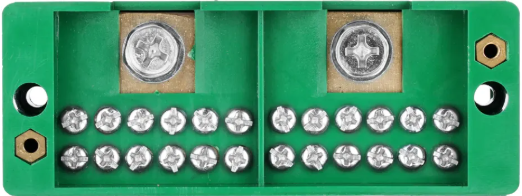
 Design with wire terminal box in Cirkit Designer
Introduction
A wire terminal box is an enclosure designed to house electrical connections, offering a safe and organized method for connecting multiple wires. It ensures that electrical connections are protected from environmental factors such as dust, moisture, and accidental contact, thereby enhancing safety and reliability in electrical systems. Wire terminal boxes are commonly used in residential, commercial, and industrial applications where multiple wires need to be securely connected and managed.
Explore Projects Built with wire terminal box
 Open Project in Cirkit Designer
 Open Project in Cirkit Designer
 Open Project in Cirkit Designer
 Open Project in Cirkit Designer
Explore Projects Built with wire terminal box
Open Project in Cirkit DesignerOpen Project in Cirkit DesignerOpen Project in Cirkit DesignerOpen Project in Cirkit DesignerCommon Applications and Use Cases
- Electrical distribution systems in homes and buildings
- Industrial control panels and machinery
- Automotive and marine wiring systems
- Renewable energy systems (e.g., solar panel installations)
- Data and communication networks
Technical Specifications
Below are the general technical specifications for a standard wire terminal box. Note that specific models may vary depending on the manufacturer and intended application.
Key Technical Details
- Material: ABS plastic, polycarbonate, or metal (e.g., aluminum, steel)
- Ingress Protection (IP) Rating: Typically IP54 to IP68 (depending on the model)
- Operating Temperature Range: -40°C to 85°C (varies by material)
- Voltage Rating: Up to 600V (check specific model for details)
- Current Rating: Up to 100A (varies by terminal type)
- Mounting Options: Wall-mounted, DIN rail-mounted, or surface-mounted
- Wire Compatibility: 22 AWG to 4 AWG (depending on terminal size)
Pin Configuration and Descriptions
Wire terminal boxes do not have traditional "pins" like electronic components but instead feature terminal blocks for wire connections. Below is a table describing the typical terminal block layout:
| Terminal Type | Description |
|---|---|
| Input Terminals | Connect incoming power or signal wires. |
| Output Terminals | Connect outgoing wires to devices or circuits. |
| Ground Terminal | Provides a secure connection for grounding wires. |
| Neutral Terminal | Used for neutral wire connections in AC systems. |
| Bus Bar (Optional) | Common connection point for distributing power or ground to multiple terminals. |
Usage Instructions
How to Use the Wire Terminal Box in a Circuit
- Select the Appropriate Box: Choose a wire terminal box that meets the voltage, current, and environmental requirements of your application.
- Prepare the Wires: Strip the insulation from the ends of the wires to expose the conductive core. Ensure the exposed length matches the terminal block specifications.
- Connect the Wires:
- Loosen the screws or clamps on the terminal block.
- Insert the stripped wire ends into the appropriate terminals (e.g., input, output, ground).
- Tighten the screws or clamps to secure the wires.
- Organize the Wires: Use cable ties or wire organizers to keep the wires neat and prevent accidental disconnections.
- Close the Enclosure: Once all connections are made, close the terminal box cover securely to protect the connections.
- Test the Connections: Power on the system and verify that all connections are functioning as expected.
Important Considerations and Best Practices
- Choose the Right Size: Ensure the terminal box has enough space for all wires and connections without overcrowding.
- Check the IP Rating: For outdoor or harsh environments, select a box with a high IP rating (e.g., IP67 or IP68).
- Use Proper Tools: Use a screwdriver or torque tool to tighten terminal screws to the recommended torque value.
- Label the Wires: Clearly label each wire to simplify troubleshooting and future maintenance.
- Avoid Overloading: Do not exceed the voltage or current rating of the terminal box or individual terminals.
Example: Connecting a Wire Terminal Box to an Arduino UNO
While wire terminal boxes are not directly connected to microcontrollers like the Arduino UNO, they can be used to organize and distribute power or signals in a project. Below is an example of how to use a wire terminal box to distribute power to multiple devices in an Arduino project:
// Example: Distributing power using a wire terminal box
// Connect the 5V and GND pins of the Arduino UNO to the input terminals
// of the wire terminal box. Use the output terminals to power multiple devices.

void setup() {
  // No specific code is required for the wire terminal box itself.
  // Ensure proper wiring and secure connections in the terminal box.
}

void loop() {
  // Example: Powering multiple devices connected via the terminal box
  // Device 1: LED connected to pin 9
  pinMode(9, OUTPUT);
  digitalWrite(9, HIGH); // Turn on the LED

  // Device 2: Servo motor connected to pin 10
  pinMode(10, OUTPUT);
  digitalWrite(10, HIGH); // Send power to the servo motor

  delay(1000); // Wait for 1 second
}
Troubleshooting and FAQs
Common Issues and Solutions
| Issue | Solution |
|---|---|
| Loose wire connections | Ensure all terminal screws or clamps are tightened securely. |
| Overheating of terminals | Check for overloaded circuits and ensure the current does not exceed ratings. |
| Corrosion or damage to terminals | Use a terminal box with a higher IP rating for better environmental protection. |
| Difficulty in organizing wires | Use cable ties, wire labels, and proper routing techniques. |
| Wires slipping out of terminals | Verify that the wire gauge matches the terminal size and re-tighten screws. |
FAQs
Can I use a wire terminal box for high-voltage applications?
- Yes, as long as the box is rated for the voltage and current of your application. Always check the specifications.
How do I choose the right IP rating for my terminal box?
- For indoor use, an IP54 rating is typically sufficient. For outdoor or wet environments, choose IP67 or IP68.
Can I use a wire terminal box for data cables?
- Yes, terminal boxes can be used for organizing and protecting data cables, but ensure the terminals are compatible with the cable type.
What tools do I need to install a wire terminal box?
- Common tools include a screwdriver, wire stripper, and cable ties. A torque tool may be needed for precise tightening.
Is it safe to use a wire terminal box outdoors?
- Yes, provided the box has a suitable IP rating (e.g., IP67 or IP68) to protect against water and dust ingress.