
How to Use USB UART CH340E: Examples, Pinouts, and Specs
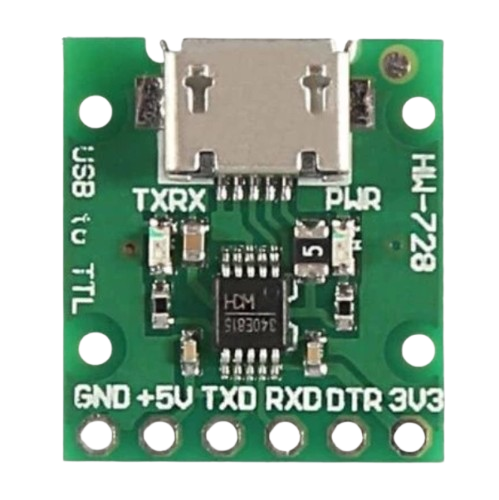
 Design with USB UART CH340E in Cirkit Designer
Introduction
The CH340E, manufactured by OEM (Part ID: USB UART 5V), is a USB to UART (Universal Asynchronous Receiver-Transmitter) bridge chip. It serves as an interface between USB ports and serial devices, enabling seamless communication. This compact and cost-effective chip is widely used in microcontroller applications, such as data transfer, programming, and debugging.
Explore Projects Built with USB UART CH340E
 Open Project in Cirkit Designer
 Open Project in Cirkit Designer
 Open Project in Cirkit Designer
 Open Project in Cirkit Designer
Explore Projects Built with USB UART CH340E
Open Project in Cirkit DesignerOpen Project in Cirkit DesignerOpen Project in Cirkit DesignerOpen Project in Cirkit DesignerCommon Applications
- USB-to-serial communication for microcontrollers (e.g., Arduino, ESP8266, ESP32)
- Serial debugging and monitoring
- Programming devices with UART interfaces
- USB-based data logging systems
- Industrial automation and IoT devices
Technical Specifications
Key Technical Details
| Parameter | Value |
|---|---|
| Manufacturer | OEM |
| Part ID | USB UART 5V |
| USB Interface | USB 2.0 Full-Speed |
| UART Baud Rate | 50 bps to 2 Mbps |
| Operating Voltage | 5V |
| Operating Temperature | -40°C to +85°C |
| Package Type | SOP-8 |
| Driver Support | Windows, macOS, Linux |
Pin Configuration and Descriptions
The CH340E comes in an SOP-8 package with the following pinout:
| Pin Number | Pin Name | Description |
|---|---|---|
| 1 | VCC | Power supply input (5V) |
| 2 | TXD | UART Transmit Data (output) |
| 3 | RXD | UART Receive Data (input) |
| 4 | GND | Ground |
| 5 | D+ | USB Data Positive |
| 6 | D- | USB Data Negative |
| 7 | NC | No Connection |
| 8 | RST | Reset pin (active low) |
Usage Instructions
How to Use the CH340E in a Circuit
- Power Supply: Connect the VCC pin to a 5V power source and the GND pin to ground.
- USB Connection: Connect the D+ and D- pins to the corresponding USB data lines. Use a USB connector for easy interfacing.
- UART Connection:
- Connect the TXD pin to the RX pin of the target device.
- Connect the RXD pin to the TX pin of the target device.
- Reset: Optionally, connect the RST pin to a reset circuit or leave it unconnected if not required.
- Driver Installation: Install the appropriate CH340 driver for your operating system. Drivers are available for Windows, macOS, and Linux.
Important Considerations
- Voltage Levels: Ensure the target device operates at 5V logic levels. If the device uses 3.3V logic, use a level shifter.
- Driver Installation: Without the correct driver, the CH340E may not be recognized by the host computer.
- Decoupling Capacitor: Place a 0.1 µF decoupling capacitor near the VCC pin for stable operation.
- USB Cable Quality: Use a high-quality USB cable to avoid communication errors.
Example: Connecting CH340E to Arduino UNO
The CH340E can be used to program or communicate with an Arduino UNO. Below is an example Arduino sketch for serial communication:
// Example: Serial communication using CH340E
// This code sends "Hello, World!" to the serial monitor every second.

void setup() {
  Serial.begin(9600); // Initialize serial communication at 9600 baud
}

void loop() {
  Serial.println("Hello, World!"); // Send message to serial monitor
  delay(1000); // Wait for 1 second
}
Troubleshooting and FAQs
Common Issues and Solutions
CH340E Not Recognized by Computer
- Cause: Missing or incorrect driver.
- Solution: Download and install the correct driver from the OEM website or a trusted source.
No Data Transmission
- Cause: Incorrect TXD/RXD connections.
- Solution: Verify that TXD is connected to the RX pin of the target device and RXD to the TX pin.
Communication Errors
- Cause: Poor-quality USB cable or electrical noise.
- Solution: Use a shielded USB cable and ensure proper grounding.
Device Overheating
- Cause: Excessive current draw or incorrect wiring.
- Solution: Check the circuit for shorts and ensure the power supply is within specifications.
FAQs
Q1: Can the CH340E operate at 3.3V?
A1: No, the CH340E is designed for 5V operation. Use a level shifter for 3.3V devices.
Q2: Is the CH340E compatible with macOS?
A2: Yes, but you may need to install a third-party driver for macOS.
Q3: What is the maximum baud rate supported by the CH340E?
A3: The CH340E supports baud rates up to 2 Mbps.
Q4: Can I use the CH340E for USB-to-serial debugging?
A4: Yes, the CH340E is ideal for serial debugging and monitoring applications.
Q5: How do I reset the CH340E?
A5: Pull the RST pin low momentarily to reset the chip.