
How to Use TFT LCD Display 2.25" 76x284: Examples, Pinouts, and Specs
 Design with TFT LCD Display 2.25" 76x284 in Cirkit Designer
Introduction
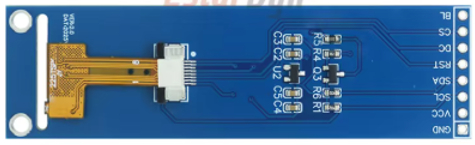
The TFT LCD Display 2.25" 76x284 (Manufacturer Part ID: TFT LCD ST7789 SPI 76x284 Display) by EstarDyn is a compact, high-quality thin-film transistor liquid crystal display. It features a resolution of 76x284 pixels and measures 2.25 inches diagonally, making it ideal for applications requiring a small yet vibrant display. This display is driven by the ST7789 controller and communicates via an SPI (Serial Peripheral Interface), ensuring fast and efficient data transfer.
Explore Projects Built with TFT LCD Display 2.25" 76x284
 Open Project in Cirkit Designer
 Open Project in Cirkit Designer
 Open Project in Cirkit Designer
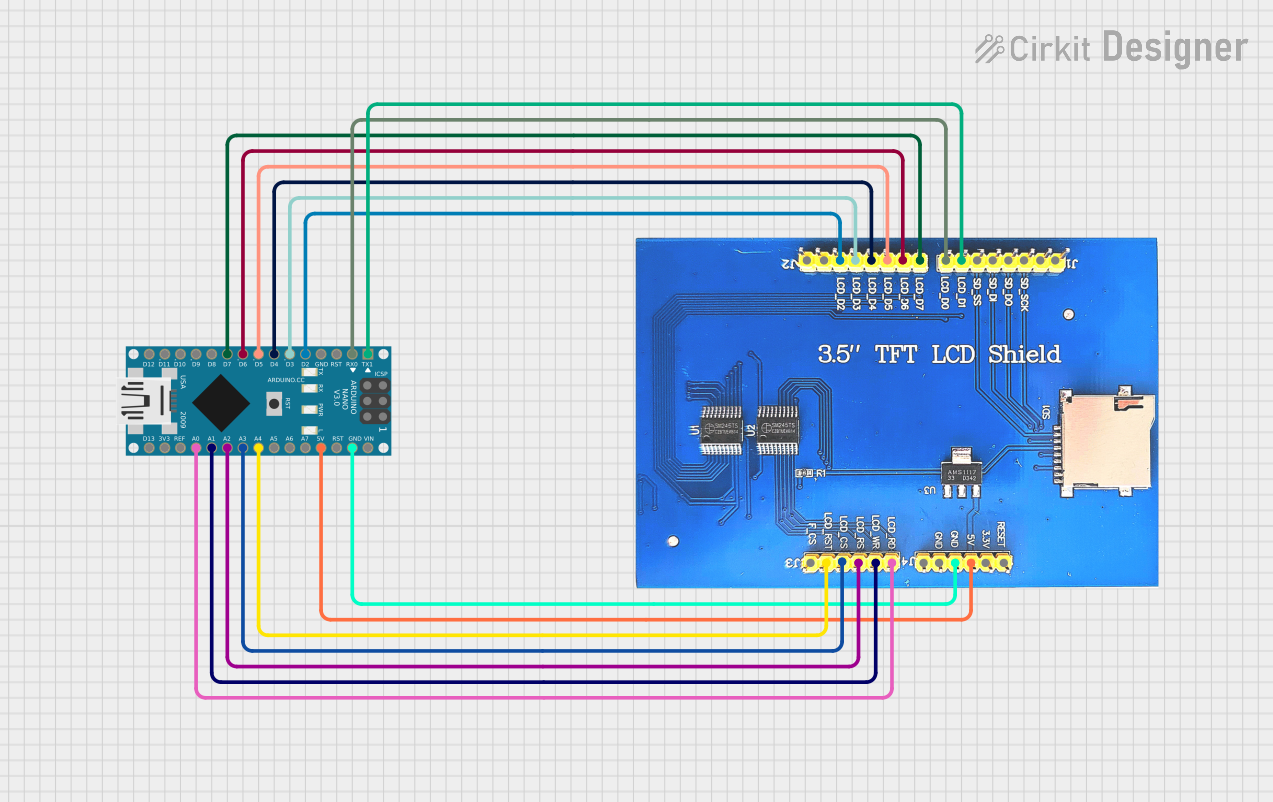 Open Project in Cirkit Designer
Explore Projects Built with TFT LCD Display 2.25" 76x284
Open Project in Cirkit DesignerOpen Project in Cirkit DesignerOpen Project in Cirkit DesignerOpen Project in Cirkit DesignerCommon Applications
- Wearable devices
- Portable medical equipment
- IoT devices and smart home systems
- Handheld gaming consoles
- Industrial control panels
- Hobbyist and DIY electronics projects
Technical Specifications
Below are the key technical details of the TFT LCD Display 2.25" 76x284:
| Parameter | Specification |
|---|---|
| Display Type | TFT LCD |
| Diagonal Size | 2.25 inches |
| Resolution | 76x284 pixels |
| Controller IC | ST7789 |
| Interface | SPI (4-wire) |
| Operating Voltage | 3.3V (logic and backlight) |
| Backlight | LED |
| Pixel Format | RGB 65K colors (16-bit color depth) |
| Operating Temperature | -20°C to 70°C |
| Dimensions | 27.8mm x 72.4mm x 2.5mm |
Pin Configuration
The TFT LCD Display has an 8-pin interface. Below is the pinout and description:
| Pin | Name | Description |
|---|---|---|
| 1 | GND | Ground connection |
| 2 | VCC | Power supply (3.3V) |
| 3 | SCL | Serial Clock Line (SPI clock input) |
| 4 | SDA | Serial Data Line (SPI data input/output) |
| 5 | RES | Reset pin (active low) |
| 6 | DC | Data/Command control pin (High = Data, Low = Command) |
| 7 | CS | Chip Select (active low) |
| 8 | BLK | Backlight control (connect to 3.3V for always-on or PWM for brightness control) |
Usage Instructions
Connecting the Display
To use the TFT LCD Display with a microcontroller (e.g., Arduino UNO), follow these steps:
- Power Supply: Connect the VCC pin to a 3.3V power source and the GND pin to ground.
- SPI Interface: Connect the SCL (SPI clock) and SDA (SPI data) pins to the corresponding SPI pins on the microcontroller.
- Control Pins:
- Connect the RES pin to a GPIO pin for resetting the display.
- Connect the DC pin to a GPIO pin to toggle between data and command modes.
- Connect the CS pin to a GPIO pin to enable or disable the display.
- Backlight: Connect the BLK pin to 3.3V for constant backlight or to a PWM-capable GPIO pin for brightness control.
Example Arduino Code
Below is an example of how to interface the display with an Arduino UNO using the Adafruit_GFX and Adafruit_ST7789 libraries:
#include <Adafruit_GFX.h>      // Core graphics library
#include <Adafruit_ST7789.h>   // ST7789 driver library
#include <SPI.h>               // SPI library

// Define pin connections
#define TFT_CS    10  // Chip Select pin
#define TFT_RST   9   // Reset pin
#define TFT_DC    8   // Data/Command pin

// Initialize the display object
Adafruit_ST7789 tft = Adafruit_ST7789(TFT_CS, TFT_DC, TFT_RST);

void setup() {
  // Initialize serial communication for debugging
  Serial.begin(9600);
  Serial.println("TFT LCD Display Test");

  // Initialize the display
  tft.init(76, 284);  // Initialize with display resolution
  tft.setRotation(1); // Set display orientation (0-3)

  // Fill the screen with a color
  tft.fillScreen(ST77XX_BLACK);

  // Display some text
  tft.setTextColor(ST77XX_WHITE);
  tft.setTextSize(1);
  tft.setCursor(10, 10);
  tft.println("Hello, TFT!");
}

void loop() {
  // Add your code here to update the display
}
Best Practices
- Ensure the power supply is stable and within the specified voltage range (3.3V).
- Use level shifters if interfacing with a 5V logic microcontroller (e.g., Arduino UNO).
- Avoid touching the display surface to prevent damage or smudges.
- Use decoupling capacitors near the power pins to reduce noise.
Troubleshooting and FAQs
Common Issues
The display does not turn on.
- Verify that the power supply is 3.3V and properly connected.
- Check the connections for loose wires or incorrect pin mapping.
- Ensure the CS pin is set low to enable the display.
The display shows a blank screen.
- Confirm that the SPI connections (SCL and SDA) are correctly wired.
- Check the RES pin to ensure the display is properly reset during initialization.
- Verify that the correct resolution (76x284) is passed to the initialization function.
The display flickers or shows distorted graphics.
- Ensure the SPI clock speed is within the supported range of the ST7789 controller.
- Use shorter wires to reduce signal interference.
- Add pull-up resistors to the SPI lines if necessary.
The backlight does not work.
- Check the BLK pin connection. If using PWM, ensure the signal is correctly configured.
- Verify that the backlight voltage is 3.3V.
FAQs
Q: Can I use this display with a 5V microcontroller?
A: Yes, but you must use level shifters to convert the 5V logic signals to 3.3V to avoid damaging the display.
Q: What is the maximum SPI clock speed supported?
A: The ST7789 controller typically supports SPI clock speeds up to 15 MHz. Check your microcontroller's capabilities for compatibility.
Q: Can I control the backlight brightness?
A: Yes, connect the BLK pin to a PWM-capable GPIO pin and adjust the duty cycle to control brightness.
Q: Is this display compatible with Raspberry Pi?
A: Yes, the display can be used with Raspberry Pi via SPI, but you may need to configure the SPI interface and install appropriate libraries.
By following this documentation, you can successfully integrate and operate the TFT LCD Display 2.25" 76x284 in your projects.