
How to Use tja1051 can module: Examples, Pinouts, and Specs
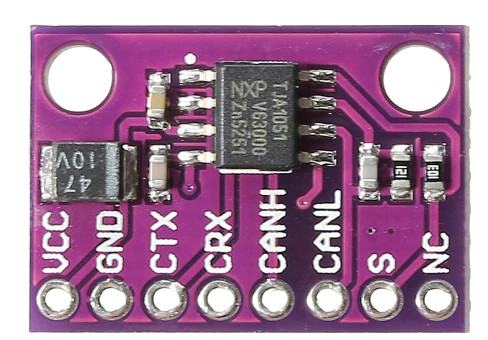
 Design with tja1051 can module in Cirkit Designer
Introduction
The TJA1051 is a high-speed CAN (Controller Area Network) transceiver manufactured by NXP. It is designed to facilitate robust communication between a CAN protocol controller and the physical CAN bus. With support for data rates up to 1 Mbps, the TJA1051 is widely used in automotive and industrial applications where reliable and efficient communication is critical.
This module is engineered to operate in harsh environments, offering fault tolerance, low power consumption, and compliance with ISO 11898-2:2016 standards. It is ideal for applications such as vehicle networking, industrial automation, and other systems requiring high-speed data exchange.
Explore Projects Built with tja1051 can module
 Open Project in Cirkit Designer
 Open Project in Cirkit Designer
 Open Project in Cirkit Designer
 Open Project in Cirkit Designer
Explore Projects Built with tja1051 can module
Open Project in Cirkit DesignerOpen Project in Cirkit DesignerOpen Project in Cirkit DesignerOpen Project in Cirkit DesignerCommon Applications
- Automotive systems (e.g., engine control units, body control modules)
- Industrial automation and control
- Robotics and embedded systems
- Building automation
- Medical devices requiring CAN communication
Technical Specifications
Key Technical Details
| Parameter | Value |
|---|---|
| Supply Voltage (Vcc) | 4.5 V to 5.5 V |
| Data Rate | Up to 1 Mbps |
| Operating Temperature | -40°C to +125°C |
| Bus Voltage Range | -27 V to +40 V |
| Standby Current | < 10 µA |
| ESD Protection | ±8 kV (HBM) |
| Compliance | ISO 11898-2:2016 |
Pin Configuration and Descriptions
The TJA1051 is typically available in an 8-pin SO (Small Outline) package. Below is the pinout and description:
| Pin Number | Pin Name | Description |
|---|---|---|
| 1 | TXD | Transmit Data Input: Connects to the CAN controller's TXD pin. |
| 2 | GND | Ground: Connect to the system ground. |
| 3 | VCC | Supply Voltage: Connect to a 5V power supply. |
| 4 | RXD | Receive Data Output: Connects to the CAN controller's RXD pin. |
| 5 | VIO | I/O Voltage Supply: Allows interfacing with lower voltage controllers. |
| 6 | CANL | CAN Low Line: Connect to the CAN bus low line. |
| 7 | CANH | CAN High Line: Connect to the CAN bus high line. |
| 8 | STB | Standby Control: Controls the module's low-power standby mode. |
Usage Instructions
How to Use the TJA1051 in a Circuit
- Power Supply: Connect the VCC pin to a regulated 5V power supply and the GND pin to the system ground. If your microcontroller operates at a lower voltage (e.g., 3.3V), connect the VIO pin to the microcontroller's supply voltage.
- CAN Bus Connection: Connect the CANH and CANL pins to the corresponding lines of the CAN bus. Use a 120-ohm termination resistor between CANH and CANL at each end of the bus.
- Microcontroller Interface:
- Connect the TXD pin to the microcontroller's CAN TX pin.
- Connect the RXD pin to the microcontroller's CAN RX pin.
- Standby Mode: Use the STB pin to control the module's standby mode. Pull the STB pin low to enable normal operation or high to enter standby mode.
Important Considerations
- Ensure proper termination of the CAN bus with 120-ohm resistors at both ends to avoid signal reflections.
- Avoid exceeding the maximum voltage ratings for any pin to prevent damage to the module.
- Use decoupling capacitors (e.g., 100 nF) close to the VCC pin to stabilize the power supply.
- For long CAN bus lines, ensure proper shielding and grounding to minimize noise and interference.
Example: Connecting TJA1051 to Arduino UNO
Below is an example of how to use the TJA1051 with an Arduino UNO for basic CAN communication:
Circuit Connections
| TJA1051 Pin | Arduino UNO Pin |
|---|---|
| TXD | D2 |
| RXD | D3 |
| VCC | 5V |
| GND | GND |
| STB | GND (Normal Mode) |
Arduino Code Example
#include <SPI.h>
#include <mcp_can.h> // Include the MCP_CAN library for CAN communication

// Define the CAN module's CS pin
#define CAN_CS_PIN 10

// Initialize the CAN object
MCP_CAN CAN(CAN_CS_PIN);

void setup() {
  Serial.begin(9600); // Initialize serial communication for debugging
  while (!Serial);

  // Initialize the CAN bus at 500 kbps
  if (CAN.begin(MCP_ANY, 500000, MCP_8MHZ) == CAN_OK) {
    Serial.println("CAN bus initialized successfully!");
  } else {
    Serial.println("Error initializing CAN bus.");
    while (1);
  }

  CAN.setMode(MCP_NORMAL); // Set the CAN module to normal mode
  Serial.println("CAN module set to normal mode.");
}

void loop() {
  // Send a test message
  byte data[8] = {0x01, 0x02, 0x03, 0x04, 0x05, 0x06, 0x07, 0x08};
  if (CAN.sendMsgBuf(0x100, 0, 8, data) == CAN_OK) {
    Serial.println("Message sent successfully!");
  } else {
    Serial.println("Error sending message.");
  }

  delay(1000); // Wait 1 second before sending the next message
}
Troubleshooting and FAQs
Common Issues and Solutions
No Communication on the CAN Bus
- Ensure the CAN bus is properly terminated with 120-ohm resistors at both ends.
- Verify that the TXD and RXD pins are correctly connected to the microcontroller.
- Check the power supply voltage and ensure it is within the specified range (4.5V to 5.5V).
High Standby Current
- Confirm that the STB pin is pulled low for normal operation. If left floating, the module may not function correctly.
Data Corruption or Noise
- Use shielded cables for the CAN bus to reduce electromagnetic interference.
- Ensure proper grounding of the system to avoid ground loops.
Module Overheating
- Check for short circuits on the CANH and CANL lines.
- Verify that the bus voltage does not exceed the specified range (-27V to +40V).
FAQs
Q: Can the TJA1051 operate at 3.3V logic levels?
A: Yes, the TJA1051 supports 3.3V logic levels when the VIO pin is connected to a 3.3V supply.
Q: What is the maximum cable length for the CAN bus?
A: The maximum cable length depends on the data rate. For example, at 1 Mbps, the maximum length is approximately 40 meters. For lower data rates, longer cable lengths are possible.
Q: Is the TJA1051 compatible with the MCP2515 CAN controller?
A: Yes, the TJA1051 can be used with the MCP2515 CAN controller for reliable CAN communication.
This concludes the documentation for the TJA1051 CAN module. For further details, refer to the official datasheet provided by NXP.