
How to Use 7" AV Monitor: Examples, Pinouts, and Specs
 Design with 7" AV Monitor in Cirkit Designer
Introduction
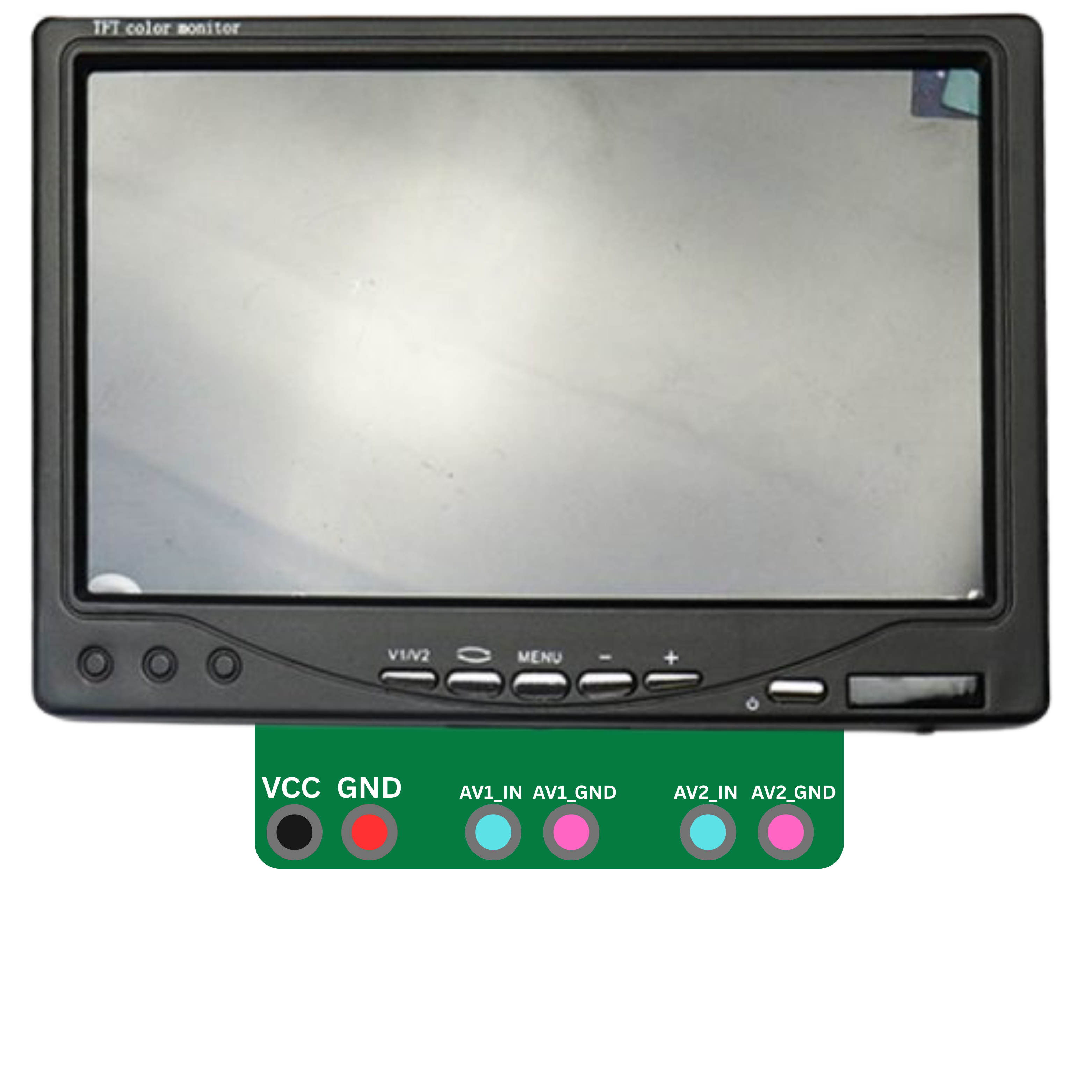
The 7" AV Monitor is a compact audio-visual display device designed to handle video signals and provide audio output. With its 7-inch screen size, it is ideal for applications requiring a portable or secondary display. This monitor is commonly used in surveillance systems, portable media setups, automotive entertainment systems, and as an auxiliary display for computers or other video sources. Its lightweight design and versatile input options make it a popular choice for both professional and personal use.
Explore Projects Built with 7" AV Monitor
 Open Project in Cirkit Designer
 Open Project in Cirkit Designer
 Open Project in Cirkit Designer
 Open Project in Cirkit Designer
Explore Projects Built with 7" AV Monitor
Open Project in Cirkit DesignerOpen Project in Cirkit DesignerOpen Project in Cirkit DesignerOpen Project in Cirkit DesignerTechnical Specifications
Below are the key technical details and pin configurations for the 7" AV Monitor:
General Specifications
| Parameter | Value |
|---|---|
| Screen Size | 7 inches |
| Resolution | 800 x 480 pixels |
| Aspect Ratio | 16:9 |
| Input Signal Types | AV (RCA), VGA, HDMI (optional) |
| Power Supply Voltage | 12V DC |
| Power Consumption | ~6W |
| Audio Output | Built-in speaker, 3.5mm jack |
| Operating Temperature | -10°C to 60°C |
| Dimensions | ~180mm x 120mm x 25mm |
| Weight | ~300g |
Pin Configuration (AV Input)
| Pin Name | Description |
|---|---|
| Video In | RCA connector for composite video input |
| Audio In | RCA connector for left and right audio |
| Power In | 12V DC barrel jack for power supply |
Pin Configuration (VGA Input, if applicable)
| Pin Number | Signal Name | Description |
|---|---|---|
| 1 | Red | Red video signal |
| 2 | Green | Green video signal |
| 3 | Blue | Blue video signal |
| 5 | Ground | Signal ground |
| 13 | Horizontal Sync | Horizontal synchronization signal |
| 14 | Vertical Sync | Vertical synchronization signal |
Pin Configuration (HDMI Input, if applicable)
| Pin Number | Signal Name | Description |
|---|---|---|
| 1 | TMDS Data2+ | HDMI video/audio data |
| 2 | TMDS Data2 Shield | Shield for Data2 |
| 3 | TMDS Data2- | HDMI video/audio data |
| 18 | +5V Power | Power for HDMI connection |
| 19 | Hot Plug Detect | Detects HDMI connection |
Usage Instructions
Connecting the Monitor
- Power Supply: Connect a 12V DC power adapter to the monitor's power input jack.
- Video Input:
- For AV input, connect the RCA video cable to the "Video In" port.
- For VGA input, connect a VGA cable from your source device to the monitor.
- For HDMI input (if supported), connect an HDMI cable from your source device to the monitor.
- Audio Input: If using AV input, connect the RCA audio cables to the "Audio In" ports. For HDMI, audio is transmitted along with the video signal.
- Audio Output: Use the built-in speaker or connect headphones/speakers to the 3.5mm audio jack.
Important Considerations
- Ensure the power supply voltage is within the specified range (12V DC). Using an incorrect voltage may damage the monitor.
- Avoid exposing the monitor to extreme temperatures or moisture to prevent damage.
- Use high-quality cables to minimize signal loss and interference.
- If using the monitor with an Arduino UNO or other microcontroller, you may need an external video signal generator or shield to output a compatible video signal.
Example: Using the Monitor with an Arduino UNO
To display video from an Arduino UNO, you can use a composite video signal generator library like TVout. Below is an example code snippet:
#include <TVout.h>
#include <fontALL.h>

// Create a TVout object
TVout TV;

// Setup function
void setup() {
  TV.begin(NTSC, 120, 96); // Initialize TVout with NTSC format and resolution
  TV.select_font(font6x8); // Select a font for text display
  TV.println("Hello, 7\" AV Monitor!"); // Display text on the monitor
}

// Loop function
void loop() {
  // Add any additional functionality here
}
Note: The TVout library requires specific hardware connections to generate a composite video signal. Refer to the library documentation for detailed wiring instructions.
Troubleshooting and FAQs
Common Issues
No Display on the Monitor:
- Ensure the power adapter is properly connected and supplying 12V DC.
- Verify that the video source is powered on and outputting a signal.
- Check the video cable connections for any loose or damaged connectors.
Distorted or Noisy Video:
- Use high-quality cables to reduce interference.
- Ensure the video source resolution matches the monitor's supported resolution (e.g., 800x480 for VGA).
No Audio Output:
- Check the audio cable connections.
- Ensure the volume is not muted or set too low on the monitor or source device.
Monitor Does Not Power On:
- Verify the power adapter is functional and providing the correct voltage.
- Inspect the power input jack for any damage.
FAQs
Q: Can I use this monitor with a Raspberry Pi?
A: Yes, the monitor can be connected to a Raspberry Pi using the HDMI or composite video output, depending on the model of the Raspberry Pi.
Q: Does the monitor support touchscreen functionality?
A: No, this 7" AV Monitor does not include touchscreen capabilities.
Q: Can I mount the monitor on a wall or stand?
A: Yes, the monitor typically includes mounting holes or brackets for wall or stand installation.
Q: Is the monitor compatible with PAL video signals?
A: Most models support both NTSC and PAL video formats. Check the specific model's documentation for confirmation.
By following this documentation, you can effectively integrate and troubleshoot the 7" AV Monitor in your projects.