
How to Use FLE-113-01-G-DV-K: Examples, Pinouts, and Specs
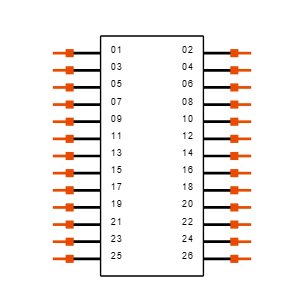
 Design with FLE-113-01-G-DV-K in Cirkit Designer
Introduction
The FLE-113-01-G-DV-K is a compact LED indicator light designed for panel mounting. It is widely used in electronic circuits to provide visual feedback or status indication. This component is known for its low power consumption, durability, and availability in multiple colors, making it suitable for a variety of applications.
Explore Projects Built with FLE-113-01-G-DV-K
 Open Project in Cirkit Designer
 Open Project in Cirkit Designer
 Open Project in Cirkit Designer
 Open Project in Cirkit Designer
Explore Projects Built with FLE-113-01-G-DV-K
Open Project in Cirkit DesignerOpen Project in Cirkit DesignerOpen Project in Cirkit DesignerOpen Project in Cirkit DesignerCommon Applications and Use Cases
- Status indication in control panels
- Power-on indicators in electronic devices
- Fault or error signaling in industrial equipment
- User feedback in consumer electronics
- Automotive dashboard indicators
Technical Specifications
Below are the key technical details of the FLE-113-01-G-DV-K:
| Parameter | Value |
|---|---|
| Operating Voltage | 2.0V to 3.3V (typical 2.2V) |
| Forward Current (If) | 20mA (typical) |
| Power Consumption | < 0.1W |
| Mounting Type | Panel Mount |
| LED Colors Available | Red, Green, Yellow, Blue |
| Viewing Angle | 120° |
| Housing Material | Polycarbonate (PC) |
| Operating Temperature | -40°C to +85°C |
| Dimensions | 11.3mm x 5.0mm x 5.0mm |
Pin Configuration and Descriptions
The FLE-113-01-G-DV-K has two pins for electrical connection. The table below describes the pin configuration:
| Pin Number | Name | Description |
|---|---|---|
| 1 | Anode (+) | Connect to the positive terminal of the power supply. |
| 2 | Cathode (-) | Connect to the negative terminal or ground. |
Usage Instructions
How to Use the FLE-113-01-G-DV-K in a Circuit
Determine the Operating Voltage: Ensure the power supply voltage matches the LED's operating voltage (2.0V to 3.3V). Use a current-limiting resistor to prevent overcurrent.
Calculate the Resistor Value: Use Ohm's Law to calculate the resistor value: [ R = \frac{V_{supply} - V_{forward}}{I_{forward}} ] For example, if the supply voltage is 5V and the forward voltage is 2.2V with a forward current of 20mA: [ R = \frac{5V - 2.2V}{0.02A} = 140\ \Omega ] Use the nearest standard resistor value (e.g., 150Ω).
Connect the LED:
- Connect the anode (longer pin) to the positive terminal of the power supply through the resistor.
- Connect the cathode (shorter pin) to the ground.
Test the Circuit: Power on the circuit and verify that the LED lights up.
Important Considerations and Best Practices
- Polarity: Ensure correct polarity when connecting the LED. Reversing the polarity may damage the component.
- Current Limiting: Always use a resistor to limit the current through the LED.
- Heat Management: Operate the LED within the specified temperature range to avoid overheating.
- Panel Mounting: Secure the LED properly in the panel to prevent mechanical stress.
Example: Connecting to an Arduino UNO
The FLE-113-01-G-DV-K can be easily connected to an Arduino UNO for status indication. Below is an example code to blink the LED:
// Define the pin connected to the LED
const int ledPin = 13; // Use digital pin 13 for the LED

void setup() {
  pinMode(ledPin, OUTPUT); // Set the LED pin as an output
}

void loop() {
  digitalWrite(ledPin, HIGH); // Turn the LED on
  delay(1000); // Wait for 1 second
  digitalWrite(ledPin, LOW); // Turn the LED off
  delay(1000); // Wait for 1 second
}
Troubleshooting and FAQs
Common Issues and Solutions
LED Does Not Light Up:
Cause: Incorrect polarity.
Solution: Verify the anode and cathode connections.
Cause: No current-limiting resistor.
Solution: Add a resistor in series with the LED.
LED Flickers:
- Cause: Unstable power supply.
- Solution: Use a regulated power supply or add a capacitor for filtering.
LED Burns Out:
- Cause: Excessive current.
- Solution: Recalculate the resistor value and ensure it limits the current to 20mA.
LED is Dim:
- Cause: Insufficient voltage or high resistor value.
- Solution: Verify the supply voltage and adjust the resistor value.
FAQs
Q1: Can I use the FLE-113-01-G-DV-K with a 12V power supply?
A1: Yes, but you must use an appropriate resistor to limit the current. For a 12V supply, calculate the resistor value as follows:
[
R = \frac{12V - 2.2V}{0.02A} = 490\ \Omega
]
Use a 470Ω or 510Ω resistor.
Q2: Is the LED waterproof?
A2: No, the FLE-113-01-G-DV-K is not waterproof. Use it in dry environments or enclosures.
Q3: Can I use PWM to dim the LED?
A3: Yes, the LED can be dimmed using Pulse Width Modulation (PWM) from a microcontroller like Arduino.
Q4: What is the lifespan of the LED?
A4: The typical lifespan is 50,000 hours under normal operating conditions.
This concludes the documentation for the FLE-113-01-G-DV-K.