Cirkit Designer Logo
Cirkit Designer
Your all-in-one circuit design IDE
Home / 
Component Documentation

How to Use KEYES薄膜壓力感知器: Examples, Pinouts, and Specs
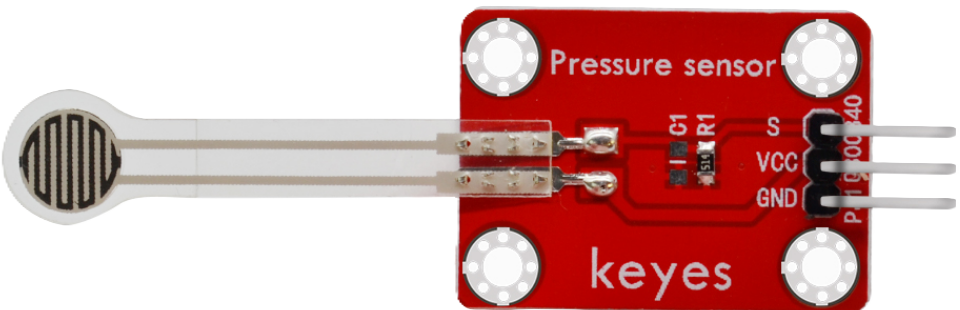

Image of KEYES薄膜壓力感知器
Cirkit Designer LogoDesign with KEYES薄膜壓力感知器 in Cirkit Designer

Introduction

The KEYES薄膜壓力感知器 (Manufacturer Part ID: KYS017) is a pressure-sensitive sensor designed to detect changes in pressure applied to its surface. Manufactured by Arduino, this sensor is ideal for applications requiring touch-sensitive controls, pressure measurement, or force detection. Its thin, flexible design makes it suitable for integration into compact and portable devices.

Explore Projects Built with KEYES薄膜壓力感知器
Use Cirkit Designer to design, explore, and prototype these projects online. Some projects support real-time simulation. Click "Open Project" to start designing instantly!
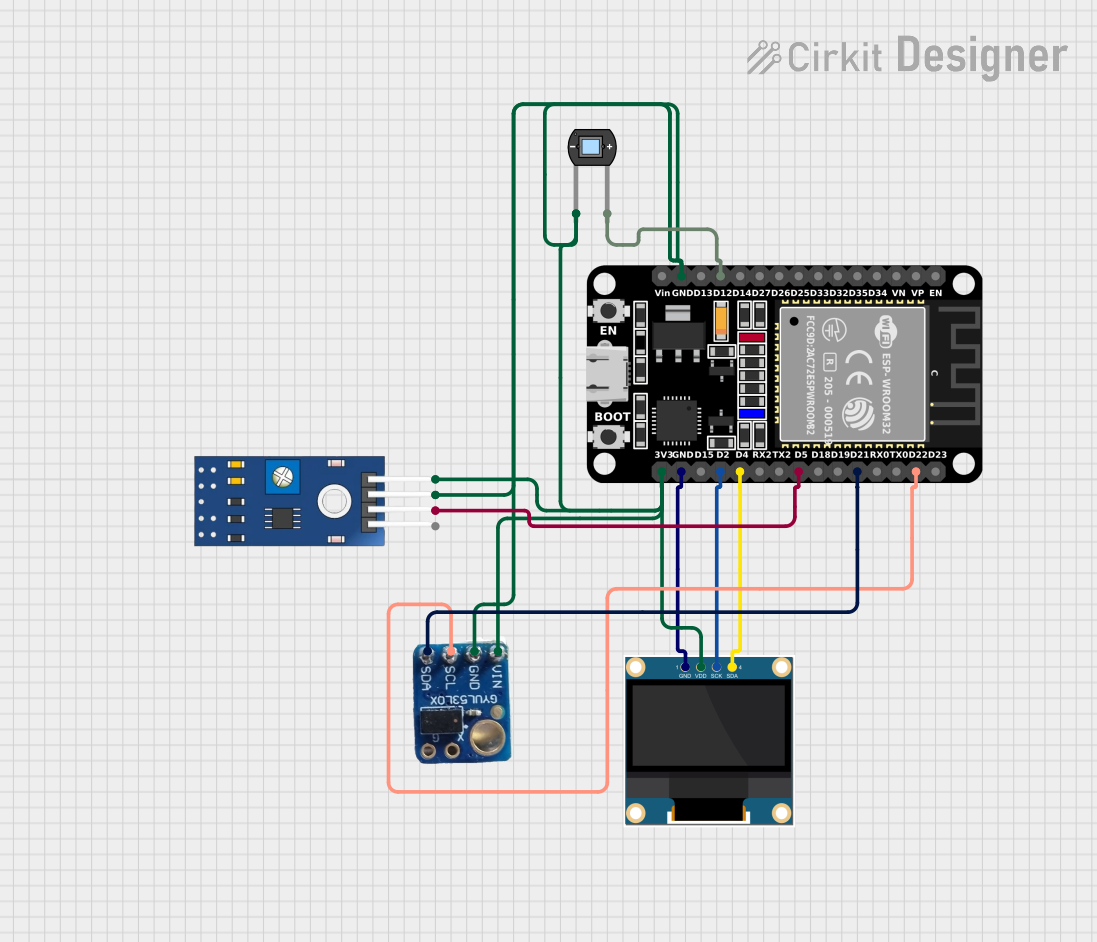
ESP32-Based Eye Pressure Monitor with OLED Display and Multiple Sensors
Image of test4: A project utilizing KEYES薄膜壓力感知器 in a practical application
This circuit is designed to monitor eye pressure and deformation using a photodiode, a TCRT 5000 IR sensor, and a VL53L0X time-of-flight distance sensor. The ESP32 microcontroller reads sensor data, processes it to determine eye pressure status, and displays the results on a 0.96" OLED screen. It includes safety features, sensor calibration, and the ability to display sensor values and eye pressure status in real-time.
Cirkit Designer LogoOpen Project in Cirkit Designer
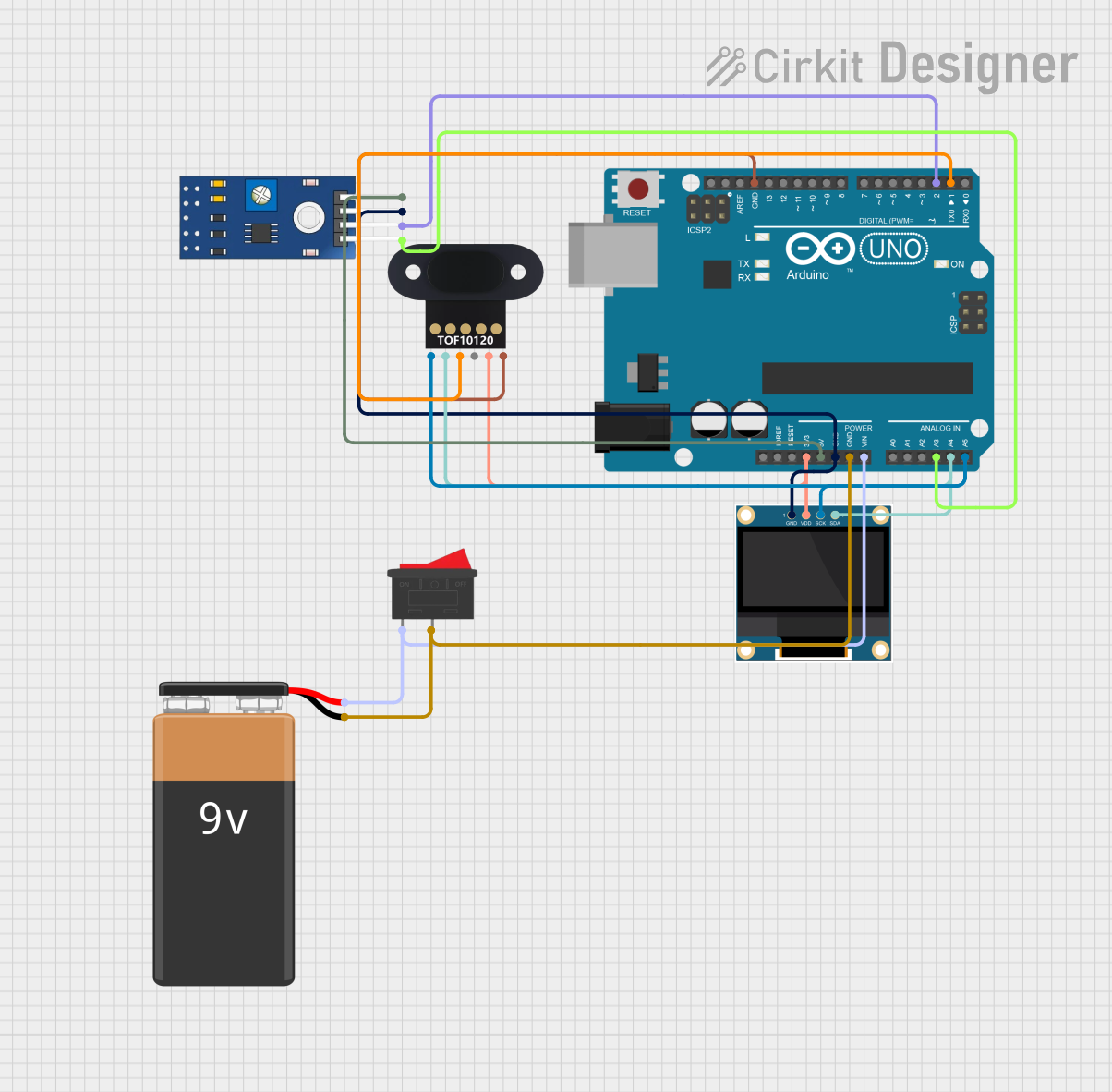
Arduino UNO-Based Eye Pressure Monitor with OLED Display and TOF Sensor
Image of test1: A project utilizing KEYES薄膜壓力感知器 in a practical application
This circuit is designed to measure eye pressure and display the status on a 0.96" OLED screen, using an Arduino UNO as the central processing unit. It includes a TOF10120 sensor for distance measurement and a TCRT 5000 IR sensor for detecting surface changes, both interfacing with the Arduino. A 9V battery powers the system, with a rocker switch to control power flow, and the Arduino manages sensor data processing and OLED display output to indicate eye pressure as high, normal, or low.
Cirkit Designer LogoOpen Project in Cirkit Designer
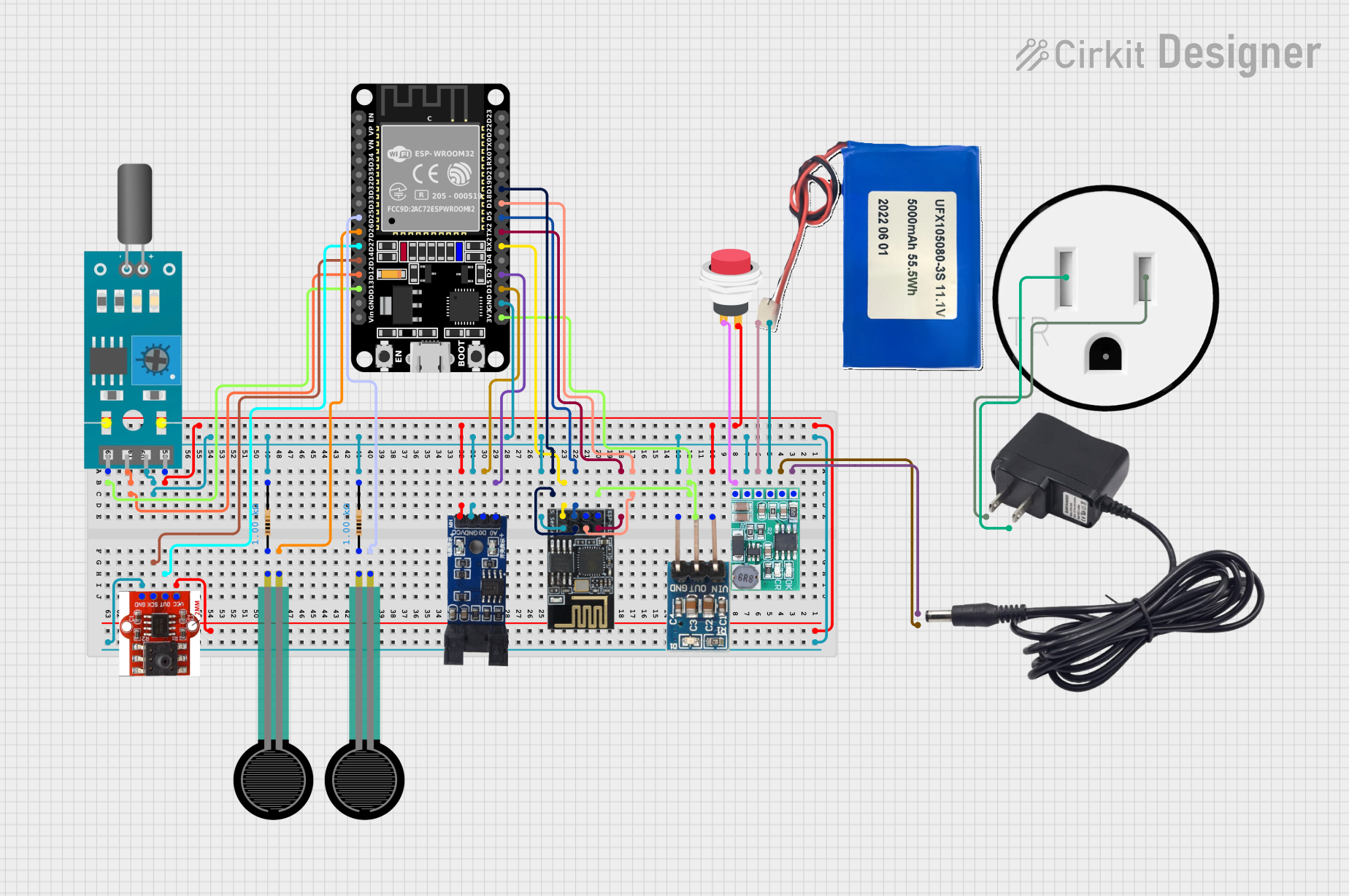
ESP32 and ESP8266 Wi-Fi Controlled Sensor Hub with Battery Backup
Image of baby guard: A project utilizing KEYES薄膜壓力感知器 in a practical application
This circuit is a sensor monitoring and data transmission system powered by a Li-ion battery and a 12V adapter. It includes various sensors (tilt, optical encoder, force sensing resistors, and air pressure) connected to an ESP32 microcontroller, which reads sensor data and transmits it via a WiFi module (ESP8266-01). The system is designed to provide real-time sensor data over a WiFi network.
Cirkit Designer LogoOpen Project in Cirkit Designer
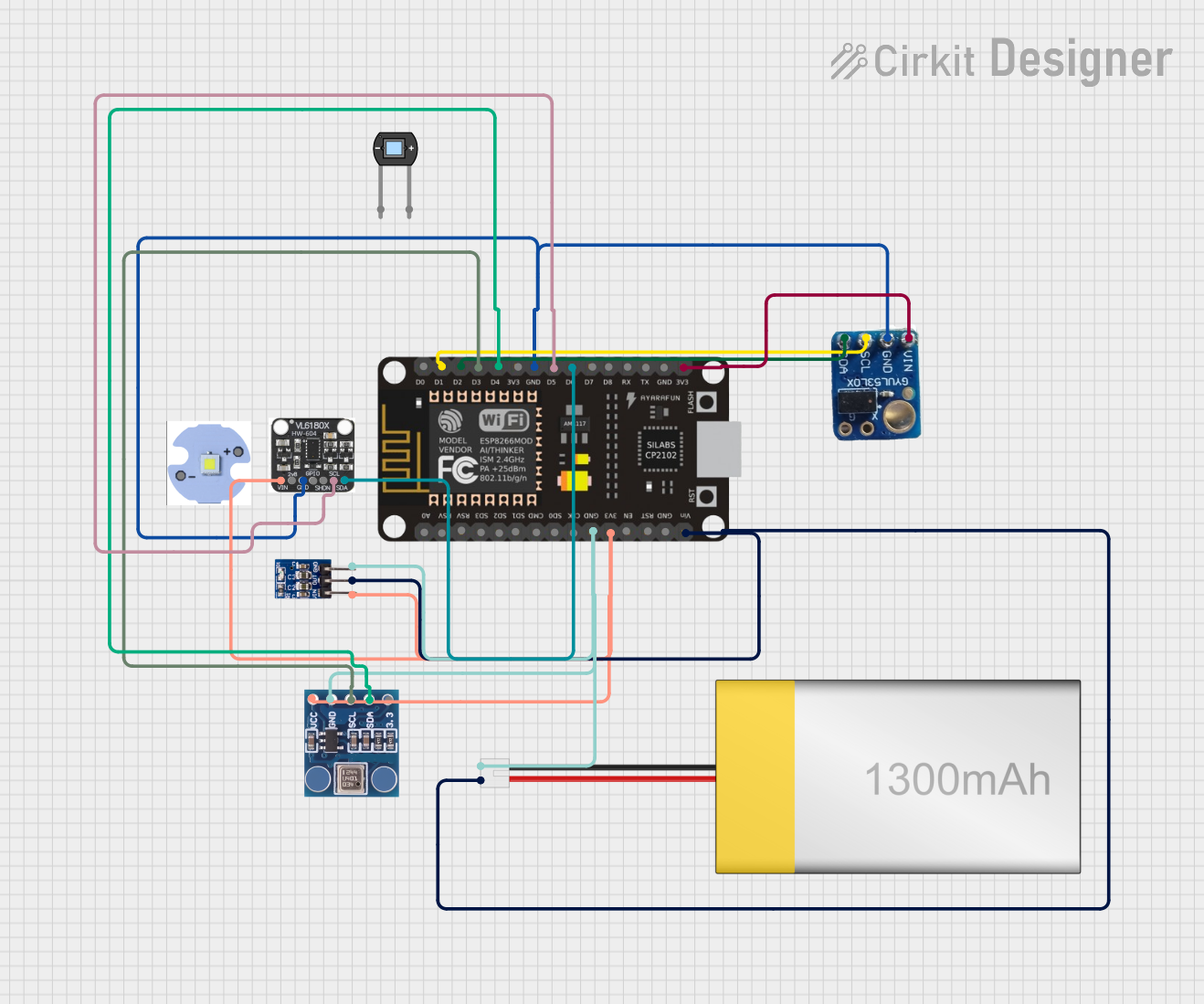
ESP8266 NodeMCU Based Multi-Sensor Monitoring System
Image of test 2: A project utilizing KEYES薄膜壓力感知器 in a practical application
This circuit is designed around an ESP8266 NodeMCU microcontroller, which interfaces with a BMP180 barometric pressure sensor, a VL53L0X time-of-flight distance sensor, and a VL6180X proximity and ambient light sensor. The microcontroller collects environmental data such as atmospheric pressure, temperature, and distances to objects, and processes this information to monitor conditions such as eye pressure. The circuit is powered by a LiPoly battery, regulated by an AMS1117 3.3V voltage regulator, and is likely intended for applications in health monitoring or environmental sensing.
Cirkit Designer LogoOpen Project in Cirkit Designer

Explore Projects Built with KEYES薄膜壓力感知器

Use Cirkit Designer to design, explore, and prototype these projects online. Some projects support real-time simulation. Click "Open Project" to start designing instantly!
Image of test4: A project utilizing KEYES薄膜壓力感知器 in a practical application
ESP32-Based Eye Pressure Monitor with OLED Display and Multiple Sensors
This circuit is designed to monitor eye pressure and deformation using a photodiode, a TCRT 5000 IR sensor, and a VL53L0X time-of-flight distance sensor. The ESP32 microcontroller reads sensor data, processes it to determine eye pressure status, and displays the results on a 0.96" OLED screen. It includes safety features, sensor calibration, and the ability to display sensor values and eye pressure status in real-time.
Cirkit Designer LogoOpen Project in Cirkit Designer
Image of test1: A project utilizing KEYES薄膜壓力感知器 in a practical application
Arduino UNO-Based Eye Pressure Monitor with OLED Display and TOF Sensor
This circuit is designed to measure eye pressure and display the status on a 0.96" OLED screen, using an Arduino UNO as the central processing unit. It includes a TOF10120 sensor for distance measurement and a TCRT 5000 IR sensor for detecting surface changes, both interfacing with the Arduino. A 9V battery powers the system, with a rocker switch to control power flow, and the Arduino manages sensor data processing and OLED display output to indicate eye pressure as high, normal, or low.
Cirkit Designer LogoOpen Project in Cirkit Designer
Image of baby guard: A project utilizing KEYES薄膜壓力感知器 in a practical application
ESP32 and ESP8266 Wi-Fi Controlled Sensor Hub with Battery Backup
This circuit is a sensor monitoring and data transmission system powered by a Li-ion battery and a 12V adapter. It includes various sensors (tilt, optical encoder, force sensing resistors, and air pressure) connected to an ESP32 microcontroller, which reads sensor data and transmits it via a WiFi module (ESP8266-01). The system is designed to provide real-time sensor data over a WiFi network.
Cirkit Designer LogoOpen Project in Cirkit Designer
Image of test 2: A project utilizing KEYES薄膜壓力感知器 in a practical application
ESP8266 NodeMCU Based Multi-Sensor Monitoring System
This circuit is designed around an ESP8266 NodeMCU microcontroller, which interfaces with a BMP180 barometric pressure sensor, a VL53L0X time-of-flight distance sensor, and a VL6180X proximity and ambient light sensor. The microcontroller collects environmental data such as atmospheric pressure, temperature, and distances to objects, and processes this information to monitor conditions such as eye pressure. The circuit is powered by a LiPoly battery, regulated by an AMS1117 3.3V voltage regulator, and is likely intended for applications in health monitoring or environmental sensing.
Cirkit Designer LogoOpen Project in Cirkit Designer

Common Applications

  • Touch-sensitive control panels
  • Pressure-sensitive input devices
  • Robotics and automation systems
  • Wearable technology
  • Force measurement in industrial applications

Technical Specifications

The following table outlines the key technical details of the KEYES薄膜壓力感知器:

Parameter Specification
Operating Voltage 3.3V to 5V
Operating Current < 10mA
Pressure Range 0 to 10kg/cm²
Response Time < 1ms
Operating Temperature -20°C to 60°C
Sensor Type Resistive pressure sensor
Dimensions 18mm x 0.2mm (sensor area diameter)

Pin Configuration

The KEYES薄膜壓力感知器 has a simple two-pin interface. The pin configuration is as follows:

Pin Name Description
1 Signal Outputs an analog voltage proportional to pressure.
2 GND Ground connection for the sensor.

Usage Instructions

How to Use the Component in a Circuit

  1. Connect the Sensor:

    • Connect the Signal pin to an analog input pin on your microcontroller (e.g., Arduino UNO).
    • Connect the GND pin to the ground (GND) of your circuit.
  2. Power the Circuit:

    • Ensure the microcontroller is powered with a voltage between 3.3V and 5V, which is within the sensor's operating range.
  3. Read the Output:

    • The sensor outputs an analog voltage that varies with the applied pressure. A higher pressure results in a lower resistance, which translates to a higher voltage reading.

Important Considerations and Best Practices

  • Avoid Overloading: Do not apply pressure beyond the specified range (10kg/cm²) to prevent damage to the sensor.
  • Stable Connections: Ensure secure and stable connections to avoid noise or inaccurate readings.
  • Calibration: For precise applications, calibrate the sensor by mapping the analog output to the actual pressure values.
  • Environmental Conditions: Use the sensor within the specified temperature range (-20°C to 60°C) to ensure reliable operation.

Example Code for Arduino UNO

Below is an example code snippet to read the sensor's output using an Arduino UNO:

// Define the analog pin connected to the sensor
const int sensorPin = A0; 

void setup() {
  Serial.begin(9600); // Initialize serial communication at 9600 baud
}

void loop() {
  int sensorValue = analogRead(sensorPin); // Read the analog value from the sensor
  float voltage = sensorValue * (5.0 / 1023.0); // Convert to voltage (0-5V range)
  
  // Print the sensor value and voltage to the Serial Monitor
  Serial.print("Sensor Value: ");
  Serial.print(sensorValue);
  Serial.print(" | Voltage: ");
  Serial.println(voltage);
  
  delay(500); // Wait for 500ms before the next reading
}

Notes on the Code

  • The analogRead() function reads the sensor's output and converts it to a value between 0 and 1023.
  • The voltage is calculated based on the Arduino's 10-bit ADC resolution and a 5V reference.

Troubleshooting and FAQs

Common Issues and Solutions

  1. No Output or Incorrect Readings:

    • Cause: Loose or incorrect connections.
    • Solution: Double-check the wiring and ensure the Signal pin is connected to an analog input.
  2. Fluctuating Readings:

    • Cause: Electrical noise or unstable power supply.
    • Solution: Use a decoupling capacitor (e.g., 0.1µF) between the Signal pin and GND to filter noise.
  3. Sensor Not Responding to Pressure:

    • Cause: Sensor may be damaged or pressure exceeds the specified range.
    • Solution: Inspect the sensor for physical damage and ensure the applied pressure is within the 0-10kg/cm² range.

FAQs

Q1: Can this sensor detect very light touches?
A1: Yes, the sensor is sensitive to light pressure, but the output may need amplification or calibration for precise detection of very small forces.

Q2: Can I use this sensor with a 3.3V microcontroller?
A2: Yes, the sensor operates within a voltage range of 3.3V to 5V, making it compatible with 3.3V systems.

Q3: How do I map the sensor's output to actual pressure values?
A3: Perform a calibration by applying known pressure values and recording the corresponding analog output. Use this data to create a mapping function in your code.

Q4: Is the sensor waterproof?
A4: No, the sensor is not waterproof. Avoid exposing it to liquids or high humidity environments.

By following this documentation, you can effectively integrate and utilize the KEYES薄膜壓力感知器 in your projects.