
How to Use ESC 40 A: Examples, Pinouts, and Specs
 Design with ESC 40 A in Cirkit Designer
Introduction
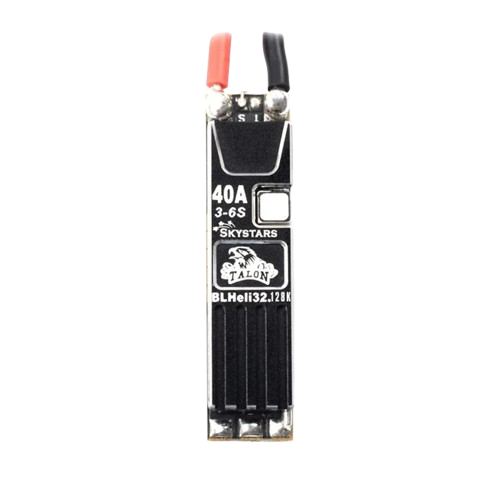
The Skystars Talon 40A Slim ESC is a high-performance Electronic Speed Controller (ESC) designed to regulate and control the speed of brushless motors. With a current rating of 40 Amperes, this ESC is ideal for applications requiring precise motor control, such as remote-controlled (RC) vehicles, drones, and robotics. Its slim design makes it particularly suitable for compact builds where space is a constraint.
Explore Projects Built with ESC 40 A
 Open Project in Cirkit Designer
 Open Project in Cirkit Designer
 Open Project in Cirkit Designer
 Open Project in Cirkit Designer
Explore Projects Built with ESC 40 A
Open Project in Cirkit DesignerOpen Project in Cirkit DesignerOpen Project in Cirkit DesignerOpen Project in Cirkit DesignerCommon Applications and Use Cases
- RC drones (quadcopters, hexacopters, etc.)
- RC cars, boats, and planes
- Robotics projects requiring brushless motor control
- DIY projects involving high-speed brushless motors
Technical Specifications
The following table outlines the key technical details of the Skystars Talon 40A Slim ESC:
| Parameter | Value |
|---|---|
| Manufacturer | Skystars |
| Part ID | Talon 40A Slim ESC |
| Continuous Current | 40A |
| Burst Current (10s) | 50A |
| Input Voltage Range | 2S-6S LiPo (7.4V - 25.2V) |
| BEC Output | None |
| Firmware | BLHeli_S |
| Weight | 7.5g |
| Dimensions | 45mm x 12mm x 5mm |
| Motor Compatibility | Brushless motors (3-phase) |
| Signal Input | PWM, DShot150/300/600 |
| Operating Temperature | -20°C to 85°C |
Pin Configuration and Descriptions
The Skystars Talon 40A Slim ESC has the following pin configuration:
| Pin Name | Description |
|---|---|
| Signal | Receives the control signal (PWM or DShot) from the flight controller or receiver. |
| + (VCC) | Positive power input terminal (connect to LiPo battery positive terminal). |
| - (GND) | Ground terminal (connect to LiPo battery negative terminal). |
| Motor Wires | Three wires to connect to the brushless motor (A, B, C phases). |
Usage Instructions
How to Use the Component in a Circuit
Connect the Power Supply:
- Connect the positive terminal of your LiPo battery to the
+ (VCC)pin of the ESC. - Connect the negative terminal of your LiPo battery to the
- (GND)pin of the ESC.
- Connect the positive terminal of your LiPo battery to the
Connect the Motor:
- Attach the three motor wires (A, B, C) from the ESC to the corresponding terminals of the brushless motor.
- If the motor spins in the wrong direction, swap any two of the three motor wires.
Connect the Signal Input:
- Connect the
Signalpin of the ESC to the PWM or DShot output pin of your flight controller or receiver.
- Connect the
Calibrate the ESC (if required):
- Follow the calibration procedure specific to your flight controller or transmitter to ensure proper throttle range.
Secure the ESC:
- Mount the ESC securely on your drone or RC vehicle using double-sided tape or zip ties. Ensure proper airflow for cooling.
Important Considerations and Best Practices
- Power Rating: Ensure the ESC's current rating (40A) matches or exceeds the requirements of your motor and propeller combination.
- Cooling: Avoid overheating by ensuring adequate airflow around the ESC during operation.
- Firmware Updates: Use BLHeli_S software to update or configure the ESC for optimal performance.
- Signal Type: Verify that your flight controller supports the signal type (PWM or DShot) used by the ESC.
- Battery Voltage: Use a LiPo battery within the supported voltage range (2S-6S).
Example Code for Arduino UNO
If you are using the ESC with an Arduino UNO to control a brushless motor via PWM, you can use the following example code:
#include <Servo.h> // Include the Servo library to generate PWM signals

Servo esc; // Create a Servo object to control the ESC

void setup() {
  esc.attach(9); // Attach the ESC signal wire to pin 9 on the Arduino
  esc.writeMicroseconds(1000); // Send minimum throttle signal (1000 µs)
  delay(2000); // Wait for 2 seconds to allow the ESC to initialize
}

void loop() {
  esc.writeMicroseconds(1500); // Set throttle to 50% (1500 µs)
  delay(5000); // Run the motor at 50% throttle for 5 seconds

  esc.writeMicroseconds(1000); // Set throttle to 0% (1000 µs)
  delay(5000); // Stop the motor for 5 seconds
}
Note: Ensure the ESC is properly calibrated before running the code. Always test the setup in a safe environment.
Troubleshooting and FAQs
Common Issues and Solutions
Motor Does Not Spin:
- Cause: Incorrect wiring or signal input.
Solution: Verify the motor wires are connected correctly and the signal wire is properly attached to the flight controller or receiver.
- Cause: Incorrect wiring or signal input.
Motor Spins in the Wrong Direction:
- Cause: Incorrect motor wire connections.
Solution: Swap any two of the three motor wires to reverse the motor's direction.
- Cause: Incorrect motor wire connections.
ESC Overheats:
- Cause: Insufficient cooling or overcurrent.
Solution: Ensure proper airflow around the ESC and verify the motor/propeller combination does not exceed the ESC's current rating.
- Cause: Insufficient cooling or overcurrent.
No Response from ESC:
- Cause: Incorrect signal type or throttle calibration.
Solution: Check the signal type (PWM or DShot) and recalibrate the ESC throttle range.
- Cause: Incorrect signal type or throttle calibration.
FAQs
Q: Can I use this ESC with a brushed motor?
A: No, this ESC is designed specifically for brushless motors.Q: Does the ESC have a built-in BEC?
A: No, the Skystars Talon 40A Slim ESC does not include a BEC. Use an external BEC if 5V power is required for other components.Q: How do I update the firmware?
A: Use the BLHeli_S configurator software and a compatible USB interface to update or configure the ESC firmware.Q: Can I use this ESC with a 7S LiPo battery?
A: No, the ESC supports a maximum of 6S (25.2V) LiPo batteries. Using a higher voltage may damage the ESC.
By following this documentation, you can effectively integrate and operate the Skystars Talon 40A Slim ESC in your projects.