
How to Use Hall Effect Sensor: Examples, Pinouts, and Specs
 Design with Hall Effect Sensor in Cirkit Designer
Introduction
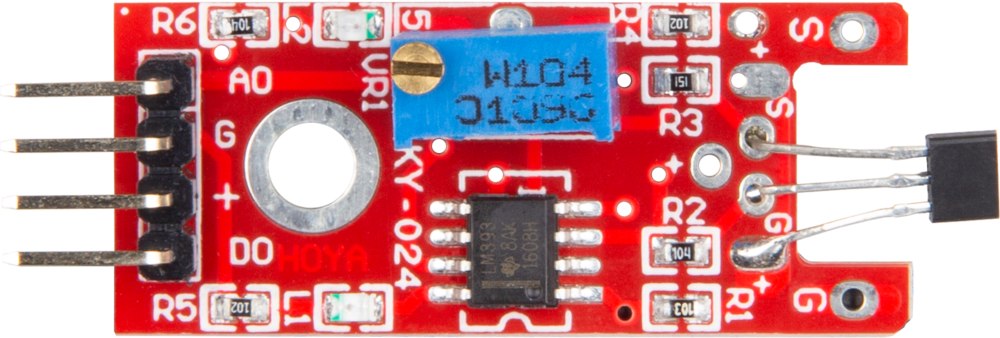
The JOY-IT KY-024 Hall Effect Sensor is a versatile electronic component designed to detect the presence and strength of a magnetic field. It operates based on the Hall effect principle, which generates a voltage proportional to the magnetic field when current flows through a conductor. This sensor is widely used in applications requiring magnetic field detection, such as proximity sensing, speed measurement, and current sensing.
Explore Projects Built with Hall Effect Sensor
 Open Project in Cirkit Designer
 Open Project in Cirkit Designer
 Open Project in Cirkit Designer
 Open Project in Cirkit Designer
Explore Projects Built with Hall Effect Sensor
Open Project in Cirkit DesignerOpen Project in Cirkit DesignerOpen Project in Cirkit DesignerOpen Project in Cirkit DesignerCommon Applications and Use Cases
- Proximity sensing: Detecting the presence of magnetic objects.
- Speed measurement: Monitoring the rotational speed of motors or wheels.
- Current sensing: Measuring current in circuits using magnetic fields.
- Position sensing: Determining the position of moving parts in machinery.
- Magnetic field strength measurement: Quantifying the intensity of magnetic fields.
Technical Specifications
The following table outlines the key technical details of the JOY-IT KY-024 Hall Effect Sensor:
| Parameter | Value |
|---|---|
| Operating Voltage | 3.3V to 5V |
| Output Type | Analog and Digital |
| Sensitivity Adjustment | Potentiometer (onboard) |
| Dimensions | 32mm x 14mm x 7mm |
| Operating Temperature | -40°C to +85°C |
| Magnetic Field Detection | Bipolar (North and South poles) |
Pin Configuration and Descriptions
The KY-024 module has three pins for interfacing:
| Pin | Name | Description |
|---|---|---|
| 1 | VCC | Power supply pin (3.3V to 5V). Connect to the positive terminal of the power source. |
| 2 | GND | Ground pin. Connect to the negative terminal of the power source. |
| 3 | OUT | Output pin. Provides both analog and digital signals based on the magnetic field. |
Usage Instructions
How to Use the KY-024 in a Circuit
- Power the Sensor: Connect the VCC pin to a 3.3V or 5V power source and the GND pin to ground.
- Connect the Output:
- For digital output, connect the OUT pin to a digital input pin of your microcontroller.
- For analog output, connect the OUT pin to an analog input pin of your microcontroller.
- Adjust Sensitivity: Use the onboard potentiometer to adjust the sensitivity of the sensor to the magnetic field.
- Place the Sensor: Position the sensor near the magnetic field source. Ensure the magnetic field is perpendicular to the sensor for optimal detection.
Important Considerations and Best Practices
- Power Supply: Ensure the sensor operates within the specified voltage range (3.3V to 5V) to avoid damage.
- Magnetic Field Orientation: For accurate detection, align the sensor perpendicular to the magnetic field.
- Noise Reduction: Use decoupling capacitors near the power supply pins to reduce noise in the circuit.
- Avoid Overheating: Operate the sensor within the specified temperature range (-40°C to +85°C).
Example: Connecting to an Arduino UNO
Below is an example of how to use the KY-024 Hall Effect Sensor with an Arduino UNO to read both digital and analog outputs.
// KY-024 Hall Effect Sensor Example with Arduino UNO
// Reads both digital and analog outputs from the sensor

// Define pin connections
const int digitalPin = 2;  // Digital output pin from KY-024
const int analogPin = A0;  // Analog output pin from KY-024

void setup() {
  pinMode(digitalPin, INPUT);  // Set digital pin as input
  Serial.begin(9600);         // Initialize serial communication
}

void loop() {
  // Read digital output
  int digitalValue = digitalRead(digitalPin);

  // Read analog output
  int analogValue = analogRead(analogPin);

  // Print values to the Serial Monitor
  Serial.print("Digital Output: ");
  Serial.print(digitalValue);
  Serial.print(" | Analog Output: ");
  Serial.println(analogValue);

  delay(500);  // Wait for 500ms before the next reading
}
Troubleshooting and FAQs
Common Issues and Solutions
No Output from the Sensor:
- Cause: Incorrect wiring or insufficient power supply.
- Solution: Double-check the connections and ensure the power supply is within the specified range (3.3V to 5V).
Inconsistent Readings:
- Cause: Noise in the circuit or improper placement of the sensor.
- Solution: Add decoupling capacitors near the power pins and ensure the sensor is properly aligned with the magnetic field.
Sensor Not Detecting Magnetic Fields:
- Cause: Sensitivity not adjusted correctly.
- Solution: Use the onboard potentiometer to fine-tune the sensitivity.
Overheating of the Sensor:
- Cause: Operating outside the specified temperature range.
- Solution: Ensure the sensor is used within the -40°C to +85°C range.
FAQs
Q1: Can the KY-024 detect both North and South poles of a magnet?
A1: Yes, the KY-024 is a bipolar sensor and can detect both North and South poles of a magnetic field.
Q2: What is the difference between the analog and digital outputs?
A2: The analog output provides a continuous voltage proportional to the magnetic field strength, while the digital output is a binary signal (HIGH or LOW) that indicates whether the magnetic field exceeds a certain threshold.
Q3: Can I use the KY-024 with a 3.3V microcontroller?
A3: Yes, the KY-024 operates within a voltage range of 3.3V to 5V, making it compatible with 3.3V microcontrollers.
Q4: How do I adjust the sensitivity of the sensor?
A4: Use the onboard potentiometer to increase or decrease the sensitivity to the magnetic field.
Q5: Is the KY-024 suitable for outdoor use?
A5: The KY-024 is not weatherproof. If used outdoors, ensure it is enclosed in a protective casing to prevent damage from moisture or dust.