
How to Use Hybrid Solar Inverter: Examples, Pinouts, and Specs
 Design with Hybrid Solar Inverter in Cirkit Designer
Introduction
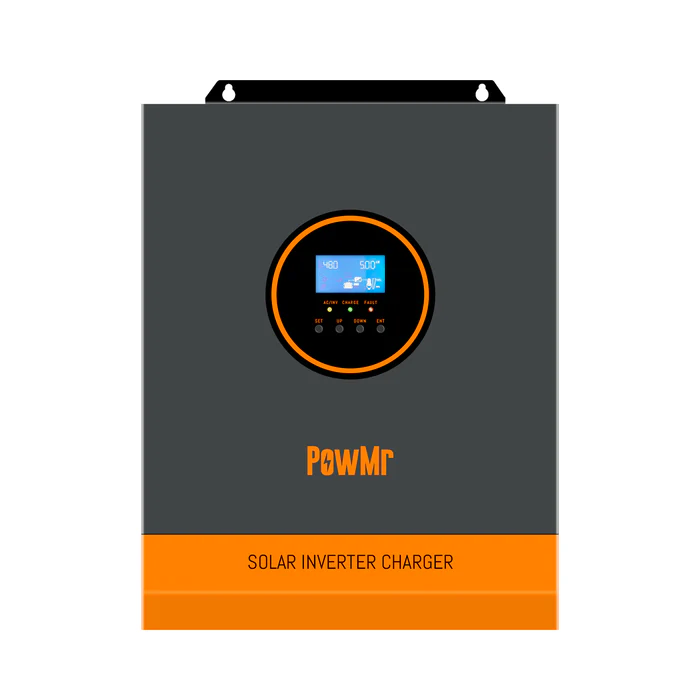
The Hybrid Solar Inverter by Powr MR is a versatile device that combines the functionality of a solar inverter and a battery inverter. It enables seamless integration of solar energy generation with energy storage systems, allowing users to optimize energy usage and ensure uninterrupted power supply during outages. This inverter is designed to manage energy from three sources: solar panels, batteries, and the electrical grid, making it an ideal solution for residential, commercial, and industrial applications.
Explore Projects Built with Hybrid Solar Inverter
 Open Project in Cirkit Designer
 Open Project in Cirkit Designer
 Open Project in Cirkit Designer
 Open Project in Cirkit Designer
Explore Projects Built with Hybrid Solar Inverter
Open Project in Cirkit DesignerOpen Project in Cirkit DesignerOpen Project in Cirkit DesignerOpen Project in Cirkit DesignerCommon Applications and Use Cases
- Residential Solar Systems: Efficiently manage solar energy and provide backup power during grid outages.
- Commercial Energy Solutions: Reduce energy costs by utilizing solar power and stored energy during peak hours.
- Off-Grid Systems: Enable energy independence in remote areas by combining solar panels and battery storage.
- Grid-Tied Systems with Backup: Provide uninterrupted power supply by switching to battery power during grid failures.
Technical Specifications
Key Technical Details
| Parameter | Value |
|---|---|
| Input Voltage (Solar) | 120V - 500V DC |
| Input Voltage (Grid) | 230V AC ± 5% |
| Output Voltage | 230V AC ± 5% |
| Rated Power | 3kW, 5kW, 10kW (model-dependent) |
| Battery Voltage | 48V DC |
| Maximum Solar Input Power | 4000W (for 5kW model) |
| Efficiency | Up to 97% |
| Operating Temperature | -10°C to 50°C |
| Communication Interfaces | RS485, Wi-Fi (optional), CAN |
| Protection Features | Overload, short circuit, over-temperature, and reverse polarity protection |
Pin Configuration and Descriptions
| Pin/Port | Description |
|---|---|
| Solar Input (+/-) | Connects to the positive and negative terminals of the solar panel array. |
| Battery Input (+/-) | Connects to the positive and negative terminals of the battery bank. |
| Grid Input (L/N) | Connects to the live (L) and neutral (N) wires of the AC grid. |
| AC Output (L/N) | Provides AC power to the connected load. |
| Communication Port | Used for monitoring and control via RS485, Wi-Fi, or CAN. |
| Ground (GND) | Connects to the system ground for safety. |
Usage Instructions
How to Use the Component in a Circuit
Connect the Solar Panels:
- Ensure the solar panel array's voltage is within the inverter's input range (120V - 500V DC).
- Connect the positive and negative terminals of the solar panels to the Solar Input pins.
Connect the Battery Bank:
- Use a 48V DC battery bank compatible with the inverter.
- Connect the positive and negative terminals of the battery to the Battery Input pins.
Connect to the Grid:
- Connect the live (L) and neutral (N) wires of the AC grid to the Grid Input pins.
- Ensure proper grounding by connecting the system ground to the Ground (GND) pin.
Connect the Load:
- Connect the devices or appliances to the AC Output pins (L/N).
Power On the System:
- Turn on the inverter and configure the settings using the control panel or monitoring software.
- Set the operating mode (e.g., grid-tied, off-grid, or hybrid) based on your application.
Important Considerations and Best Practices
- Battery Compatibility: Use only batteries with the recommended voltage and capacity to avoid damage.
- Proper Grounding: Ensure the system is properly grounded to prevent electrical hazards.
- Overload Protection: Do not exceed the inverter's rated power to avoid triggering overload protection.
- Firmware Updates: Regularly update the inverter's firmware (if applicable) to ensure optimal performance.
- Monitoring: Use the communication interface (e.g., RS485 or Wi-Fi) to monitor system performance and troubleshoot issues.
Arduino UNO Integration (Optional Monitoring Example)
You can use an Arduino UNO to monitor the inverter's performance via the RS485 communication interface. Below is an example code snippet for reading data from the inverter:
#include <SoftwareSerial.h>

// Define RS485 communication pins
#define RX_PIN 10  // Arduino RX pin connected to RS485 module TX
#define TX_PIN 11  // Arduino TX pin connected to RS485 module RX

SoftwareSerial rs485(RX_PIN, TX_PIN); // Initialize RS485 communication

void setup() {
  Serial.begin(9600); // Start serial communication with PC
  rs485.begin(9600);  // Start RS485 communication with inverter

  Serial.println("Hybrid Solar Inverter Monitoring Started");
}

void loop() {
  // Request data from the inverter
  rs485.write("READ_DATA"); // Replace with the actual command for your inverter

  // Wait for a response
  delay(100);

  // Check if data is available
  if (rs485.available()) {
    String data = "";
    while (rs485.available()) {
      char c = rs485.read();
      data += c; // Append received characters to the data string
    }

    // Print the received data to the serial monitor
    Serial.println("Inverter Data: " + data);
  }

  delay(1000); // Wait 1 second before the next request
}
Note: Replace
"READ_DATA"with the actual command supported by the Powr MR Hybrid Solar Inverter. Consult the manufacturer's communication protocol documentation for details.
Troubleshooting and FAQs
Common Issues and Solutions
| Issue | Possible Cause | Solution |
|---|---|---|
| Inverter does not turn on | Battery or grid not connected properly | Check all connections and ensure proper voltage levels. |
| No output power | Overload or short circuit detected | Reduce the load or check for short circuits in the connected devices. |
| Low efficiency | Solar panels not receiving enough sunlight | Ensure the solar panels are clean and positioned correctly. |
| Communication failure (RS485/Wi-Fi) | Incorrect wiring or configuration | Verify the communication interface wiring and settings. |
| Battery not charging | Faulty battery or incorrect settings | Check the battery health and ensure the charging parameters are configured. |
FAQs
Can I use this inverter without a battery?
- Yes, the inverter can operate in grid-tied mode without a battery, but backup power will not be available during outages.
What type of batteries are compatible with this inverter?
- The inverter supports 48V lead-acid or lithium-ion batteries. Ensure the battery's capacity matches your energy requirements.
How do I update the firmware?
- Firmware updates can be performed via the communication interface (e.g., RS485 or Wi-Fi). Refer to the manufacturer's instructions for detailed steps.
Can I monitor the inverter remotely?
- Yes, the inverter supports remote monitoring via Wi-Fi or RS485. Use the manufacturer's app or software for real-time data access.
What happens during a grid outage?
- In hybrid mode, the inverter automatically switches to battery power to provide uninterrupted energy to connected loads.
This concludes the documentation for the Powr MR Hybrid Solar Inverter. For further assistance, refer to the manufacturer's user manual or contact technical support.