
How to Use MS5837: Examples, Pinouts, and Specs
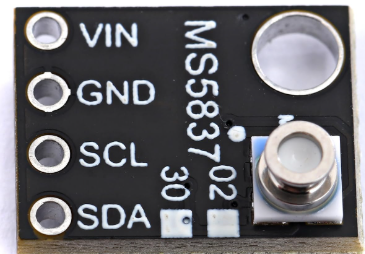
 Design with MS5837 in Cirkit Designer
Introduction
The MS5837 is a high-resolution pressure sensor designed to measure both pressure and temperature with exceptional accuracy. It features a digital output via an I²C interface, making it easy to integrate into a wide range of applications. The sensor is compact, robust, and capable of operating in harsh environments, making it ideal for underwater depth measurement, weather monitoring, and industrial applications.
Explore Projects Built with MS5837
 Open Project in Cirkit Designer
 Open Project in Cirkit Designer
 Open Project in Cirkit Designer
 Open Project in Cirkit Designer
Explore Projects Built with MS5837
Open Project in Cirkit DesignerOpen Project in Cirkit DesignerOpen Project in Cirkit DesignerOpen Project in Cirkit DesignerCommon Applications
- Underwater depth measurement (e.g., diving equipment, ROVs)
- Weather monitoring systems
- Altitude measurement in drones and aircraft
- Industrial process control
- Scientific research requiring precise pressure and temperature data
Technical Specifications
The MS5837 is available in two variants: MS5837-30BA (30 bar) and MS5837-02BA (2 bar). Below are the key technical details:
General Specifications
| Parameter | Value |
|---|---|
| Pressure Range | 0 to 30 bar (MS5837-30BA) |
| 0 to 2 bar (MS5837-02BA) | |
| Temperature Range | -40°C to +85°C |
| Pressure Resolution | Up to 0.2 mbar |
| Temperature Resolution | 0.01°C |
| Interface | I²C (2-wire) |
| Supply Voltage | 1.5V to 3.6V |
| Current Consumption | 0.6 µA (standby) |
| Accuracy | ±0.5 mbar (pressure) |
| ±2.0°C (temperature) | |
| Package Type | Ceramic, waterproof |
Pin Configuration
The MS5837 has four pins, as shown in the table below:
| Pin Number | Name | Description |
|---|---|---|
| 1 | VDD | Power supply (1.5V to 3.6V) |
| 2 | GND | Ground |
| 3 | SDA | I²C data line |
| 4 | SCL | I²C clock line |
Usage Instructions
Connecting the MS5837 to a Circuit
- Power Supply: Connect the VDD pin to a 3.3V power source (or within the range of 1.5V to 3.6V). Connect the GND pin to the ground of your circuit.
- I²C Communication: Connect the SDA and SCL pins to the corresponding I²C data and clock lines of your microcontroller. Use pull-up resistors (typically 4.7 kΩ) on both SDA and SCL lines if not already present on your board.
- Waterproofing: If using the MS5837 in underwater applications, ensure the sensor is properly sealed to prevent water ingress.
Important Considerations
- Power Supply: Ensure the supply voltage does not exceed 3.6V to avoid damaging the sensor.
- I²C Address: The default I²C address of the MS5837 is
0x76. Ensure no other devices on the I²C bus share this address. - Data Conversion: The sensor outputs raw pressure and temperature data, which must be converted using the provided compensation formulas in the datasheet.
Example Code for Arduino UNO
Below is an example of how to interface the MS5837 with an Arduino UNO using the I²C protocol:
#include <Wire.h>
#include <MS5837.h> // Include the MS5837 library

MS5837 sensor; // Create an instance of the MS5837 class

void setup() {
  Serial.begin(9600); // Initialize serial communication
  Wire.begin();       // Initialize I²C communication

  if (!sensor.init()) {
    // Initialize the sensor and check for errors
    Serial.println("MS5837 initialization failed!");
    while (1); // Halt execution if initialization fails
  }

  sensor.setModel(MS5837::MS5837_30BA); // Set the sensor model
  sensor.setFluidDensity(997); // Set fluid density for water (997 kg/m³)
}

void loop() {
  sensor.read(); // Read pressure and temperature data from the sensor

  // Print pressure in mbar
  Serial.print("Pressure (mbar): ");
  Serial.println(sensor.pressure());

  // Print temperature in Celsius
  Serial.print("Temperature (°C): ");
  Serial.println(sensor.temperature());

  delay(1000); // Wait 1 second before the next reading
}
Notes on the Code
- The
MS5837library must be installed in your Arduino IDE. You can find it in the Arduino Library Manager. - The
setFluidDensity()function is used to calculate depth in water. Adjust the density value for other fluids.
Troubleshooting and FAQs
Common Issues
No Data from the Sensor
- Ensure the sensor is properly connected to the I²C bus.
- Verify that the correct I²C address (
0x76) is being used in your code. - Check the pull-up resistors on the SDA and SCL lines.
Incorrect Pressure or Temperature Readings
- Ensure the sensor is not exposed to conditions outside its operating range.
- Verify that the compensation formulas are correctly implemented in your code.
Sensor Not Initializing
- Check the power supply voltage (must be between 1.5V and 3.6V).
- Ensure the I²C lines are not shorted or disconnected.
FAQs
Q: Can the MS5837 be used in saltwater?
A: Yes, the MS5837 is designed for underwater applications, including saltwater. However, ensure proper waterproofing and clean the sensor after prolonged exposure to prevent corrosion.
Q: What is the maximum depth the MS5837 can measure?
A: The MS5837-30BA can measure up to 30 bar, equivalent to approximately 300 meters of water depth. The MS5837-02BA is suitable for depths up to 20 meters.
Q: Can I use the MS5837 with a 5V microcontroller?
A: Yes, but you must use a level shifter to step down the I²C signals to 3.3V, as the MS5837 operates at a maximum voltage of 3.6V.
Q: How do I calculate depth from pressure?
A: Depth can be calculated using the formula:
Depth = Pressure / (Fluid Density × Gravitational Acceleration)
For water, use a density of 997 kg/m³ and gravitational acceleration of 9.81 m/s².