
Cirkit Designer
Your all-in-one circuit design IDE
Home /
Component Documentation
How to Use VCC 5V: Examples, Pinouts, and Specs
 Design with VCC 5V in Cirkit Designer
Introduction
- Overview: The VCC 5V is a voltage supply that provides a constant 5 volts, which is a standard power level for many digital circuits and microcontrollers. It serves as a reliable power source for a wide range of electronic components and systems.
- Common Applications:
- Powering microcontrollers such as Arduino, Raspberry Pi, and ESP32.
- Supplying power to sensors, actuators, and modules in embedded systems.
- Providing a stable voltage for digital logic circuits and communication devices.
Explore Projects Built with VCC 5V
High Voltage Generator with Push Switch Activation
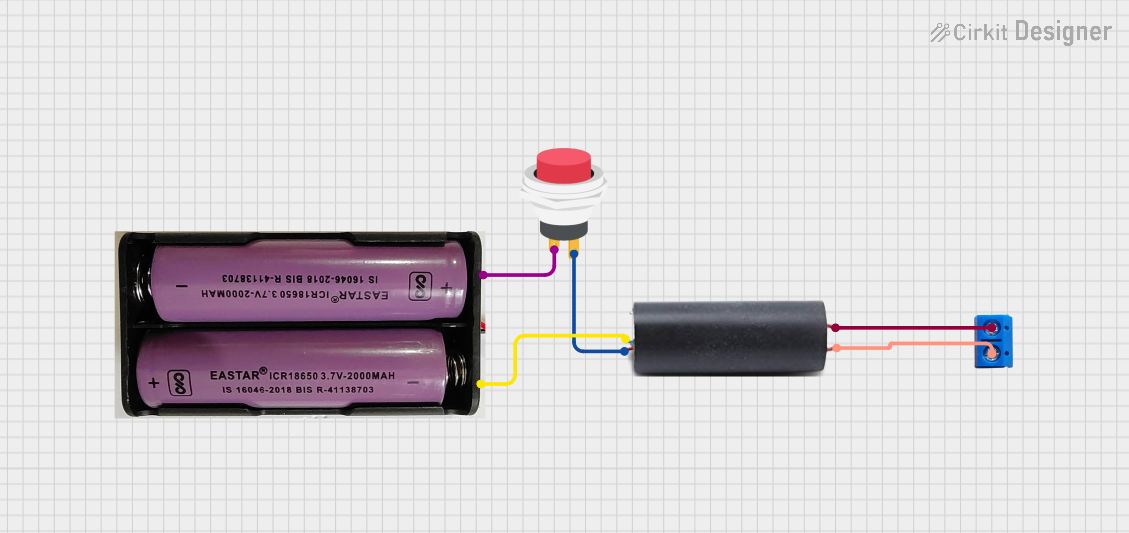
This circuit features a high voltage generator connected to a terminal PCB for output, with its power supply controlled by a 2-pin push switch. The high voltage generator's VCC is connected through the switch, allowing the user to turn the high voltage output on and off. The circuit is powered by a 7.4V battery, with the positive terminal connected to the switch and the negative terminal connected to the generator's ground.
Open Project in Cirkit Designer12V to 5V Power Supply with LED Indicator and Push Switch

This circuit is a 12V to 5V regulated power supply with an LED indicator. It uses a 5408 diode for reverse polarity protection, an LM340T5 7805 voltage regulator to step down the voltage to 5V, and a push switch to control the LED indicator. The circuit also includes capacitors for filtering and a resistor to limit the current through the LED.
Open Project in Cirkit DesignerBattery-Powered USB Charger with LED Indicator and DC Motor

This circuit converts AC power to DC using a bridge rectifier and regulates the voltage to 5V with a 7805 voltage regulator. It powers a USB port and indicates power status with an LED, while also providing a charging interface through a multi-charging cable.
Open Project in Cirkit DesignerDC-DC Converter and Relay Module Power Distribution System

This circuit consists of a DC-DC converter powering a 6-channel power module, which in turn supplies 5V to a 2-relay module. The power module distributes the converted voltage to the relay module, enabling it to control external devices.
Open Project in Cirkit DesignerExplore Projects Built with VCC 5V
High Voltage Generator with Push Switch Activation
This circuit features a high voltage generator connected to a terminal PCB for output, with its power supply controlled by a 2-pin push switch. The high voltage generator's VCC is connected through the switch, allowing the user to turn the high voltage output on and off. The circuit is powered by a 7.4V battery, with the positive terminal connected to the switch and the negative terminal connected to the generator's ground.
Open Project in Cirkit Designer12V to 5V Power Supply with LED Indicator and Push Switch
This circuit is a 12V to 5V regulated power supply with an LED indicator. It uses a 5408 diode for reverse polarity protection, an LM340T5 7805 voltage regulator to step down the voltage to 5V, and a push switch to control the LED indicator. The circuit also includes capacitors for filtering and a resistor to limit the current through the LED.
Open Project in Cirkit DesignerBattery-Powered USB Charger with LED Indicator and DC Motor
This circuit converts AC power to DC using a bridge rectifier and regulates the voltage to 5V with a 7805 voltage regulator. It powers a USB port and indicates power status with an LED, while also providing a charging interface through a multi-charging cable.
Open Project in Cirkit DesignerDC-DC Converter and Relay Module Power Distribution System
This circuit consists of a DC-DC converter powering a 6-channel power module, which in turn supplies 5V to a 2-relay module. The power module distributes the converted voltage to the relay module, enabling it to control external devices.
Open Project in Cirkit DesignerTechnical Specifications
- Voltage Output: 5V DC (Direct Current)
- Current Rating: Typically up to 1A or higher, depending on the source.
- Power Source: Can be derived from USB ports, voltage regulators, or dedicated power supplies.
- Polarity: Positive voltage (VCC) with respect to ground (GND).
Pin Configuration and Descriptions
| Pin Name | Description | Notes |
|---|---|---|
| VCC | Positive 5V output | Connect to the power input of your circuit. |
| GND | Ground (0V reference) | Connect to the ground of your circuit. |
Usage Instructions
Connecting the VCC 5V to a Circuit:
- Identify the VCC and GND pins on your circuit or device.
- Connect the VCC pin of the 5V supply to the VCC or power input pin of your circuit.
- Connect the GND pin of the 5V supply to the GND or ground pin of your circuit.
- Ensure proper polarity to avoid damage to components.
Important Considerations:
- Verify that the current rating of the 5V supply meets the requirements of your circuit.
- Avoid short circuits between VCC and GND, as this can damage the power source or components.
- Use decoupling capacitors (e.g., 0.1µF and 10µF) near the power input of your circuit to reduce noise and stabilize the voltage.
Using VCC 5V with an Arduino UNO:
- The Arduino UNO has a 5V pin that can be used as a VCC source for external components.
- Example code to blink an LED using the Arduino UNO's 5V pin:
// Example: Blink an LED using Arduino UNO's 5V pin
// Connect the LED's anode (longer leg) to a 220-ohm resistor, then to pin 13.
// Connect the LED's cathode (shorter leg) to GND.

void setup() {
  pinMode(13, OUTPUT); // Set pin 13 as an output pin
}

void loop() {
  digitalWrite(13, HIGH); // Turn the LED on
  delay(1000);            // Wait for 1 second
  digitalWrite(13, LOW);  // Turn the LED off
  delay(1000);            // Wait for 1 second
}
Troubleshooting and FAQs
Common Issues
No Power Output:
- Cause: The power source is not connected or is faulty.
- Solution: Check the power source and ensure it is properly connected and functional.
Voltage Drop:
- Cause: The circuit is drawing more current than the supply can provide.
- Solution: Use a power supply with a higher current rating or reduce the load on the circuit.
Overheating:
- Cause: Excessive current draw or short circuit.
- Solution: Check for short circuits and ensure the current draw is within the supply's limits.
FAQs
Q: Can I use the VCC 5V to power a 3.3V device?
- A: No, 3.3V devices require a lower voltage. Use a voltage regulator or level shifter to step down the voltage.
Q: Is it safe to connect multiple devices to the same VCC 5V supply?
- A: Yes, as long as the total current draw of all devices does not exceed the supply's current rating.
Q: How can I protect my circuit from voltage spikes?
- A: Use decoupling capacitors and consider adding a TVS (Transient Voltage Suppressor) diode for additional protection.