The QTRX-MD-16A Reflectance Sensor Array, manufactured by Pololu, is a high-performance sensor array designed for detecting surface reflectance. It is commonly used in robotics applications such as line-following robots, edge detection, and obstacle avoidance. The array consists of 16 pairs of infrared emitters and photodetectors, enabling precise and high-resolution surface reflectance measurements. Its compact design and modularity make it suitable for a wide range of projects.
Explore Projects Built with QTRX-MD-16A Reflectance Sensor Array
Use Cirkit Designer to design, explore, and prototype these projects online. Some projects support real-time simulation. Click "Open Project" to start designing instantly!
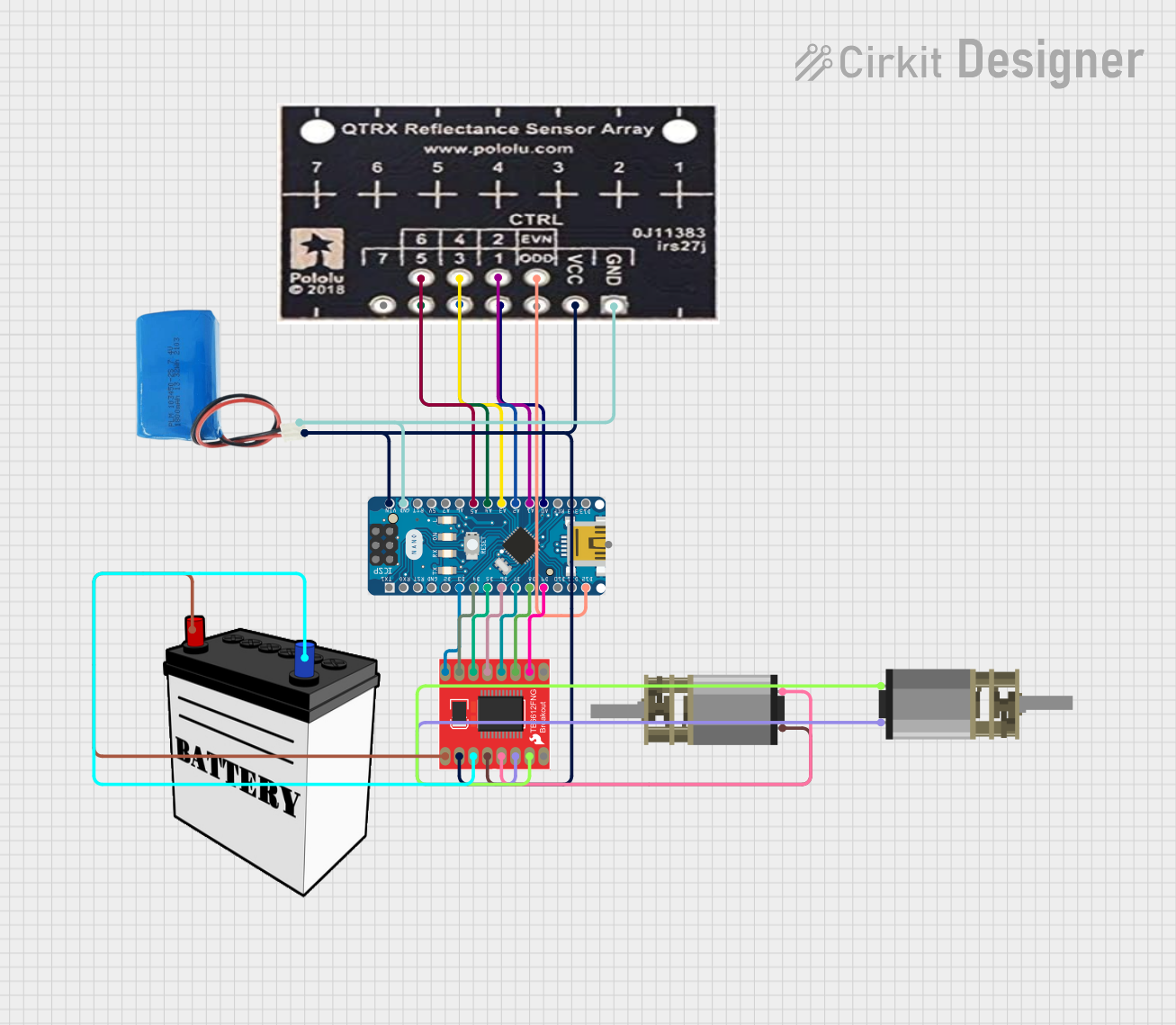
This circuit is designed for an advanced line-following robot that uses a QTRX-HD-07RC Reflectance Sensor Array for line sensing and a Motor Driver 1A Dual TB6612FNG to control two DC Mini Metal Gear Motors. The Arduino Nano serves as the microcontroller, running a PID control algorithm to adjust the motor speeds for precise tracking. Power is supplied by a 5V battery for the logic and a 12V battery for the motor driver.
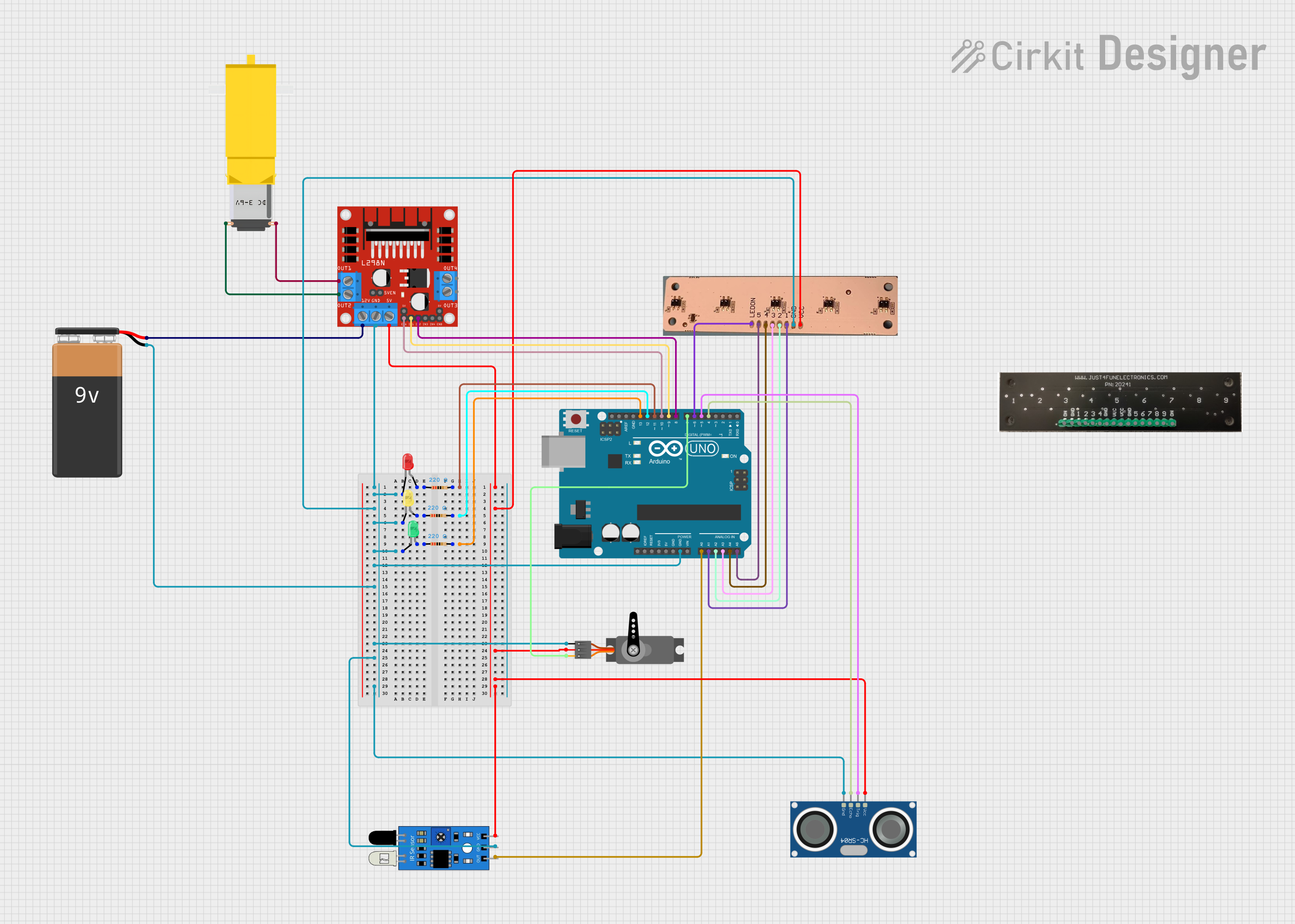
This is a robotic control system utilizing an Arduino UNO to interface with a DC gearmotor via an L298N motor driver for motion control, a servo motor for additional actuation, and multiple sensors (IR, ultrasonic, reflectance sensor array) for environmental sensing. It also includes RGB status LEDs with current-limiting resistors. The embedded code for the Arduino is currently a placeholder, requiring further development for specific functionalities.
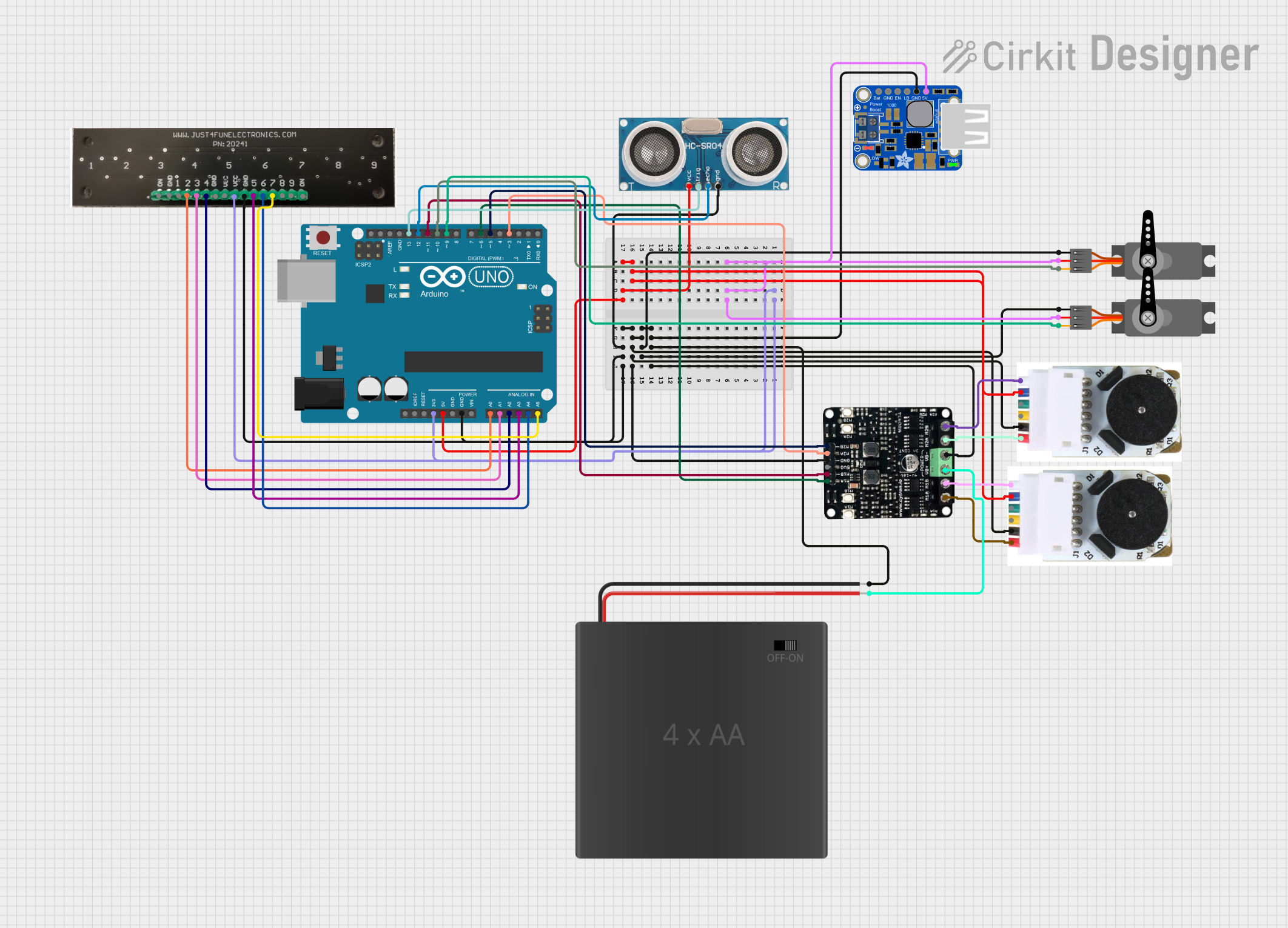
This circuit is a robotic system controlled by an Arduino UNO, featuring a reflectance sensor array for line detection, an ultrasonic sensor for distance measurement, and two DC motors with encoders for movement. It also includes two servos for additional mechanical control, all powered by a PowerBoost 1000 Basic Terminal USB and a 4xAA battery pack.
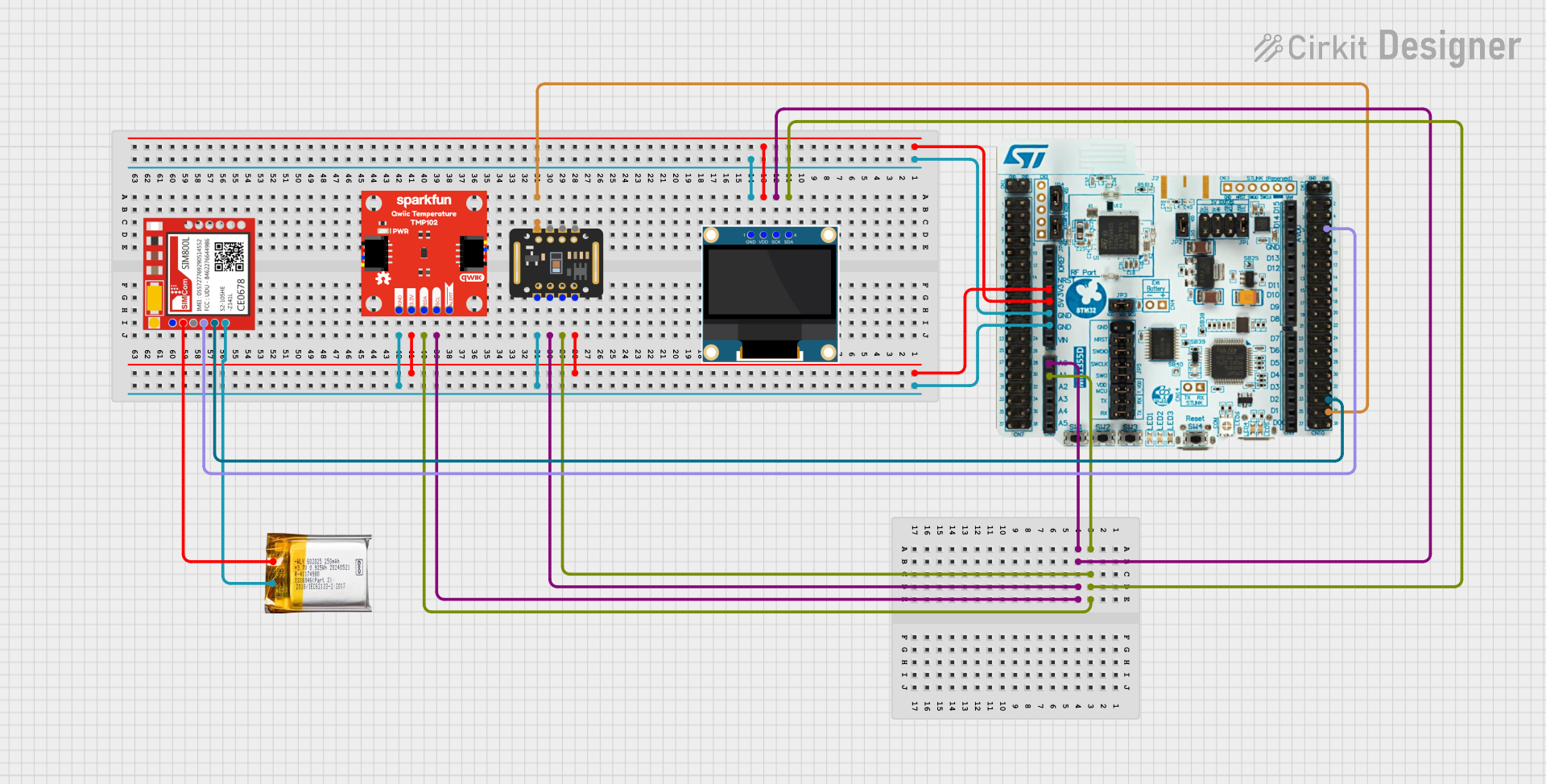
This circuit is a multi-sensor data acquisition system that uses a Nucleo WB55RG microcontroller to interface with a digital temperature sensor (TMP102), a pulse oximeter and heart-rate sensor (MAX30102), and a 0.96" OLED display via I2C. Additionally, it includes a Sim800l module for GSM communication, powered by a 3.7V LiPo battery.
Surface reflectance measurement for industrial automation
Maze-solving robots
Technical Specifications
The following table outlines the key technical details of the QTRX-MD-16A Reflectance Sensor Array:
Parameter
Value
Manufacturer
Pololu
Part Number
QTRX-MD-16A
Operating Voltage
2.9 V to 5.5 V
Current Consumption
~100 mA (typical, all emitters on)
Number of Sensors
16
Sensor Type
Infrared emitter and phototransistor pair
Output Type
Analog voltage (0 V to Vcc)
Dimensions
145 mm × 15 mm × 3 mm
Weight
7.5 g
Optimal Sensing Distance
3 mm to 9 mm
Operating Temperature
-40°C to 85°C
Pin Configuration and Descriptions
The QTRX-MD-16A has a 16-pin interface for sensor outputs and additional pins for power and control. The pin configuration is as follows:
Pin
Name
Description
1-16
OUT1-OUT16
Analog output for each sensor, corresponding to the reflectance detected.
17
VCC
Power supply input (2.9 V to 5.5 V).
18
GND
Ground connection.
19
LEDON
Control pin for enabling/disabling the IR emitters. High = ON, Low = OFF.
Usage Instructions
How to Use the QTRX-MD-16A in a Circuit
Power the Sensor Array: Connect the VCC pin to a regulated power supply (2.9 V to 5.5 V) and the GND pin to the ground of your circuit.
Connect Outputs: Each sensor output (OUT1 to OUT16) provides an analog voltage proportional to the reflectance detected. Connect these outputs to the analog input pins of a microcontroller or ADC (Analog-to-Digital Converter).
Enable Emitters: Use the LEDON pin to control the IR emitters. Set the pin HIGH to enable the emitters or LOW to disable them.
Read Sensor Data: Measure the analog voltage from each output pin. A higher voltage indicates higher reflectance (lighter surfaces), while a lower voltage indicates lower reflectance (darker surfaces).
Important Considerations and Best Practices
Optimal Sensing Distance: For best results, position the sensor array 3 mm to 9 mm above the surface being measured.
Emitter Control: To save power, disable the emitters (set LEDON to LOW) when the sensor is not in use.
Calibration: Calibrate the sensor array for your specific application to account for variations in surface reflectance and ambient lighting.
Avoid Interference: Ensure that the sensor array is not exposed to direct sunlight or other strong IR sources, as this may affect accuracy.
Example: Using QTRX-MD-16A with Arduino UNO
Below is an example of how to use the QTRX-MD-16A with an Arduino UNO to read reflectance values from the first sensor (OUT1):
// Define the pin connections
#define SENSOR_PIN A0  // Connect OUT1 to Arduino analog pin A0
#define LEDON_PIN 7    // Connect LEDON to Arduino digital pin 7

void setup() {
  pinMode(LEDON_PIN, OUTPUT);  // Set LEDON pin as output
  digitalWrite(LEDON_PIN, HIGH);  // Turn on the IR emitters
  Serial.begin(9600);  // Initialize serial communication
}

void loop() {
  int sensorValue = analogRead(SENSOR_PIN);  // Read the analog value from OUT1
  Serial.print("Sensor Value: ");
  Serial.println(sensorValue);  // Print the sensor value to the Serial Monitor
  delay(100);  // Wait for 100 ms before the next reading
}
Troubleshooting and FAQs
Common Issues and Solutions
No Output from Sensors
Cause: The IR emitters may be disabled.
Solution: Ensure the LEDON pin is set HIGH to enable the emitters.
Inconsistent Readings
Cause: The sensor array may be too far from or too close to the surface.
Solution: Adjust the distance to fall within the optimal range of 3 mm to 9 mm.
Interference from Ambient Light
Cause: Strong ambient light or IR sources may interfere with the sensors.
Solution: Use the sensor in a controlled lighting environment or shield it from external IR sources.
High Power Consumption
Cause: All emitters are enabled continuously.
Solution: Disable the emitters (set LEDON to LOW) when the sensor is not actively measuring.
FAQs
Q: Can the QTRX-MD-16A be used with a 3.3 V microcontroller?
A: Yes, the sensor array operates within a voltage range of 2.9 V to 5.5 V, making it compatible with 3.3 V systems.
Q: How do I calibrate the sensor array?
A: Calibration involves reading the sensor outputs for both the darkest and lightest surfaces in your application and mapping the values to a desired range (e.g., 0 to 100).
Q: Can I use fewer than 16 sensors?
A: Yes, you can use only the outputs you need. Unused outputs can be left unconnected.
Q: What is the maximum sampling rate?
A: The sampling rate depends on your microcontroller's ADC speed. Most microcontrollers can sample each sensor at several kHz.


 Open Project in Cirkit Designer