
How to Use GX16 5pin: Examples, Pinouts, and Specs
 Design with GX16 5pin in Cirkit Designer
Introduction
The GX16 5-pin connector, manufactured by Base (Part ID: GX16 5pin), is a circular electrical connector designed for reliable and secure connections in various applications. Its robust metal construction and five-pin configuration make it ideal for transmitting signals or power in demanding environments. This connector is commonly used in audio equipment, lighting systems, industrial machinery, and DIY electronics projects.
Explore Projects Built with GX16 5pin
 Open Project in Cirkit Designer
 Open Project in Cirkit Designer
 Open Project in Cirkit Designer
 Open Project in Cirkit Designer
Explore Projects Built with GX16 5pin
Open Project in Cirkit DesignerOpen Project in Cirkit DesignerOpen Project in Cirkit DesignerOpen Project in Cirkit DesignerCommon Applications
- Connecting microphones, speakers, and other audio equipment
- Signal and power transmission in lighting systems
- Industrial control systems and machinery
- Robotics and DIY electronics projects
Technical Specifications
Key Technical Details
| Parameter | Specification |
|---|---|
| Manufacturer | Base |
| Part ID | GX16 5pin |
| Number of Pins | 5 |
| Connector Type | Circular |
| Material | Metal (nickel-plated brass) |
| Rated Voltage | 250V AC |
| Rated Current | 5A |
| Operating Temperature | -20°C to +85°C |
| Mounting Style | Panel mount or cable mount |
| Contact Resistance | ≤ 5 mΩ |
| Insulation Resistance | ≥ 1000 MΩ |
Pin Configuration and Descriptions
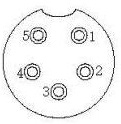
The GX16 5-pin connector features five pins arranged in a circular pattern. Below is the pinout configuration:
| Pin Number | Description | Typical Use Case |
|---|---|---|
| 1 | Signal/Power (Positive) | Positive voltage or signal line |
| 2 | Signal/Power (Negative) | Ground or negative voltage line |
| 3 | Auxiliary Signal/Control | Additional signal or control line |
| 4 | Auxiliary Signal/Control | Additional signal or control line |
| 5 | Auxiliary Signal/Control | Additional signal or control line |
Note: The pin assignments may vary depending on the specific application. Always refer to the wiring diagram for your project.
Usage Instructions
How to Use the GX16 5pin Connector
Wiring the Connector:
- Unscrew the rear cover of the connector to access the soldering terminals.
- Identify the pin numbers on the connector (usually marked on the inside).
- Solder the wires to the appropriate pins based on your circuit design.
- Ensure proper insulation to prevent short circuits.
- Reassemble the connector by screwing the rear cover back in place.
Panel Mounting:
- Drill a hole in the panel with a diameter matching the connector's mounting size (16mm).
- Insert the connector into the hole and secure it using the provided nut.
Cable Mounting:
- Use a compatible cable with the appropriate diameter for the connector.
- Secure the cable using the strain relief mechanism to prevent damage.
Important Considerations
- Polarity: Double-check the polarity of the connections to avoid damage to your equipment.
- Current and Voltage Ratings: Ensure the connector is used within its rated voltage (250V AC) and current (5A) limits.
- Environmental Conditions: Avoid exposing the connector to extreme temperatures or moisture unless additional sealing is applied.
Example: Connecting to an Arduino UNO
The GX16 5-pin connector can be used to interface external devices with an Arduino UNO. Below is an example of connecting a sensor using the GX16 5-pin connector:
Circuit Diagram
- Pin 1: VCC (5V from Arduino)
- Pin 2: GND (Ground from Arduino)
- Pin 3: Signal (Sensor output to Arduino analog pin A0)
Arduino Code
// Example code for reading a sensor connected via GX16 5-pin connector
const int sensorPin = A0; // Sensor signal connected to analog pin A0

void setup() {
  Serial.begin(9600); // Initialize serial communication
  pinMode(sensorPin, INPUT); // Set sensor pin as input
}

void loop() {
  int sensorValue = analogRead(sensorPin); // Read sensor value
  Serial.print("Sensor Value: ");
  Serial.println(sensorValue); // Print sensor value to Serial Monitor
  delay(500); // Wait for 500ms before next reading
}
Tip: Use heat shrink tubing or electrical tape to insulate soldered connections for added durability.
Troubleshooting and FAQs
Common Issues and Solutions
| Issue | Possible Cause | Solution |
|---|---|---|
| No signal or power transmission | Incorrect wiring or loose connections | Verify wiring and ensure secure connections. |
| Overheating of connector | Exceeding current or voltage ratings | Ensure the load is within rated limits (5A, 250V AC). |
| Signal interference | Poor shielding or grounding | Use shielded cables and ensure proper grounding. |
| Difficulty in soldering | Excessive solder or improper technique | Use a fine-tipped soldering iron and avoid over-soldering. |
FAQs
Can the GX16 5-pin connector be used outdoors?
- The connector is not inherently waterproof. For outdoor use, additional sealing (e.g., heat shrink tubing or silicone) is recommended.
What type of cable is compatible with the GX16 5-pin connector?
- The connector supports cables with diameters ranging from 4mm to 6mm. Use shielded cables for signal applications to reduce interference.
How do I identify the pin numbers on the connector?
- Pin numbers are typically engraved or marked on the inside of the connector near the soldering terminals.
Can I use the GX16 5-pin connector for high-frequency signals?
- While the connector is suitable for most low-frequency applications, it may not perform optimally for high-frequency signals due to potential impedance mismatches.
By following this documentation, you can effectively integrate the GX16 5-pin connector into your projects and ensure reliable performance.