
How to Use JOYELEC_relè_Contattore automatico CA domestico 220V / 230V 50 / 60Hz: Examples, Pinouts, and Specs
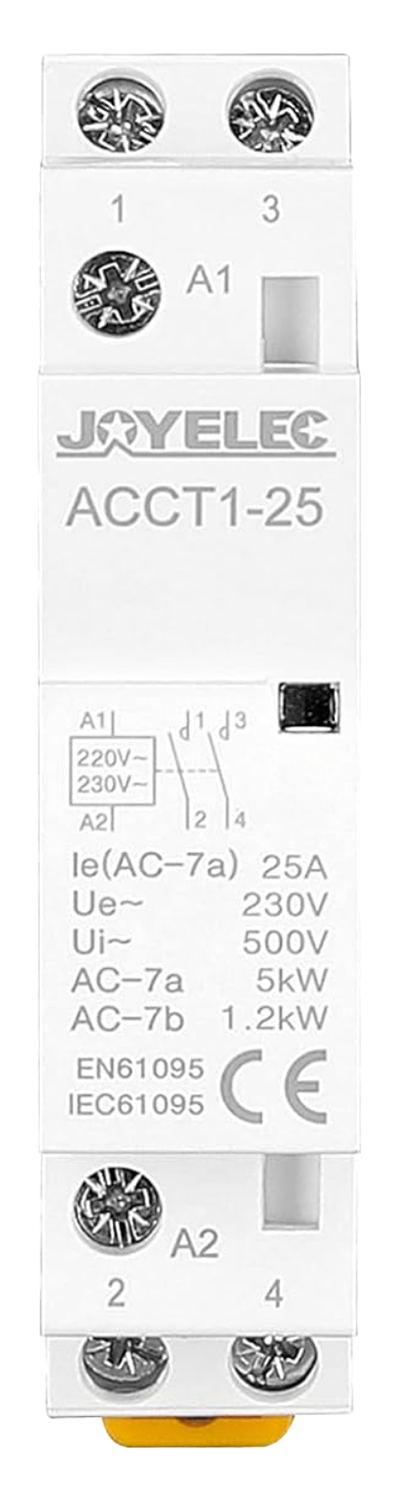
 Design with JOYELEC_relè_Contattore automatico CA domestico 220V / 230V 50 / 60Hz in Cirkit Designer
Introduction
The JOYELEC_relè_Contattore automatico CA domestico 220V / 230V 50 / 60Hz (Manufacturer Part ID: ACCT1) is a domestic AC relay contactor designed for reliable and efficient control of electrical devices. Operating at 220V/230V with a frequency of 50/60Hz, this component is ideal for automating the switching of household appliances, lighting systems, and other electrical loads.
Explore Projects Built with JOYELEC_relè_Contattore automatico CA domestico 220V / 230V 50 / 60Hz
 Open Project in Cirkit Designer
 Open Project in Cirkit Designer
 Open Project in Cirkit Designer
 Open Project in Cirkit Designer
Explore Projects Built with JOYELEC_relè_Contattore automatico CA domestico 220V / 230V 50 / 60Hz
Open Project in Cirkit DesignerOpen Project in Cirkit DesignerOpen Project in Cirkit DesignerOpen Project in Cirkit DesignerCommon Applications and Use Cases
- Home Automation: Automating the control of lights, fans, and other appliances.
- Industrial Control: Managing small-scale machinery or equipment.
- Energy Management: Switching loads to optimize energy consumption.
- Safety Systems: Isolating circuits during faults or overloads.
Technical Specifications
The following table outlines the key technical details of the JOYELEC AC relay contactor:
| Parameter | Specification |
|---|---|
| Operating Voltage | 220V / 230V AC |
| Frequency | 50 / 60 Hz |
| Rated Current | 16A |
| Contact Configuration | SPST (Single Pole Single Throw) |
| Coil Power Consumption | ≤ 2W |
| Insulation Resistance | ≥ 100MΩ |
| Operating Temperature | -10°C to +55°C |
| Dimensions | 86mm x 36mm x 65mm |
| Weight | 150g |
Pin Configuration and Descriptions
The relay contactor has the following pin configuration:
| Pin Number | Label | Description |
|---|---|---|
| 1 | L (Line) | Connect to the live AC input (220V/230V). |
| 2 | N (Neutral) | Connect to the neutral AC input. |
| 3 | NO (Normally Open) | Output terminal for the load; closed when relay is active. |
| 4 | COM (Common) | Common terminal for the load circuit. |
Usage Instructions
How to Use the Component in a Circuit
- Power Connection: Connect the live (L) and neutral (N) terminals to the 220V/230V AC power supply.
- Load Connection:
- Connect one terminal of the load to the COM pin.
- Connect the other terminal of the load to the NO pin.
- Control Signal: Use an external control circuit (e.g., a microcontroller or a manual switch) to activate the relay coil.
Important Considerations and Best Practices
- Voltage Compatibility: Ensure the input voltage matches the rated 220V/230V AC.
- Current Rating: Do not exceed the rated current of 16A to avoid damage.
- Proper Insulation: Maintain proper insulation between live and neutral connections to prevent short circuits.
- Mounting: Securely mount the relay in a well-ventilated area to avoid overheating.
- Safety Precautions: Always disconnect the power supply before wiring or servicing the relay.
Example: Connecting to an Arduino UNO
The JOYELEC relay can be controlled using an Arduino UNO. Below is an example circuit and code to toggle the relay:
Circuit Setup
- Connect the relay's control input to a digital pin on the Arduino (e.g., pin 7).
- Use a transistor (e.g., 2N2222) and a flyback diode (e.g., 1N4007) to drive the relay safely.
- Connect the Arduino's GND to the relay's GND.
Arduino Code
// Define the pin connected to the relay
const int relayPin = 7;

void setup() {
  pinMode(relayPin, OUTPUT); // Set the relay pin as an output
  digitalWrite(relayPin, LOW); // Ensure the relay is off initially
}

void loop() {
  digitalWrite(relayPin, HIGH); // Turn the relay on
  delay(5000); // Keep it on for 5 seconds
  digitalWrite(relayPin, LOW); // Turn the relay off
  delay(5000); // Keep it off for 5 seconds
}
Note: Use a proper relay driver circuit to protect the Arduino from high currents.
Troubleshooting and FAQs
Common Issues and Solutions
Relay Not Activating:
- Cause: Insufficient control voltage or incorrect wiring.
- Solution: Verify the control voltage and ensure proper connections.
Overheating:
- Cause: Exceeding the rated current or poor ventilation.
- Solution: Reduce the load current and ensure adequate airflow around the relay.
Buzzing Noise:
- Cause: Fluctuating input voltage or loose connections.
- Solution: Stabilize the input voltage and tighten all connections.
Load Not Switching:
- Cause: Faulty relay contacts or incorrect load wiring.
- Solution: Check the load wiring and test the relay contacts for continuity.
FAQs
Q: Can this relay be used with DC loads?
- A: No, this relay is designed for AC loads only. For DC loads, use a DC-specific relay.
Q: Is the relay suitable for outdoor use?
- A: No, the relay is not weatherproof. Use it in indoor environments only.
Q: Can I control the relay directly from an Arduino pin?
- A: No, the Arduino pin cannot supply enough current. Use a transistor or relay driver circuit.
Q: What is the maximum load power this relay can handle?
- A: The relay can handle up to 16A at 230V AC, which equals 3680W.
By following this documentation, users can effectively integrate the JOYELEC AC relay contactor into their projects for reliable and efficient operation.