Cirkit Designer Logo
Cirkit Designer
Your all-in-one circuit design IDE
Home / 
Component Documentation

How to Use Kaki MY2N: Examples, Pinouts, and Specs
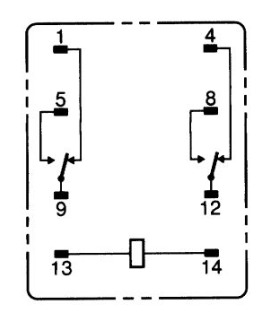

Image of Kaki MY2N
Cirkit Designer LogoDesign with Kaki MY2N in Cirkit Designer

Introduction

The Kaki MY2N is an electromechanical relay manufactured by SMKN 2 Trenggalek. It is designed for switching applications, allowing low-power control signals to manage high-power loads. With its compact design and reliable performance, the Kaki MY2N is widely used in automation, industrial control systems, and home appliances. It is available in coil voltage variants of 12V or 24V, making it versatile for various circuit designs.

Explore Projects Built with Kaki MY2N
Use Cirkit Designer to design, explore, and prototype these projects online. Some projects support real-time simulation. Click "Open Project" to start designing instantly!
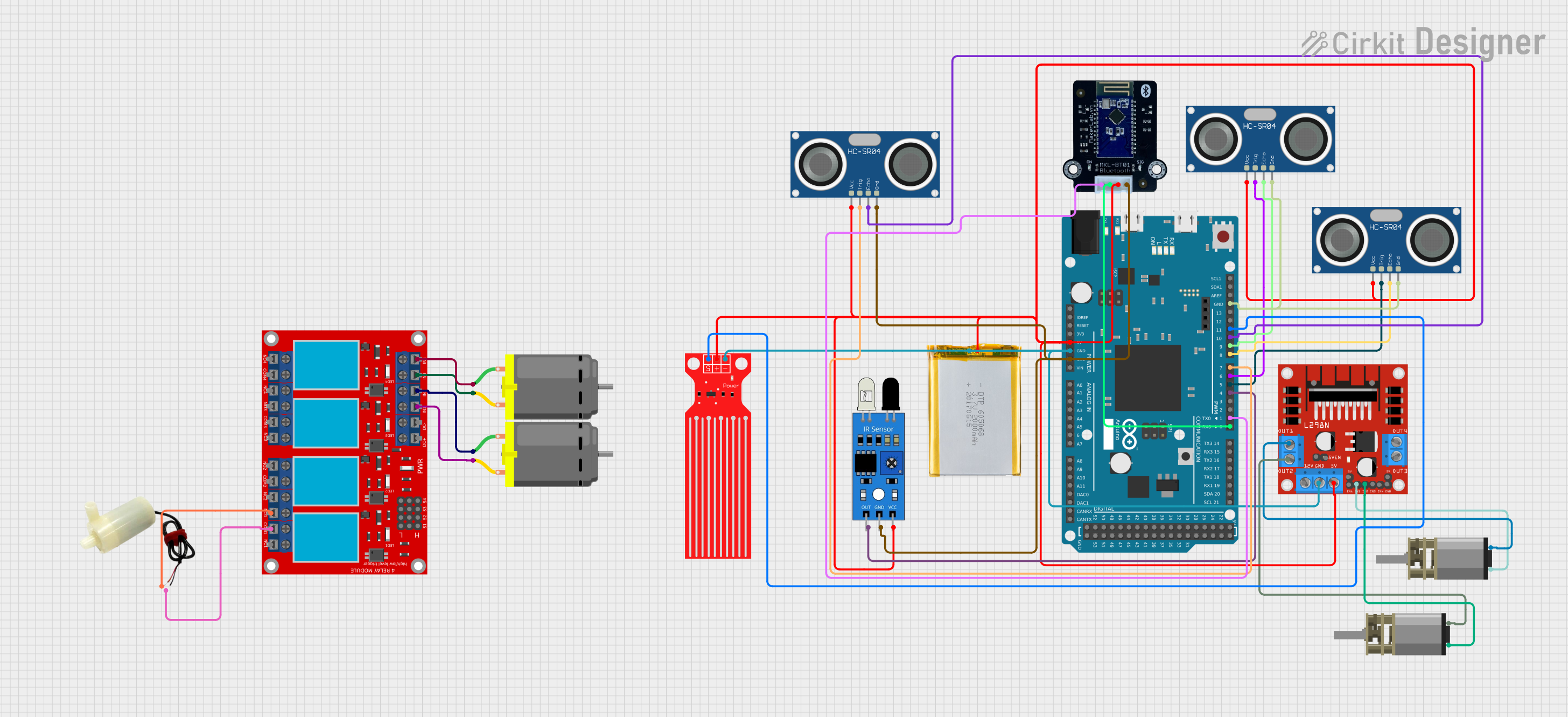
Arduino Due-Based Obstacle Avoidance Robot with Bluetooth Control
Image of Vaccum: A project utilizing Kaki MY2N in a practical application
This circuit is an automated two-wheeled robot controlled by an Arduino Due, featuring obstacle avoidance using ultrasonic sensors and object recognition via an IR sensor. The L298N motor driver controls the motors, while the MKE-M15 Bluetooth module enables communication with a phone for remote control. Additional components include a water level sensor and a relay module for extended functionality.
Cirkit Designer LogoOpen Project in Cirkit Designer
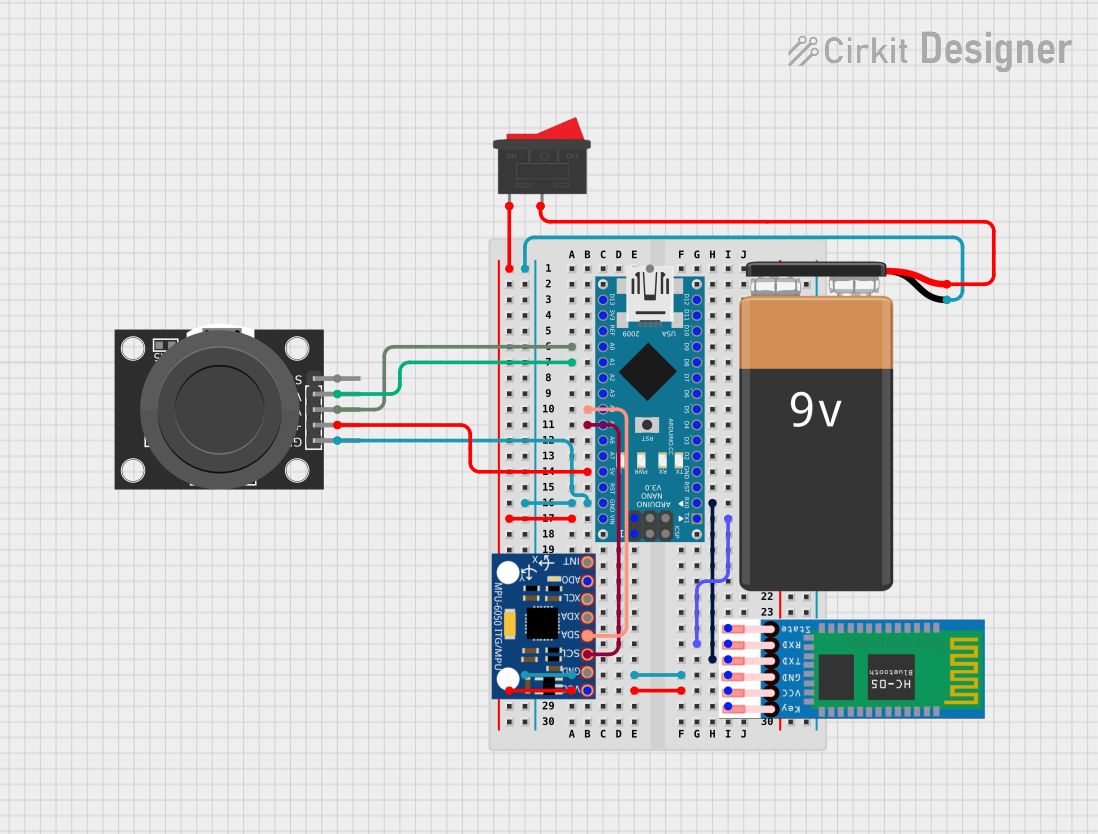
Arduino Nano-Based Wireless Joystick and Motion Controller
Image of hand gesture: A project utilizing Kaki MY2N in a practical application
This circuit features an Arduino Nano microcontroller interfaced with an HC-05 Bluetooth module, an MPU-6050 accelerometer/gyroscope, and a KY-023 Dual Axis Joystick Module. The Arduino Nano is powered by a 9V battery through a rocker switch and communicates with the HC-05 for Bluetooth connectivity, reads joystick positions from the KY-023 module via analog inputs, and communicates with the MPU-6050 over I2C to capture motion data. The circuit is likely designed for wireless control and motion sensing applications, such as a remote-controlled robot or a game controller.
Cirkit Designer LogoOpen Project in Cirkit Designer
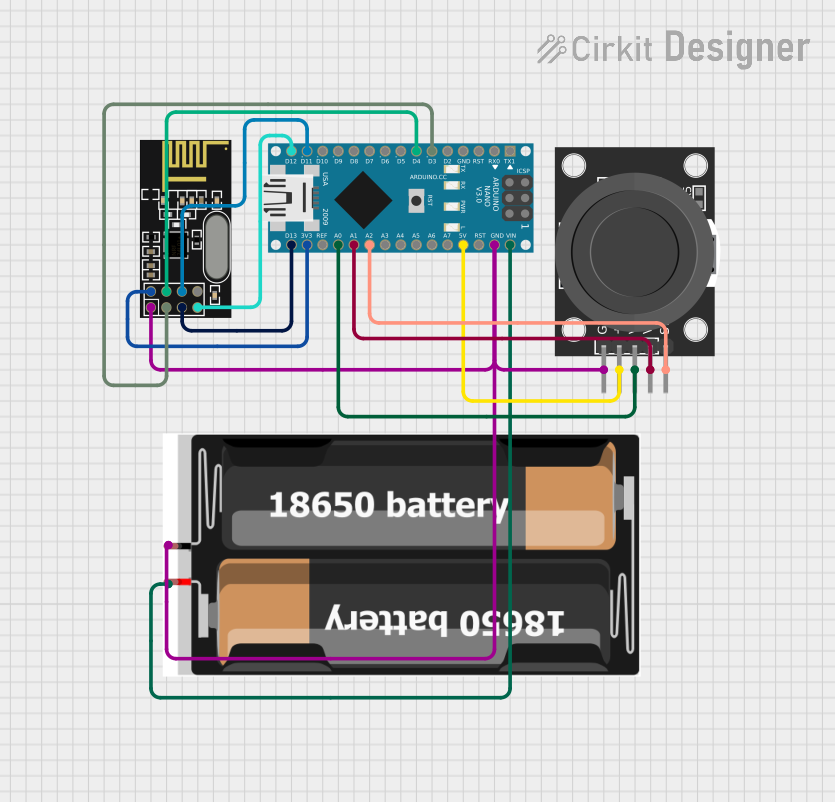
Wireless Joystick-Controlled Interface with Arduino Nano and NRF24L01
Image of Transmitter 11: A project utilizing Kaki MY2N in a practical application
This circuit features an Arduino Nano interfaced with a KY-023 Dual Axis Joystick Module for analog input, and an NRF24L01 module for wireless communication. The joystick provides x and y-axis control signals to the Arduino's analog inputs and a switch signal to a digital input, while the NRF24L01 enables the Arduino to communicate with other devices wirelessly. The 2x 18650 batteries supply power to the Arduino, which in turn powers the joystick and the NRF24L01 module.
Cirkit Designer LogoOpen Project in Cirkit Designer
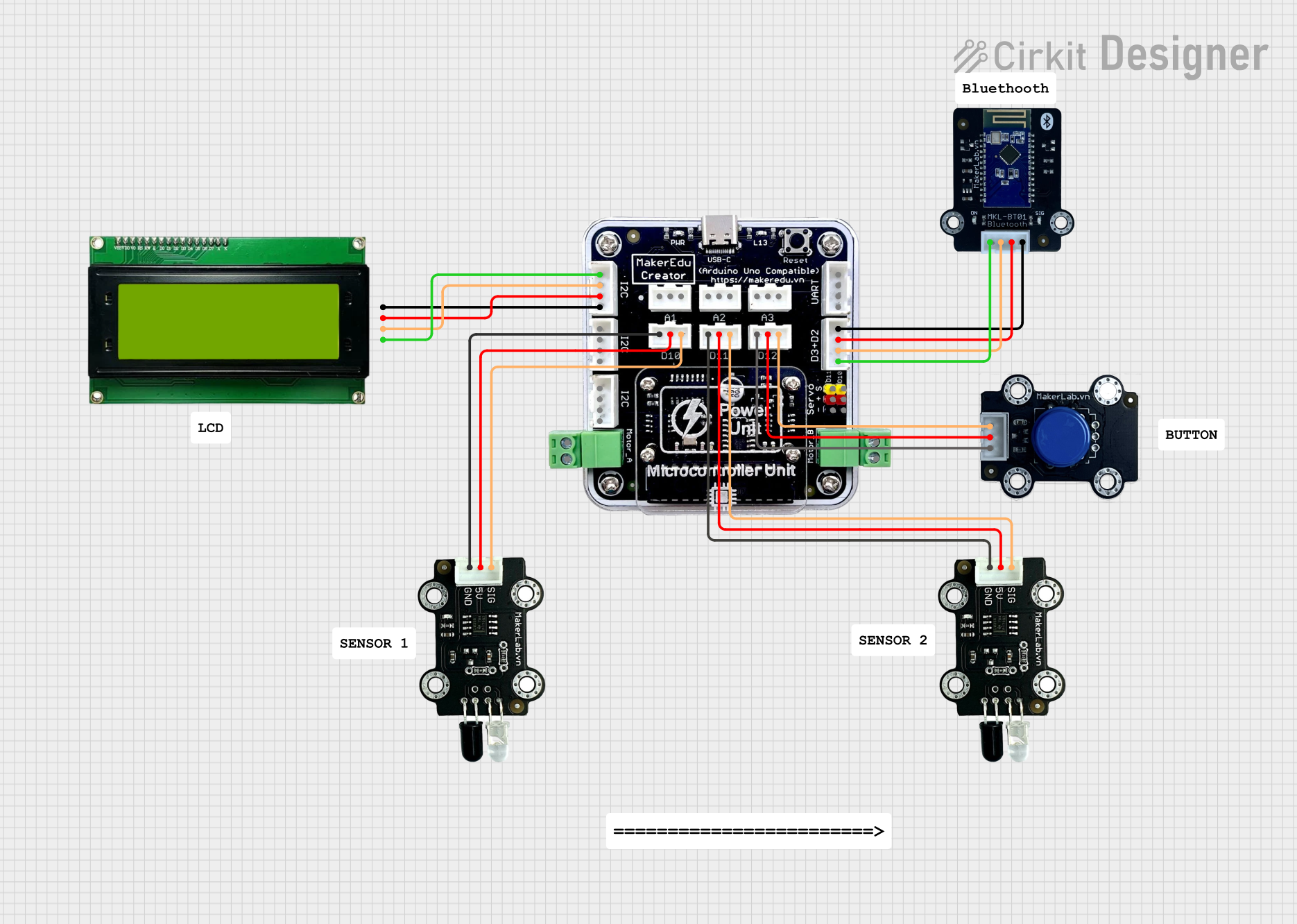
MakerEdu Creator with Bluetooth, IR Sensors, LCD Display, and Push Button Interaction
Image of MKL Distance Measurement: A project utilizing Kaki MY2N in a practical application
This circuit features a MakerEdu Creator microcontroller board interfaced with two MKE-S11 IR Infrared Obstacle Avoidance Sensors, a MKE-M02 Push Button Tact Switch, a MKE-M15 Bluetooth module, and a MKE-M08 LCD2004 I2C display module. The push button is connected to a digital input for user interaction, while the IR sensors are likely used for detecting obstacles. The Bluetooth module enables wireless communication, and the LCD display provides a user interface for displaying information or statuses.
Cirkit Designer LogoOpen Project in Cirkit Designer

Explore Projects Built with Kaki MY2N

Use Cirkit Designer to design, explore, and prototype these projects online. Some projects support real-time simulation. Click "Open Project" to start designing instantly!
Image of Vaccum: A project utilizing Kaki MY2N in a practical application
Arduino Due-Based Obstacle Avoidance Robot with Bluetooth Control
This circuit is an automated two-wheeled robot controlled by an Arduino Due, featuring obstacle avoidance using ultrasonic sensors and object recognition via an IR sensor. The L298N motor driver controls the motors, while the MKE-M15 Bluetooth module enables communication with a phone for remote control. Additional components include a water level sensor and a relay module for extended functionality.
Cirkit Designer LogoOpen Project in Cirkit Designer
Image of hand gesture: A project utilizing Kaki MY2N in a practical application
Arduino Nano-Based Wireless Joystick and Motion Controller
This circuit features an Arduino Nano microcontroller interfaced with an HC-05 Bluetooth module, an MPU-6050 accelerometer/gyroscope, and a KY-023 Dual Axis Joystick Module. The Arduino Nano is powered by a 9V battery through a rocker switch and communicates with the HC-05 for Bluetooth connectivity, reads joystick positions from the KY-023 module via analog inputs, and communicates with the MPU-6050 over I2C to capture motion data. The circuit is likely designed for wireless control and motion sensing applications, such as a remote-controlled robot or a game controller.
Cirkit Designer LogoOpen Project in Cirkit Designer
Image of Transmitter 11: A project utilizing Kaki MY2N in a practical application
Wireless Joystick-Controlled Interface with Arduino Nano and NRF24L01
This circuit features an Arduino Nano interfaced with a KY-023 Dual Axis Joystick Module for analog input, and an NRF24L01 module for wireless communication. The joystick provides x and y-axis control signals to the Arduino's analog inputs and a switch signal to a digital input, while the NRF24L01 enables the Arduino to communicate with other devices wirelessly. The 2x 18650 batteries supply power to the Arduino, which in turn powers the joystick and the NRF24L01 module.
Cirkit Designer LogoOpen Project in Cirkit Designer
Image of MKL Distance Measurement: A project utilizing Kaki MY2N in a practical application
MakerEdu Creator with Bluetooth, IR Sensors, LCD Display, and Push Button Interaction
This circuit features a MakerEdu Creator microcontroller board interfaced with two MKE-S11 IR Infrared Obstacle Avoidance Sensors, a MKE-M02 Push Button Tact Switch, a MKE-M15 Bluetooth module, and a MKE-M08 LCD2004 I2C display module. The push button is connected to a digital input for user interaction, while the IR sensors are likely used for detecting obstacles. The Bluetooth module enables wireless communication, and the LCD display provides a user interface for displaying information or statuses.
Cirkit Designer LogoOpen Project in Cirkit Designer

Common Applications

  • Industrial automation systems
  • Motor control circuits
  • Home appliance control
  • Signal switching in control panels
  • Power distribution systems

Technical Specifications

Key Specifications

Parameter Value
Manufacturer SMKN 2 Trenggalek
Part ID SMKN 2 Trenggalek
Coil Voltage 12V DC or 24V DC
Contact Configuration DPDT (Double Pole Double Throw)
Contact Rating 5A at 250V AC / 30V DC
Coil Resistance 400Ω (12V version) / 1600Ω (24V version)
Operating Temperature -40°C to +70°C
Insulation Resistance ≥ 100MΩ at 500V DC
Dielectric Strength 1500V AC for 1 minute
Dimensions 28mm x 21mm x 36mm
Weight Approximately 35g

Pin Configuration

The Kaki MY2N relay has 8 pins, which are configured as follows:

Pin Number Description
1 Coil Terminal 1 (Positive)
2 Coil Terminal 2 (Negative)
3 Common Contact 1 (COM1)
4 Normally Open Contact 1 (NO1)
5 Normally Closed Contact 1 (NC1)
6 Common Contact 2 (COM2)
7 Normally Open Contact 2 (NO2)
8 Normally Closed Contact 2 (NC2)

Usage Instructions

How to Use the Kaki MY2N in a Circuit

  1. Power the Coil: Connect the coil terminals (pins 1 and 2) to a DC power source matching the relay's rated coil voltage (12V or 24V). Ensure correct polarity.
  2. Connect the Load:
    • For switching, connect the load to the common (COM) and normally open (NO) or normally closed (NC) contacts, depending on the desired operation.
    • When the relay is inactive, the NC contact is connected to COM. When the relay is energized, the NO contact connects to COM.
  3. Control Signal: Use a low-power control signal (e.g., from a microcontroller or switch) to activate the relay coil.

Important Considerations

  • Diode Protection: Place a flyback diode across the coil terminals to protect the circuit from voltage spikes when the relay is de-energized.
  • Contact Ratings: Ensure the load current and voltage do not exceed the relay's contact ratings (5A at 250V AC or 30V DC).
  • Mounting: Secure the relay in a socket or PCB to prevent mechanical stress.
  • Isolation: Use optocouplers or transistors to isolate the control circuit from the relay coil if necessary.

Example: Connecting to an Arduino UNO

Below is an example of how to control the Kaki MY2N relay using an Arduino UNO:

// Define the relay control pin
const int relayPin = 7; // Connect this pin to the relay's coil terminal 1

void setup() {
  pinMode(relayPin, OUTPUT); // Set the relay pin as an output
  digitalWrite(relayPin, LOW); // Ensure the relay is off initially
}

void loop() {
  // Turn the relay on
  digitalWrite(relayPin, HIGH); 
  delay(1000); // Keep the relay on for 1 second

  // Turn the relay off
  digitalWrite(relayPin, LOW); 
  delay(1000); // Keep the relay off for 1 second
}

Note: Use a transistor or relay driver circuit to interface the Arduino with the relay, as the Arduino's GPIO pins cannot directly supply sufficient current to the relay coil.

Troubleshooting and FAQs

Common Issues and Solutions

  1. Relay Not Activating

    • Cause: Insufficient coil voltage or incorrect polarity.
    • Solution: Verify the power supply voltage matches the relay's rated coil voltage. Check the polarity of the connections.
  2. Chattering or Unstable Operation

    • Cause: Insufficient current or noisy control signal.
    • Solution: Ensure the power supply can provide adequate current. Use a capacitor to filter noise in the control signal.
  3. Contacts Not Switching Properly

    • Cause: Overloaded contacts or damaged relay.
    • Solution: Ensure the load does not exceed the relay's contact ratings. Replace the relay if damaged.
  4. Voltage Spikes in the Circuit

    • Cause: Inductive kickback from the relay coil.
    • Solution: Install a flyback diode across the coil terminals.

FAQs

Q1: Can the Kaki MY2N relay switch DC loads?
A1: Yes, the relay can switch DC loads up to 30V at 5A. Ensure the load does not exceed these ratings.

Q2: Is the relay suitable for high-frequency switching?
A2: No, the Kaki MY2N is not designed for high-frequency switching. It is best suited for low-frequency applications.

Q3: Can I use the relay with a 5V control signal?
A3: No, the relay requires a 12V or 24V coil voltage. Use a transistor or relay driver circuit to interface a 5V control signal with the relay.

Q4: How do I test if the relay is working?
A4: Apply the rated coil voltage to the coil terminals and listen for a clicking sound, which indicates the relay is switching. You can also measure continuity between the COM and NO/NC contacts.