
How to Use Adafruit TCA9548A: Examples, Pinouts, and Specs
 Design with Adafruit TCA9548A in Cirkit Designer
Introduction
The Adafruit TCA9548A is an I2C multiplexer designed to expand the capabilities of a single I2C bus. It allows you to connect up to 8 different I2C devices, even if they share the same I2C address. By dynamically switching between channels, the TCA9548A ensures seamless communication with multiple devices, making it an essential component for complex I2C-based projects.
Explore Projects Built with Adafruit TCA9548A
 Open Project in Cirkit Designer
 Open Project in Cirkit Designer
 Open Project in Cirkit Designer
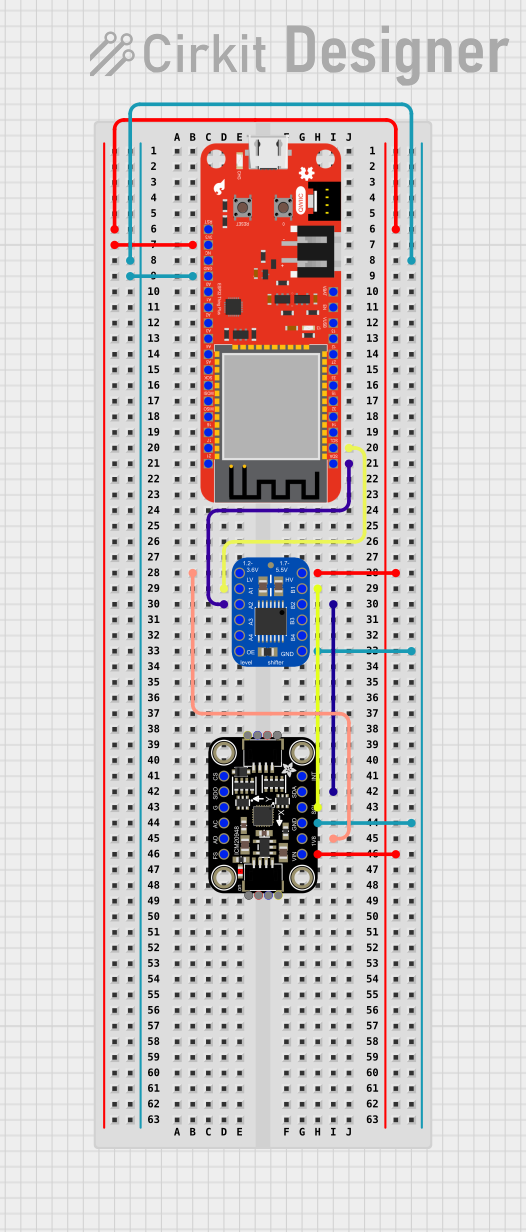 Open Project in Cirkit Designer
Explore Projects Built with Adafruit TCA9548A
Open Project in Cirkit DesignerOpen Project in Cirkit DesignerOpen Project in Cirkit DesignerOpen Project in Cirkit DesignerCommon Applications and Use Cases
- Connecting multiple sensors or modules with identical I2C addresses.
- Expanding the I2C bus for large-scale projects.
- Prototyping and testing multiple I2C devices simultaneously.
- Applications in robotics, IoT, and data acquisition systems.
Technical Specifications
The Adafruit TCA9548A is a versatile and robust I2C multiplexer with the following key specifications:
| Parameter | Value |
|---|---|
| Operating Voltage | 1.65V to 5.5V |
| Logic Voltage Levels | Compatible with 3.3V and 5V logic |
| I2C Address Range | 0x70 to 0x77 (configurable via jumpers) |
| Number of Channels | 8 |
| Maximum I2C Speed | 400 kHz (Fast Mode I2C) |
| Current Consumption | ~1 µA (standby), ~1 mA (active) |
| Dimensions | 25mm x 25mm x 4mm |
Pin Configuration and Descriptions
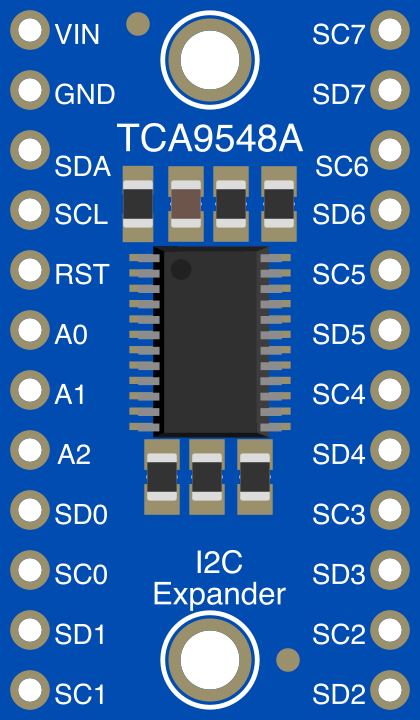
The TCA9548A has 10 pins, as described in the table below:
| Pin | Name | Description |
|---|---|---|
| 1 | VIN | Power input (1.65V to 5.5V). Connect to the power supply. |
| 2 | GND | Ground. Connect to the ground of your circuit. |
| 3 | SDA | I2C data line. Connect to the SDA line of your microcontroller. |
| 4 | SCL | I2C clock line. Connect to the SCL line of your microcontroller. |
| 5 | SDx (0-7) | Individual I2C data lines for each channel (x = 0 to 7). |
| 6 | SCx (0-7) | Individual I2C clock lines for each channel (x = 0 to 7). |
| 7 | A0 | Address selection pin. Used to configure the I2C address (default: 0x70). |
| 8 | A1 | Address selection pin. Used to configure the I2C address (default: 0x70). |
| 9 | A2 | Address selection pin. Used to configure the I2C address (default: 0x70). |
| 10 | RESET | Active-low reset pin. Pull low to reset the multiplexer. |
Usage Instructions
How to Use the TCA9548A in a Circuit
- Power the Module: Connect the VIN pin to a power source (1.65V to 5.5V) and the GND pin to ground.
- Connect the I2C Bus: Attach the SDA and SCL pins to the corresponding I2C lines of your microcontroller.
- Configure the Address: Use the A0, A1, and A2 pins to set the I2C address. Leave them unconnected for the default address (0x70), or connect them to GND or VIN to change the address.
- Connect I2C Devices: Attach your I2C devices to the SDx and SCx pins for the desired channels.
- Control the Channels: Use I2C commands to enable or disable specific channels for communication.
Important Considerations and Best Practices
- Pull-Up Resistors: Ensure that the SDA and SCL lines have appropriate pull-up resistors (typically 4.7kΩ). The TCA9548A does not include built-in pull-ups.
- Channel Isolation: Only one channel can be active at a time. Ensure you deactivate a channel before switching to another.
- Address Conflicts: Use the multiplexer to resolve address conflicts by assigning devices to different channels.
- Reset Pin: Use the RESET pin to recover from communication errors or to reinitialize the multiplexer.
Example Code for Arduino UNO
Below is an example of how to use the Adafruit TCA9548A with an Arduino UNO to communicate with devices on different channels:
#include <Wire.h>

// Define the I2C address of the TCA9548A (default is 0x70)
#define TCA9548A_ADDR 0x70

// Function to select a specific channel on the TCA9548A
void selectChannel(uint8_t channel) {
  if (channel > 7) return; // Ensure the channel is valid (0-7)
  Wire.beginTransmission(TCA9548A_ADDR);
  Wire.write(1 << channel); // Send the channel selection command
  Wire.endTransmission();
}

void setup() {
  Wire.begin(); // Initialize the I2C bus
  Serial.begin(9600); // Start serial communication for debugging

  Serial.println("TCA9548A Example");

  // Select channel 0 and communicate with a device
  selectChannel(0);
  Serial.println("Channel 0 selected");
  // Add code here to communicate with the device on channel 0

  // Select channel 1 and communicate with another device
  selectChannel(1);
  Serial.println("Channel 1 selected");
  // Add code here to communicate with the device on channel 1
}

void loop() {
  // Add your main code here
}
Troubleshooting and FAQs
Common Issues and Solutions
No Communication with Devices:
- Ensure the correct channel is selected using the
selectChannel()function. - Verify that the I2C address of the TCA9548A matches the address in your code.
- Check the wiring and ensure all connections are secure.
- Ensure the correct channel is selected using the
Devices Not Responding:
- Confirm that the devices are powered and connected to the correct SDx and SCx pins.
- Check for address conflicts and ensure only one device is active on a channel.
I2C Bus Errors:
- Verify that pull-up resistors are present on the SDA and SCL lines.
- Use the RESET pin to reinitialize the TCA9548A if communication errors occur.
FAQs
Q: Can I use multiple TCA9548A modules in the same circuit?
A: Yes, you can use multiple modules by configuring each with a unique I2C address using the A0, A1, and A2 pins.
Q: What happens if I activate multiple channels simultaneously?
A: The TCA9548A is designed to allow only one channel to be active at a time. Activating multiple channels may cause communication errors.
Q: Is the TCA9548A compatible with 3.3V and 5V logic?
A: Yes, the TCA9548A supports both 3.3V and 5V logic levels, making it compatible with a wide range of microcontrollers.
This concludes the documentation for the Adafruit TCA9548A.