
How to Use Solar Charger: Examples, Pinouts, and Specs
 Design with Solar Charger in Cirkit Designer
Introduction
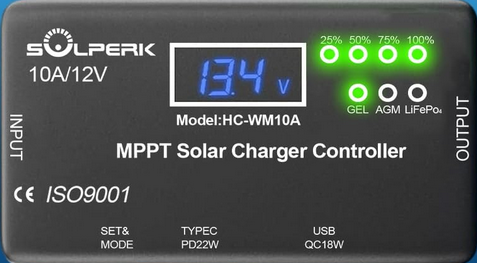
The Solperk MPPT 10A Solar Charger is a high-efficiency device designed to convert sunlight into electrical energy. It utilizes Maximum Power Point Tracking (MPPT) technology to optimize the energy harvested from solar panels and efficiently charge batteries or power electronic devices. This solar charger is ideal for off-grid systems, RVs, boats, and other renewable energy applications.
Explore Projects Built with Solar Charger
 Open Project in Cirkit Designer
 Open Project in Cirkit Designer
 Open Project in Cirkit Designer
 Open Project in Cirkit Designer
Explore Projects Built with Solar Charger
Open Project in Cirkit DesignerOpen Project in Cirkit DesignerOpen Project in Cirkit DesignerOpen Project in Cirkit DesignerCommon Applications and Use Cases
- Charging 12V or 24V lead-acid, AGM, or lithium batteries.
- Powering small off-grid systems such as lighting, fans, or communication devices.
- Renewable energy systems for RVs, boats, and cabins.
- Backup power systems for emergencies.
Technical Specifications
Key Technical Details
| Parameter | Value |
|---|---|
| Manufacturer | Solperk |
| Part ID | MPPT 10A |
| Maximum Input Voltage | 50V |
| Rated Charging Current | 10A |
| Battery Voltage Support | 12V / 24V (auto-detect) |
| Efficiency | Up to 98% |
| Operating Temperature | -20°C to 60°C |
| Protection Features | Overcharge, over-discharge, |
| short-circuit, reverse polarity |
Pin Configuration and Descriptions
The Solperk MPPT 10A Solar Charger has the following terminal connections:
| Terminal Label | Description |
|---|---|
| PV+ | Positive input terminal for the solar panel. |
| PV- | Negative input terminal for the solar panel. |
| BAT+ | Positive output terminal for the battery connection. |
| BAT- | Negative output terminal for the battery connection. |
| LOAD+ | Positive terminal for connecting a load (optional). |
| LOAD- | Negative terminal for connecting a load (optional). |
Usage Instructions
How to Use the Component in a Circuit
Connect the Solar Panel:
- Attach the positive wire of the solar panel to the PV+ terminal.
- Attach the negative wire of the solar panel to the PV- terminal.
- Ensure the solar panel's voltage does not exceed the maximum input voltage (50V).
Connect the Battery:
- Connect the positive terminal of the battery to the BAT+ terminal.
- Connect the negative terminal of the battery to the BAT- terminal.
- The charger will automatically detect whether the battery is 12V or 24V.
Optional Load Connection:
- If you wish to power a load directly, connect the load's positive wire to the LOAD+ terminal and the negative wire to the LOAD- terminal.
Power On:
- Once all connections are secure, the solar charger will begin operating automatically. The MPPT algorithm will optimize the charging process.
Important Considerations and Best Practices
- Battery Compatibility: Ensure the battery type (lead-acid, AGM, or lithium) is supported by the charger.
- Wire Sizing: Use appropriately sized wires to handle the current without overheating.
- Fuses: Install fuses on both the solar panel and battery connections for added safety.
- Ventilation: Place the charger in a well-ventilated area to prevent overheating.
- Reverse Polarity: Double-check all connections to avoid reverse polarity, even though the charger has built-in protection.
Arduino UNO Integration Example
The Solperk MPPT 10A Solar Charger can be monitored using an Arduino UNO by measuring the battery voltage and current. Below is an example code snippet:
// Example code to monitor battery voltage and current using Arduino UNO
// Connect a voltage divider to A0 for voltage measurement
// Connect a current sensor (e.g., ACS712) to A1 for current measurement

const int voltagePin = A0; // Pin connected to the voltage divider
const int currentPin = A1; // Pin connected to the current sensor

void setup() {
  Serial.begin(9600); // Initialize serial communication
}

void loop() {
  // Read battery voltage
  int voltageRaw = analogRead(voltagePin);
  float batteryVoltage = (voltageRaw / 1023.0) * 25.0;
  // Adjust the multiplier based on your voltage divider ratio

  // Read battery current
  int currentRaw = analogRead(currentPin);
  float batteryCurrent = (currentRaw - 512) * 0.1;
  // Adjust the multiplier based on your current sensor specifications

  // Print the results
  Serial.print("Battery Voltage: ");
  Serial.print(batteryVoltage);
  Serial.println(" V");

  Serial.print("Battery Current: ");
  Serial.print(batteryCurrent);
  Serial.println(" A");

  delay(1000); // Wait for 1 second before the next reading
}
Troubleshooting and FAQs
Common Issues and Solutions
No Output from the Charger:
- Cause: Incorrect wiring or loose connections.
- Solution: Double-check all connections, ensuring proper polarity and secure terminals.
Battery Not Charging:
- Cause: Solar panel voltage is too low or insufficient sunlight.
- Solution: Verify the solar panel's voltage and ensure it is exposed to direct sunlight.
Overheating:
- Cause: Poor ventilation or excessive current draw.
- Solution: Place the charger in a well-ventilated area and ensure the load does not exceed the rated current.
Load Not Powering On:
- Cause: Load current exceeds the charger's capacity.
- Solution: Ensure the load's current draw is within the charger's specifications.
FAQs
Q: Can I use this charger with a 48V battery?
A: No, the Solperk MPPT 10A supports only 12V and 24V batteries.Q: Does the charger work in cloudy weather?
A: Yes, but the charging efficiency will be reduced due to lower solar panel output.Q: Can I connect multiple solar panels?
A: Yes, but ensure the combined voltage does not exceed 50V and the current stays within the charger's capacity.Q: Is the charger waterproof?
A: No, the charger is not waterproof. Install it in a dry, protected location.
This concludes the documentation for the Solperk MPPT 10A Solar Charger. For further assistance, refer to the manufacturer's user manual or contact technical support.