
How to Use AC-DC converter 220-12V: Examples, Pinouts, and Specs
 Design with AC-DC converter 220-12V in Cirkit Designer
Introduction
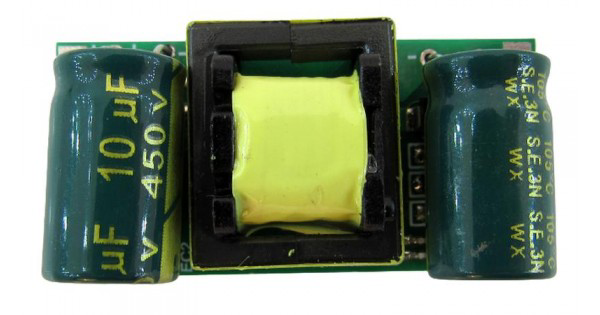
The AC-DC Converter 220-12V (Manufacturer: Stanislav from C.C.C., Part ID: 1) is a device designed to convert alternating current (AC) from a 220V source into direct current (DC) at 12V. This component is widely used in applications requiring a stable 12V DC power supply, such as powering electronic devices, LED lighting systems, and small appliances. Its compact design and reliable performance make it a popular choice for both industrial and hobbyist projects.
Explore Projects Built with AC-DC converter 220-12V
 Open Project in Cirkit Designer
 Open Project in Cirkit Designer
 Open Project in Cirkit Designer
 Open Project in Cirkit Designer
Explore Projects Built with AC-DC converter 220-12V
Open Project in Cirkit DesignerOpen Project in Cirkit DesignerOpen Project in Cirkit DesignerOpen Project in Cirkit DesignerCommon Applications
- Powering microcontrollers, sensors, and other low-voltage electronics
- LED lighting systems
- Battery charging circuits
- Home automation systems
- Industrial control systems
Technical Specifications
The following table outlines the key technical specifications of the AC-DC Converter 220-12V:
| Parameter | Value |
|---|---|
| Input Voltage | 220V AC ±10% |
| Output Voltage | 12V DC ±5% |
| Output Current | Up to 2A |
| Power Rating | 24W |
| Efficiency | ≥85% |
| Operating Temperature | -20°C to +60°C |
| Dimensions | 70mm x 40mm x 25mm |
| Weight | 50g |
| Protection Features | Overload, Short Circuit, Overheat |
Pin Configuration and Descriptions
The AC-DC Converter 220-12V typically has the following pin configuration:
| Pin Name | Description |
|---|---|
| AC IN (L) | Live wire input for 220V AC |
| AC IN (N) | Neutral wire input for 220V AC |
| DC OUT (+) | Positive terminal for 12V DC output |
| DC OUT (-) | Negative terminal (ground) for 12V DC output |
Usage Instructions
How to Use the Component in a Circuit
- Input Connection: Connect the AC IN (L) and AC IN (N) terminals to a 220V AC power source. Ensure proper insulation and safety precautions when handling high-voltage connections.
- Output Connection: Connect the DC OUT (+) and DC OUT (-) terminals to the load requiring 12V DC. Verify the polarity to avoid damage to the connected device.
- Mounting: Secure the converter in a well-ventilated area to prevent overheating. Avoid placing it near heat-sensitive components.
- Testing: Use a multimeter to confirm the output voltage is 12V DC before connecting sensitive electronics.
Important Considerations and Best Practices
- Safety First: Always disconnect the power supply before making any connections or modifications.
- Load Compatibility: Ensure the connected load does not exceed the maximum output current of 2A.
- Ventilation: Operate the converter in a well-ventilated environment to maintain optimal performance and prevent overheating.
- Polarity Check: Double-check the polarity of the output connections to avoid damaging the connected devices.
- Fuse Protection: Consider adding a fuse on the input side for additional safety.
Example: Using with an Arduino UNO
The AC-DC Converter 220-12V can be used to power an Arduino UNO by stepping down the voltage to 12V DC. Below is an example of how to connect the converter to the Arduino UNO:
- Connect the AC IN (L) and AC IN (N) terminals to a 220V AC power source.
- Connect the DC OUT (+) terminal to the VIN pin of the Arduino UNO.
- Connect the DC OUT (-) terminal to the GND pin of the Arduino UNO.
Here is a simple Arduino code example to blink an LED while powered by the AC-DC converter:
// This code blinks an LED connected to pin 13 of the Arduino UNO.
// Ensure the AC-DC converter is properly connected to the Arduino.

void setup() {
  pinMode(13, OUTPUT); // Set pin 13 as an output pin
}

void loop() {
  digitalWrite(13, HIGH); // Turn the LED on
  delay(1000);            // Wait for 1 second
  digitalWrite(13, LOW);  // Turn the LED off
  delay(1000);            // Wait for 1 second
}
Troubleshooting and FAQs
Common Issues and Solutions
No Output Voltage
- Cause: Incorrect input connections or no power supply.
- Solution: Verify the AC IN (L) and AC IN (N) connections and ensure the power source is active.
Output Voltage Too Low or Unstable
- Cause: Overloaded output or insufficient ventilation.
- Solution: Reduce the load to within the 2A limit and ensure proper ventilation.
Overheating
- Cause: Prolonged operation at maximum load or poor ventilation.
- Solution: Operate the converter below its maximum load and improve airflow around the device.
Device Not Powering On
- Cause: Blown fuse or internal damage.
- Solution: Check for a blown fuse on the input side and replace if necessary. If the issue persists, consider replacing the converter.
FAQs
Q: Can this converter be used with a 110V AC input?
A: No, this model is designed specifically for 220V AC input. Using it with 110V AC may result in improper operation or damage.
Q: Is the output voltage adjustable?
A: No, the output voltage is fixed at 12V DC.
Q: Can I use this converter outdoors?
A: This converter is not waterproof or weatherproof. Use it indoors or in a protected enclosure if used outdoors.
Q: What happens if I exceed the 2A output current?
A: The converter is equipped with overload protection and will shut down to prevent damage. Reduce the load and restart the device.
By following this documentation, users can safely and effectively integrate the AC-DC Converter 220-12V into their projects.